



Apple 2025 iMac All-in-One Desktop Computer with M4 chip with 10-core CPU
Apple’s latest iMac proves that “all-in-one” doesn’t have to mean “compromise.” Built around the M4 chip and packed into a strikingly thin, colorful chassis, the 2025 iMac is aimed at creatives, remote workers, students, and families who want serious performance without a tangle of cables and boxes under the desk Apple 2025 iMac All-in-One Desktop.
Performance That Doesn’t Flinch
The M4 chip brings together CPU, GPU, and Neural Engine on a single piece of silicon, and the difference shows. The 10-core CPU configuration is a major step up from the M1 generation and leaves the old Intel iMacs in the dust—Apple cites gains of roughly 1.7x over M1 and up to 4x over Intel-based models are Apple 2025 iMac All-in-One Desktop.
- 10-core CPU—handles compiling code, rendering 3D scenes, and batch-exporting high-res photos without breaking a sweat.
- GPU (8-core or 10-core, depending on configuration)—smooth, detailed graphics for everything from casual gaming to demanding creative apps.
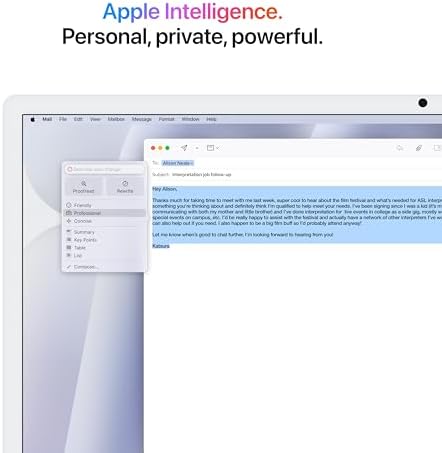
- 16-core Neural Engine—powers on-device machine learning tasks like live video analysis, dictation, and Apple Intelligence features.
Whether you’re a developer in Austin or a video editor in LA, there’s enough horsepower here for real work, not just web browsing.
A Display Built for Long Days
The 24-inch 4.5K Retina display (4480 x 2520, 11.3 million pixels) is still the standout feature of the iMac line. With P3 wide color and 500 nits of brightness, it renders images with the kind of accuracy photo and video editors actually rely on.
- True Tone adjusts white balance to match ambient light, easing eye strain during marathon work sessions.
- Anti-reflective coating keeps the screen usable near windows or under office lighting.
- Optional nano-texture glass gives professional editors a matte finish that cuts glare without dulling contrast.
Thin, Colorful, and Clutter-Free
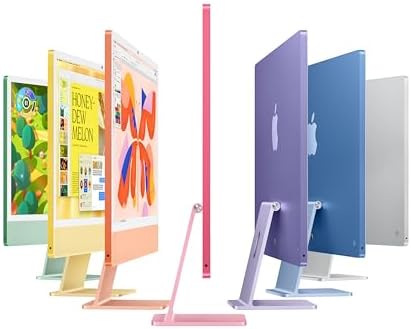
The entire computer lives inside an 11.5 mm-thin display—no tower, no separate speakers, no external webcam needed. It’s available in seven colors (blue, green, pink, silver, yellow, orange, and purple), so it can look at home in an office or a kitchen.
- A single color-matched, braided power cable—no bulky brick.
- A 1080p FaceTime HD camera with Center Stage for sharper, better-framed video calls.
- Six speakers with force-cancelling woofers, tuned for spatial audio and Dolby Atmos, plus a three-mic array well-suited to podcasting and calls.
Ports and Connectivity
The higher-end 10-core CPU configuration steps up to four Thunderbolt / USB 4 ports (versus two on the entry model), enough to drive two external 6K displays alongside fast external storage or a dock of Apple 2025 iMac All-in-One Desktop.
- Gigabit Ethernet built into the power adapter—handy for households on fiber connections from providers like Xfinity, Spectrum, or Verizon.
- Wi-Fi 6E and Bluetooth 5.3 for fast, low-latency wireless.
- A headphone jack that supports higher-impedance headphones.
Multi-monitor users—traders, editors, developers—will want the 10-core model specifically for the extra display support to Apple 2025 iMac All-in-One Desktop.
Memory and Storage
Apple bumped the base configuration to 16 GB of unified memory (up from 8 GB), which noticeably improves everyday multitasking—think dozens of browser tabs alongside creative apps running simultaneously. Memory is configurable up to 24 GB or 32 GB depending on needs.
Storage starts at 256GB SSD, with 512GB, 1TB, and 2TB options for anyone who expects to outgrow the base tier. Since storage isn’t upgradeable after purchase, it’s worth sizing up front if you’re unsure.
Included Accessories
Every iMac ships with a color-matched Magic Keyboard with Touch ID and a Magic Mouse.
- Touch ID unlocks the machine, authorizes Apple Pay, and switches user profiles instantly—no more typing passwords.
- The Magic Mouse supports multi-touch gestures, though it still charges from a port on its underside—a small but persistent quirk.
Who It’s For
- Creative professionals who need color accuracy and rendering muscle.
- Remote workers and students spending long hours on video calls and documents, who’ll appreciate the easier-on-the-eyes 4.5K display.
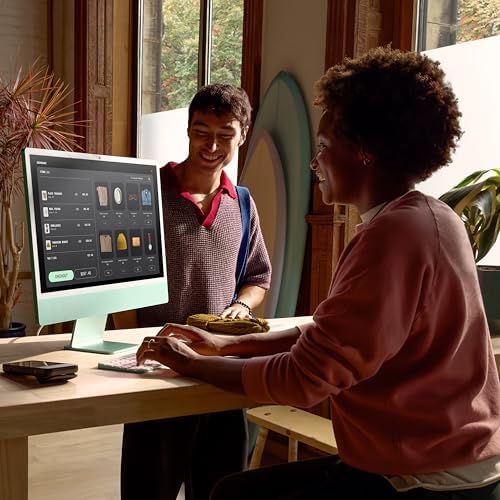
- Small business owners looking for a point-of-sale, office, or kiosk machine.
- Families who want a shared computer that’s simple, reliable, and good-looking on a countertop.
Pros and Cons
| Pros | Cons |
|---|---|
| Fast M4 chip, strong multi-core performance | Base 256GB storage fills up quickly. |
| 16GB RAM standard—real value at this price | RAM and storage aren’t upgradeable later. |
| The 10-core model supports two external 6K displays. | Magic Mouse’s charging port placement |
| Excellent 4.5K Retina display | Storage upgrades get pricey. |
| Four Thunderbolt ports (10-core config) | No native USB-A ports |
| Touch ID built into the keyboard | Not designed with hardcore PC gaming in mind |
Specs at a Glance
- Chip: Apple M4 (10-core CPU, 8- or 10-core GPU, 16-core Neural Engine)
- Display: 24-inch 4.5K Retina (4480 x 2520), 218 ppi, 500 nits, P3 wide color, True Tone
- Memory: 16GB unified (configurable to 24GB or 32GB)
- Storage: 256GB SSD (configurable to 512GB, 1TB, or 2TB)
- Ports: Up to 4x Thunderbolt/USB 4, Gigabit Ethernet (in power adapter), headphone jack
- Camera: 1080p FaceTime HD with Center Stage
- Audio: Six speakers, force-cancelling woofers, spatial audio, Dolby Atmos, three-mic array
- Wireless: Wi-Fi 6E, Bluetooth 5.3
- Included: Magic Keyboard with Touch ID, Magic Mouse, woven power cable, USB-C to Lightning cable
- OS: macOS Sequoia
- Dimensions: 18.8 x 18.1 x 0.5 in (46.1 x 54.7 x 1.47 cm)
- Weight: 9.8 lbs (4.44 kg)
- Warranty: 1-year limited, 90 days of free technical support; AppleCare+ available
The Bottom Line
The 2025 iMac fixes the previous generation’s biggest complaint—too little base memory—while keeping the things people love about the line: a gorgeous display, a genuinely all-in-one footprint, and enough performance for serious creative and productivity work. It’s not a gaming rig, and the lack of upgradeability means it pays to configure carefully at checkout. But for anyone weighing it against building a separate PC, monitor, webcam, and speaker setup, the iMac remains a compelling, tidy alternative.

Aalibee –
Love it!!
Fantastic! Perfect for my artistic endeavours and it’s even up to the task of running many process heavy programs at once with no lag. I have always loved Apple, since the days of it being Macintosh until now. Their products simply work. This is a beautifully designed desktop and the performance is top notch. I don’t see why anyone shouldn’t want this computer. I am definitely a happy camper. The only draw back is the incapability for using more than two external displays. It is worth the money to me.
4 people found this helpful
Diego –
Solid choice
Works perfectly. The unboxing experience is amazing! The color looks so good in person. The size is perfect for my desk and I genuinely feel like I got great value for my money. The computer is easy to use and super sturdy. There are 4 usb-c ports on the back, which are very useful.
3 people found this helpful
Shazzy1929 –
Absolutely beautiful
I love my Apple iMac. This colour is so refreshing and outstanding. Love my apple products. From order to delivery was very efficient. I am so pleased. So easy to set up. Great functions.
3 people found this helpful
Joaquin Esquivel –
Good purchase
Great computer. Have enjoyed having it. Works well and fast
5 people found this helpful
Seaguy71 –
Great Computer!!
Best computer I’ve ever owned! Fast reliable, easy to use! I use mine for straining activities like editing video it works absolutely perfect perfectly. It’s well worth what you pay for it. I could not recommend buying one of these more.
7 people found this helpful
Familyof4 –
Great computer!!!
Perfecto!! I LOVE this computer. Easy delivery and set up was simple. It replaced my old Mac. The only negative is the ports in the back. I can’t plug in anything and had to buy a hub for my other things to work otherwise, this thing is heaven!!
4 people found this helpful
Scott B –
The new M4 iMac
This would likely be a 5 Star review, but since I transferred a large amount of very old data from my old computer, I’ve been having issues. I don’t know if the issues are related to the new OS or if the issues stem from my browsers or from certain websites. What’s frustrating is I can’t get any answer from anyone, anywhere, so I suppose I’m taking it out on the new iMac. That said, it’s an impressive new machine. Just be prepared to purchase USB A to USB C adapter(s) so you can connect your external devices to the new Thunderbolt C ports.
18 people found this helpful
Ron Simmons –
The new iMac will not disappoint
This iMac is a replacement for my older iMac computer–it is a great update. There are a few disappointments with the new iMac, however. Many of my accessories run through USB ports….the new iMac doesn’t have any USB ports. So that forces purchasing dongles to convert to the new lightening ports or purchasing a hub that accepts the older iterations of USB. So that is the only criticism I have with this iMac. I like the speed of the SSD but again many of the configurations offer 256G of resident storage. So to satisfy the necessary additional storage, you have to purchase an external device. That is exactly what I did. I purchased a hub that also allowed a variety of SSD cards to be integrated and serve as additional storage. Both integrated seamlessly and have performed without any hiccups. So there are easy workarounds for the new configuration of the iMac and reasonably priced.
7 people found this helpful
geezer –
A Mac is still a Mac
After about 15 years my old Mac started borrowing my walker. To avoid losing files I got a new Mac. Needless to say, it has a lot of new bells and whistles. Whole damn symphony orchestra. All I need is a single bugle to play taps (but not quite yet). Consequently I ignored all the new stuff and kept doing what I need to do with no learning curve. Lest you misunderstand my needs, I have done about a half dozen books, all heavily illustrated. I also do powerpoint (called Keynote on the Mac), and can show mineral specimens under the microscope to an audience. The beauty of the Mac is that it is user friendly for those of us who want to do a job; not play games. You do not need to upgrade (at a cost) every year or two. I had to use a pc briefly not long ago. In 5 minutes I was ready to kill. And long live the Magic Mouse!
2 people found this helpful
DGDG –
great buy
Absolutely love this computer. It was a bit of a down grade coming from my 10 year old 24 inch Mac but I had to order another one so I went with this one I got the blue one . It was real easy to set up and it is so much faster than my old one .If you are thinking about getting the new computer don’t think twice this one is well worth it.
One person found this helpful