
Best Ryzen 7 Mini PC for Gaming USA – MINIX Compact Desktop for Home Office and Gaming

Best Ryzen 7 Mini PC for Gaming in the USA (2026 Buying Guide)
Mini PCs have crossed a threshold that once seemed impossible: a box small enough to hide behind a monitor can now run modern games at 1080p without a discrete graphics card. The engine behind that shift is AMD’s Ryzen 7 mobile lineup—chips like the Ryzen 7 8745HS, 8845HS, and PRO 6850U—paired with Radeon 680M/780M integrated graphics. For U.S. shoppers who want desktop-class gaming performance without a full tower, here’s what to look for and which Ryzen 7 mini PCs are worth buying right now.
Why Ryzen 7 Is the Sweet Spot for Mini PC Gaming
AMD’s Ryzen 7000 and 8000-series mobile chips are built on a 4 nm process and pack 8 cores and 16 threads into a low-power laptop-class package—which is exactly what mini PCs repurpose for desktop duty. The real gaming story, though, is the integrated Radeon 680M/780M graphics bundled with these chips. Independent testing has found the Radeon 780M competitive with entry-level discrete laptop GPUs, capable of running modern titles at 1080p on medium-to-reasonable settings without any add-in card. That makes Ryzen 7 the practical minimum for anyone serious about gaming on a mini PC in 2026; anything below it (Ryzen 5, Intel N-series, or Celeron/Pentium chips) tends to bottleneck even modest games.
What to Look for When Buying
- CPU: Ryzen 7 8745HS, 8845HS, or PRO 6850U are the current benchmarks; the newer Ryzen 7 H255 offers roughly a 40% performance jump over the previous-generation 7735HS.
- Graphics: Radeon 680M or 780M integrated graphics for actual 1080p gaming capability.
- RAM: 32GB DDR5 is the sweet spot for gaming, streaming, and multitasking headroom; 16GB is the practical minimum.
- Storage: 1TB NVMe SSD minimum—modern AAA titles routinely exceed 100GB installed, and a 500GB drive fills up fast.
- eGPU support (optional but valuable): An OCuLink or USB4/Thunderbolt port lets you attach an external GPU dock later, turning a “compact desktop” into a genuine gaming rig without replacing the whole system.
- Cooling: Look for multi-fan or vapor-chamber designs and copper heat pipes; sustained gaming sessions expose weak thermal designs quickly.
Top Ryzen 7 Mini PC Picks for U.S. Gamers
GMKtec M7 Ultra—Pairs a Ryzen 7 PRO 6850U with Radeon 680M graphics (12 cores at 2200–2600 MHz), 32 GB DDR5, and a 1 TB SSD. Performance lands close to an entry-level discrete GPU, and its OCuLink port is the standout feature: it provides PCIe x4 bandwidth for an external GPU dock, effectively giving you an upgrade path to real discrete-GPU gaming later. Dual 2.5 Gb Ethernet and dual USB4 round out the package. Typically sold in the $650–$750 range on Amazon, with frequent discounts.
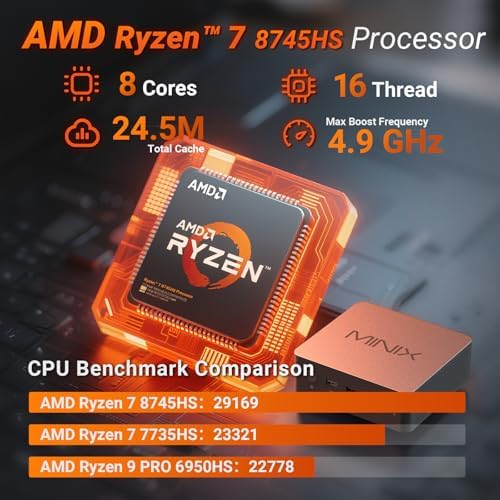
Beelink SER5 Pro / SER9 Pro AI—The SER5 Pro’s Ryzen 7 8745HS delivers an 8-core, 16-thread CPU boosting to 4.9GHz alongside Radeon 780M graphics, usually bundled with 32GB DDR5 and a 1TB NVMe drive for around $499. The newer SER9 Pro AI steps up to the Ryzen 7 H255 chip with 24GB LPDDR5X and triple 4K display support up to 240 Hz, aimed at buyers who want the latest silicon rather than maximum value.
GEEKOM A7 Max—Built around the Ryzen 9 7940HS/8945HS class of chips with Radeon 780M graphics, marketed specifically as a gaming-capable mini PC. GEEKOM highlights third-party testing showing the 780M competing with low-end discrete laptop GPUs, making this a solid pick for buyers who want a polished, well-supported build.
Mini PCs with OCuLink eGPU support (Fateka-recommended builds)—For buyers who want a clear upgrade path, models pairing a Ryzen 7 8845HS with 32GB DDR5, a 1TB NVMe Gen4 drive, and an OCuLink port are worth seeking out. OCuLink runs PCIe 4.0 x4 with lower latency than Thunderbolt-based eGPU connections, letting you add a real discrete GPU dock later for $200–$400 rather than buying a whole new machine.
Framework Desktop (Ryzen AI Max+ chips) — A step above standard Ryzen 7 builds, using 16-core Zen 5 silicon with dramatically stronger integrated graphics. It’s priced higher than typical Ryzen 7 mini PCs but worth mentioning for buyers who want the most headroom for 1080p/1440p gaming without an eGPU at all.
Pros & Cons of Ryzen 7 Mini PCs for Gaming
Pros |
Cons |
|---|---|
| Genuine 1080p gaming capability without a discrete GPU | Integrated graphics still fall short of mid-range/high-end discrete GPUs. |
| Extremely compact—many fit behind a monitor | Some models are limited to a single NVMe slot. |
| Upgradable DDR5 RAM and NVMe storage on most models | Warranties on budget brands are often just one year. |
| OCuLink/USB4 eGPU support gives a real upgrade path on select models. | eGPU docks are a separate $200–$400+ purchase. |
| Strong price-to-performance vs. building an equivalent desktop | Sustained gaming can trigger thermal throttling on weaker cooling designs. |
| Low power draw and quiet in everyday productivity use | Fan noise increases noticeably under gaming loads on smaller chassis. |
Bottom Line
For U.S. buyers, a Ryzen 7 mini PC with Radeon 680M/780M graphics, 32GB of DDR5, and a 1TB NVMe SSD is the current sweet spot for compact gaming—typically landing between $500 and $750. Buyers who want future flexibility should prioritize a model with OCuLink or USB4 eGPU support, since it turns a modest integrated-graphics box into a real discrete-GPU gaming rig down the line. Established brands like Beelink, GMKtec, and GEEKOM currently offer the most well-rounded combination of performance, upgradability, and support in this category.
Drew Peterson –
Great home server
Installed Linux on it, using it as a home server. Runs really well.
JohnS –
Great fast mini
Fast and configured well
wizozzie –
Why USB4 on the front? You need it in the BACK.
MINIX NGC-NR660 is a small and cute little mini PC that packs a punch for its size. The AMD Ryzen 5 6600H (6 cores, 12 threads) and Radeon 660M graphics handles everyday computing, office work, streaming, and even some light gaming.Out of the box, you get 16GB of fast DDR5 RAM and a 512GB NVMe SSD, both of which are upgradeable-there’s two M.2 slot for storage and the two it has does 4x NVMe speeds. The RAM slots WILL support 96GB. I tried it with my laptop ram from another unit and it recognized both of them at 4800.Connectivity is pretty good: you get WiFi 6E, Bluetooth 5.2, two 2.5G Ethernet ports, USB4 (up to 40Gbps, supporting external GPUs), HDMI 2.0, DisplayPort 1.4, and plenty of USB ports. Triple monitor setups are possible, and the system supports dual 4K@60Hz displays smoothly.One thing that is IRRITATING to me is that the USB4 port is in the FRONT. If you have a front port, you should also have a matching back port because if you’re using an eGPU or Dock, you’ll always have something plugged into it and that’s annoying when you’re trying to have a nice small clean setup.Performance is fast for productivity, web browsing, and media playback. It runs Windows 11 Pro out of the box but is also compatible with Linux. The cooling system does a good job-fans are quiet during normal use, though you’ll hear them under heavy load. Thermals stay in check, and power consumption is low for the performance you get.Gaming is possible at 1080p or 720p on lower settings for titles like Fortnite or League of Legends, but don’t expect AAA performance. Adding a second RAM stick for dual-channel makes a noticeable difference in gaming and multitasking. This is the lower version of this generation’s integrated graphics and is very memory speed dependent. If you’re not using dual channel, you’re wrong, so make sure to upgrade BOTH sticks. The memory is taken from main ram so the more you have the better for you.Build quality is solid for a plastic chassis, and the compact footprint means it’s easy to mount behind a monitor or tuck away on a desk. The only real downside is the external power brick, which is a bit bulky. I’d rather have that heat outside the device anyway, however it does make for a less portable setup.Overall, MINIX NGC-NR660 is neat little mini PC with great connectivity and upgrade potential. It’s a strong choice for productivity, light content creation, and as a compact home theater or office PC. It’s a RECOMMEND!
One person found this helpful
LD_C –
Excellent home office use
The unit arrived as scheduled. Plastic wrap on box ripped. All expected components included in the box. The unit was setup and Windows loaded and updated as expected. No problems seen yet, but will update the review after more active and heavy duty usage.Wish the system came with 2 sticks of DDR5 memory installed.
Byung Kim –
WiFi 6
A perfect mini desktop PC for home. Fast booting and WiFi 6 provides wonderful video streaming.
DudeMeToo –
Compact Powerhouse with Versatility and Speed
This mini PC delivers surprising performance in a small, easily concealable footprint. Setup was quick and painless, and the system boots fast, thanks to its speedy SSD and ample DDR5 memory. Windows 11 Pro comes pre-installed, and everything from web browsing to video streaming and multitasking runs smoothly without lag.The build feels solid, and connectivity is more than sufficient, with dual 2.5G LAN, USB4, and support for multiple high-resolution displays. It fits nicely behind a monitor or in tight workspaces, making it a fantastic choice for home offices, media centers, or even lightweight gaming.Gaming at 1080p on low-to-medium settings is perfectly doable, and productivity tasks are handled effortlessly. The fan can be audible under heavy load, but it’s nothing disruptive. The only minor gripe is the external power brick, which slightly affects portability.My Rating: ★★★★☆ (4.5 out of 5, rounded to 5 stars for recommendation purposes)Why 5 Stars?Despite minor nitpicks like port placement and the audible fan under load, its excellent speed, connectivity, expandability, and reliable performance more than justify a top rating—especially for the price.
David Larose –
A Clean Sweep
This MINIX mini computer scores five stars in every category – and that’s rare!For my use, it’s perfect. The Wi-Fi is as good as a laptop, the graphics are excellent, the expandability is fine. I’m not a gamer, so I don’t much care about high-speed, high-resolution graphics. The accompanying video was edited on another ‘desktop’ style computer. The audio in the MINIX is also good enough. I won’t be doing any audiophile editing on this machine.My primary use for this will be in the kitchen. Since I don’t have Cat-5 cable run there, I use Wi-Fi to connect. Maybe to keep up with podcasts, maybe to pull up a recipe or check whatever comes to mind. So for me, this little computer is, again, perfect.Both the User Guide and the box it comes in have contact information. Email, website, social media(s), QR (Quick Response) code matrix, even their physical address in Hong Kong. Warranty information is implied, but not expressly spelled out. The inclusion of Windows 11 Pro probably complicates their ability to make guarantees.I agree with other reviewers, that this device is not the ultimate in several categories, but like I mentioned, those categories are not so relevant to my use.At the current advertised, discounted price, this mini PC is a good deal.It could be perfect for space-limited applications, or, like me, as an easy expansion of a local LAN.
Amazonian FlierAmazonian Flier –
A great little PC with a slightly dated Ryzen CPU. But excellent product overall!
This is a fantastic option for HTPCs, road warriors, or stand alone / standing desk setups, which is what I got this for (see picture).The only reason I rated it as 4 stars is the price to performance, which should be more closer to 250 to 280 dollars in my opinion, based on the slightly dated 6600H and only 512GB of storage. But overall, this is a fantastic little setup and leaves nothing to be desired in most non intensive, office tasks.I’ve set it up with a 27″ 100Hz monitor via HDMI, a USB A to 5 port USB A connecting a wired USB keyboard, wireless mouse receiver, USB printer, USB speaker, USB DVD burner / player, on a standing desk around my kitchen area and the result was excellent, making my wife and son fall in love with this extremely functional and useful setup. We really loved how this little corner of the house turned out.I haven’t really encountered any problems with this tiny PC. I’m running the default OS, which is a Windows 11 Pro key. I might format it and install a clean Windows 11 Pro instead in the future on a 1TB NVMe drive. But for now it’s working just fine with the 512GB drive. 16GB is plenty for most people. Wi-Fi 6E is also pretty competitive and doesn’t miss out much on the Wi-Fi 7 protocol.Plenty of USB ports but you can definitely use some USB expansion like I’m using at this time.I like this setup, over a laptop on a desk, because it allows you use a larger display or two if you so choose, and use up very little desk space (unless you set up your laptop closed and vertically behind a monitor).A good alternative to this would be docking one of those portable gaming devices that can be found on sale or clearance with the AMD Z1 or Z1 Extreme for 400 dollars or less. Just food for thought. The options and uses of these tiny PCs or mobile gaming devices are pretty much endless. It’s a great time for tech people and geeks for sure.All in all I’m quite pleased with this MINIX PC and regardless of my minor critiques, I’d still recommend it to my fellow Amazon shoppers – if this is something that would work for your needs and your budget.
One person found this helpful
Erik –
Great little Shop PC
Great little shop PC. I have this mounted and hooked up to a 27″ monitor with a keyboard and trackpad on my workbench in my workshop. It’s much better than a laptop for me as I can have a large screen. The PC came with Windows 11 Pro and boots up fast. It has plenty of drive space for my needs. It’s a fast little sucker! WiFi 6e lets me take advantage of my Wifi router and gives me excellent speeds. Overall a great little shop PC that more than meets my needs to look up info, watch youtube videos and do some casual gaming in my workshop.
Rene T.Rene T. –
tiny and mighty
quite powerfull, tiny p.c that fits pretty much anywhere. Its easy to set up, has plenty of usb ports and decent wifi speeds even in my old house.