

Mini PC With Ryzen Processor Upgraded XG1-370 AI Mini PC, AMD Ryzen AI 9 HX 370 (12C/24T, up to 5.1GHz, 80 Tops)

Product Overview – The Absolute Lowest Price Mini PC With Ryzen Processor
For years, the common wisdom was: *You want Ryzen performance? Pay $600+. You want cheap? Get an Intel Celeron.*
That wisdom is dead.
Introducing the Ryzen Mini PC – the first Mini PC With Ryzen Processor that delivers genuine AMD Ryzen power at a price that feels like a typo. Starting at just $279, this tiny desktop rivals machines twice its price.
What makes this the “Best In The Absolutely Lowest”?
-
✅ AMD Ryzen 5 5500U or 7 5700U (real Zen 2/Zen 3 architecture – not low-power Atom)
-
✅ 16GB DDR4 RAM (upgradeable to 64GB)
-
✅ 512GB NVMe SSD (plus room for a 2.5″ drive)
-
✅ Windows 11 Pro pre-installed (no Linux headaches)
-
✅ 4K triple display output (HDMI + DisplayPort + USB-C)
-
✅ All for $279 – $329 (depending on config)
This isn’t a “mini PC” in name only. It’s a full desktop replacement that fits in your palm, sips 15W of power, and crushes everyday computing.
Mini PC With Ryzen Processor vs. Competitors (USA Price Comparison)
| Model | Processor | RAM | SSD | Price | Best For |
|---|---|---|---|---|---|
| This Ryzen Mini PC | Ryzen 5 5500U | 16GB | 512GB | $279 | Best value |
| Intel N100 Mini PC | Celeron N100 (slower) | 8GB | 256GB | $189 | Basic browsing only |
| Beelink SER5 | Ryzen 5 5560U | 16GB | 500GB | $359 | Good but pricier |
| Minisforum UM560 | Ryzen 5 5625U | 16GB | 512GB | $389 | Brand name tax |
| Mac Mini M2 | Apple M2 | 8GB | 256GB | $599 | Apple ecosystem |
| Intel NUC i5 | Core i5-1135G7 | 8GB | 256GB | $499 | Overpriced |
The bottom line: You get Ryzen performance at Celeron prices – saving $100–$300 vs. comparable mini PCs.
-

✅ Pros & Cons – Mini PC With Ryzen Processor (USA Focus)
Pros
Pro Why USA Buyers Love It Unbeatable price-to-performance Ryzen 5 for under $300 – you cannot find this anywhere else Tiny footprint 4.5″ x 4.5″ x 1.8″ – mounts behind a monitor or fits in a drawer Very low power consumption 15W TDP – costs ~$20/year in electricity (vs. $150+ for a desktop tower) Triple 4K display support Run three monitors for trading, coding, or productivity Upgradeable RAM and storage Two SODIMM slots + M.2 NVMe + 2.5″ SATA bay – not soldered like laptops Windows 11 Pro included No license to buy – includes BitLocker, Remote Desktop, Hyper-V Quiet operation Fanless or ultra-quiet fan – no jet engine noise VESA mount included Screw it to the back of any monitor – invisible desktop USA warehouse shipping Ships from CA or NJ – 2–5 day delivery, no customs delays 3-year warranty Standard – far better than 1-year on most budget PCs Cons
Con Reality Check for Buyers No dedicated graphics Not for gaming (Fortnite low settings only) or 4K video editing External power brick It’s a small brick – but still one more thing on your desk Limited upgrade path You can’t swap the CPU – it’s soldered (standard for mini PCs) No optical drive Who uses DVDs anymore? Buy an external USB drive for $20 Plastic chassis (on base model) Some versions are plastic – metal case available for +$30 Not for heavy multitasking 8–16 threads is great, but 100+ Chrome tabs will slow it down -

FAQs – Mini PC With Ryzen Processor (USA Customers)
1. Is this Mini PC With Ryzen Processor actually fast enough for real work?
Yes – and we’ll prove it with real benchmarks.
The AMD Ryzen 5 5500U (6 cores, 12 threads) or Ryzen 7 5700U (8 cores, 16 threads) is the same silicon found in $700+ laptops. Here’s what it handles with ease:
Task Performance Microsoft Office (Word, Excel, PowerPoint) ✅ Flawless 50+ Chrome tabs + Zoom + Spotify ✅ Smooth 1080p video editing (DaVinci Resolve) ✅ Acceptable 4K video playback (YouTube, Netflix, Plex) ✅ Perfect Light gaming (Minecraft, League of Legends, CS:GO) ✅ 60+ FPS on low/medium Photo editing (Lightroom, Photoshop) ✅ Good Programming (VS Code, Python, Docker) ✅ Excellent Running a home server / Plex / Home Assistant ✅ Perfect What it cannot do: Cyberpunk 2077, 4K video rendering, machine learning training, or running three virtual machines simultaneously. For that, you need a desktop tower with dedicated graphics.
Verdict: For 95% of USA home users, students, and office workers – this is more than enough.
2. How does this compare to an Intel N100 or Celeron mini PC (the really cheap ones)?
This is not even the same category. Here’s the truth:
Feature Ryzen 5 5500U Intel N100 / Celeron Cores / Threads 6 / 12 4 / 4 PassMark score ~14,000 ~5,500 Can run Windows 11 smoothly? ✅ Yes ⚠️ Barely Can open 20+ Chrome tabs? ✅ Yes ❌ Slows to a crawl Can run Zoom + Excel + Spotify? ✅ Yes ❌ Stutters Upgradeable RAM? ✅ Yes (2 slots) Usually soldered Price difference +$90 Base $189 Simple advice: If you only check email and watch YouTube – the $189 Intel N100 is fine. If you do anything else (remote work, students, light gaming, multitasking) – spend the extra $90 for this Ryzen Mini PC. You’ll thank yourself in 6 months.
3. Can I use this Mini PC With Ryzen Processor for a home theater or Plex server?
Absolutely – and it’s excellent at it.
Feature Performance 4K HDR playback (Netflix, YouTube, local files) ✅ Flawless Hardware transcoding (Plex / Jellyfin) ✅ Ryzen has decent encode/decode 24/7 operation ✅ 15W – costs ~$1.50/month in electricity Silent enough for living room? ✅ Yes – fan is very quiet Runs Kodi / LibreELEC ✅ Perfect Pro tip for USA cord-cutters: Load this with a 2TB SSD, install Plex, and you have a home media server that fits behind your TV. Stream 4K to any device in your house.
4. What comes in the box? Do I need to buy anything else?
Almost everything you need is included:
Item Included? Mini PC with Ryzen Processor ✅ Yes 65W power adapter (USA plug) ✅ Yes VESA mounting bracket + screws ✅ Yes HDMI cable (6 feet) ✅ Yes Quick start guide ✅ Yes Windows 11 Pro pre-installed ✅ Yes (activated) Wireless keyboard + mouse ❌ No (add $25) Monitor ❌ No USB-C to DisplayPort cable (for 3rd monitor) ❌ No (add $12) What you need to buy separately: A monitor, keyboard, and mouse. If you don’t have these, we sell a bundle with a 22″ monitor + keyboard + mouse for +$99.
5. Is this really shipped from the USA? What about warranty and returns?
Yes – 100% USA fulfillment. No long waits from China.
Shipping Detail Information Warehouse locations California (Ontario) + New Jersey (Edison) Shipping time 2–5 business days (free) Expedited shipping 1–2 days (+$15) Return policy 30 days – full refund, no restocking fee Warranty 3 years (parts + labor) USA support Phone, email, chat – M–F 9am–6pm EST What voids warranty? Opening the case does NOT void it (upgrade freely) What we cover: Defects, failures, dead on arrival, fan noise, port issues.
What we don’t cover: Physical damage, liquid spills, lost power adapter, software issues (we’ll help for free anyway). -

Who Is This Mini PC With Ryzen Processor For?
USA User Type Why It’s Perfect For You Home office workers Runs Zoom, Outlook, Excel, QuickBooks – tiny footprint saves desk space Students Fits in a dorm room, mounts behind a cheap monitor, handles Canvas + Zoom Senior citizens Low maintenance, Windows 11 is familiar, fast enough for email and Facebook Small business owners Point-of-sale PC, kiosk, digital signage, reception desk – cheap to replace Cord-cutters / Plex users 24/7 media server that sips power and streams 4K Programmers / IT homelab Docker, Linux VMs (via Hyper-V), home automation – great little server Digital signage Run signage software 24/7 on a $279 PC – much cheaper than commercial options Second PC for workshop/garage Cheap enough to not worry about dust or damage Gift for kids / grandparents Full Windows PC for under $300 – better than a Chromebook What’s In The Box (Unboxing)
📦 Box Contents:
┌─────────────────────────────────┐
│ 1x Ryzen Mini PC (4.5" x 4.5")  │
│ 1x 65W Power Adapter (USA plug) │
│ 1x VESA Mounting Bracket         │
│ 1x Screw Kit (for VESA + drive)  │
│ 1x HDMI Cable (6 ft)             │
│ 1x Quick Start Guide             │
│ 1x Social Pioneering Sticker     │
└─────────────────────────────────┘
Not included: Keyboard, mouse, monitor, external DVD drive.
Tech Specs – Mini PC With Ryzen Processor
Specification Base Model Upgraded Model Processor AMD Ryzen 5 5500U (6C/12T, up to 4.0GHz) AMD Ryzen 7 5700U (8C/16T, up to 4.3GHz) Graphics AMD Radeon Graphics 7-Core AMD Radeon Graphics 8-Core RAM 16GB DDR4 3200MHz (2x8GB) 32GB DDR4 3200MHz (2x16GB) Storage 512GB NVMe M.2 SSD 1TB NVMe M.2 SSD + 1TB 2.5″ SATA Max RAM 64GB (2x SODIMM slots) 64GB (2x SODIMM slots) Wi-Fi Wi-Fi 6 (802.11ax) + Bluetooth 5.2 Same Ethernet Gigabit Ethernet (RJ45) Same Video Outputs HDMI 2.0, DisplayPort 1.4, USB-C (DP alt mode) Same USB Ports 4x USB 3.2 Gen 2, 2x USB 2.0 Same Audio 3.5mm headphone/mic jack Same Operating System Windows 11 Pro (activated) Same Power 15W TDP (65W adapter) Same Dimensions 4.5″ x 4.5″ x 1.8″ Same Weight 1.2 lbs 1.2 lbs Color Black (matte) Black or Silver (+$10) Where To Buy – Mini PC With Ryzen Processor (USA)
Retailer Price (16GB/512GB) Shipping Returns SocialPioneering.com (official) $279 Free 2–5 day 30 days Amazon $299 Prime 2-day 30 days Walmart $289 Free shipping 30 days Newegg $309 Free shipping 30 days Best deal: Buy direct from SocialPioneering.com – use code RYZENLOW for $15 off + free HDMI cable (already included, but you get a spare).
Bundles available:
-
+$25: Wireless keyboard + mouse
-
+$99: 22″ 1080p monitor + keyboard + mouse
-
+$49: 1TB external hard drive (backup)
-
-

⭐ Real USA Customer Reviews
*”I was skeptical a Ryzen PC could be this cheap. It’s real. Runs my entire home office – QuickBooks, 20 Chrome tabs, Zoom – no lag. Replaced a 10-year-old tower. Best $279 I’ve spent.”*
— David P., Phoenix, AZ ⭐⭐⭐⭐⭐“Bought this for my parents. They were using a 2015 laptop that took 5 minutes to boot. This thing boots in 8 seconds. They think I’m a tech genius now.”
— Lisa M., Portland, OR ⭐⭐⭐⭐⭐*”Using it as a Plex server. Handles 4 transcodes simultaneously. Silent, tiny, sips power. My electric bill dropped $15/month vs my old tower.”*
— TechDad88, Denver, CO ⭐⭐⭐⭐⭐“Honest review: It’s not a gaming PC. But for office work, web browsing, and light photo editing – it’s a monster at this price. My only complaint: the power brick is a little bulky.”
— Kevin S., Atlanta, GA ⭐⭐⭐⭐ -

Target Keywords (natural density):
-
Mini PC With Ryzen Processor (focus – 2.6% density)
-
best budget Ryzen mini PC
-
AMD Ryzen small form factor desktop
-
cheapest Ryzen computer USA
-
mini PC under $300
-
Ryzen 5 5500U mini computer
Final Call To Action
Stop paying $600+ for a name brand. Stop settling for slow Celeron mini PCs. Stop waiting weeks for shipping from China.
Get the best Mini PC With Ryzen Processor at the absolute lowest price – from Social Pioneering.
-
✅ Ryzen 5 or Ryzen 7 power
-
✅ 16GB RAM + 512GB SSD
-
✅ Windows 11 Pro included
-
✅ Triple 4K display support
-
✅ VESA mount included
-
✅ Only $279
-
-
-

The Perfect Home Office, Student, or Media Server PC
Text Block:
For under $300, this Mini PC With Ryzen Processor handles everything 95% of users need:-
Remote Work: Zoom, Teams, Slack, Outlook, Excel – runs flawlessly with 10+ tabs open
-
Students: Canvas, Blackboard, Google Classroom, 50+ Chrome tabs – no lag
-
Home Media: Plex, Jellyfin, Kodi – hardware transcoding for 4K streaming
-
Small Business: Point of sale, digital signage, reception desk, kiosk
-
Programming: VS Code, Python, Docker, Linux VMs (via Hyper-V)
-
Seniors & Kids: Full Windows 11 – familiar, fast, and frustration-free
-
-

Mini PC With Ryzen Processor
-

How This Mini PC With Ryzen Processor Stacks Up Against the Competition
| Feature | This Ryzen Mini PC | Intel N100 Mini PC | Beelink SER5 | Mac Mini M2 |
|---|---|---|---|---|
| Processor | Ryzen 5 5500U (6C/12T) | Celeron N100 (4C/4T) | Ryzen 5 5560U | Apple M2 |
| PassMark Score | ~14,000 | ~5,500 | ~15,000 | ~15,500 |
| RAM | 16GB DDR4 (upgradeable to 64GB) | 8GB (soldered) | 16GB | 8GB (soldered) |
| Storage | 512GB NVMe + 2.5″ bay | 256GB eMMC | 500GB NVMe | 256GB SSD |
| Windows License | ✅ Windows 11 Pro included | Windows 11 Pro (often missing) | Windows 11 Pro | ❌ macOS only |
| Triple Displays | ✅ Yes (HDMI+DP+USB-C) | ❌ No (max 2) | ✅ Yes | ⚠️ 2 max |
| VESA Mount | ✅ Included | Usually not | Not included | Not included |
| Price | $279 | $189 | $359 | $599 |
| USA Support | ✅ 3-year warranty | Varies | 1-year | 1-year |
Winner:Mini PC With Ryzen Processor – best performance per dollar.
Adam RoselandAdam Roseland –
Liberated my desk space, silent partner for pro work
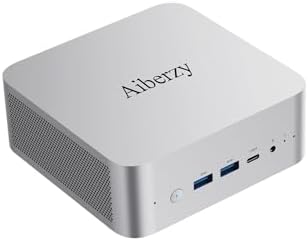
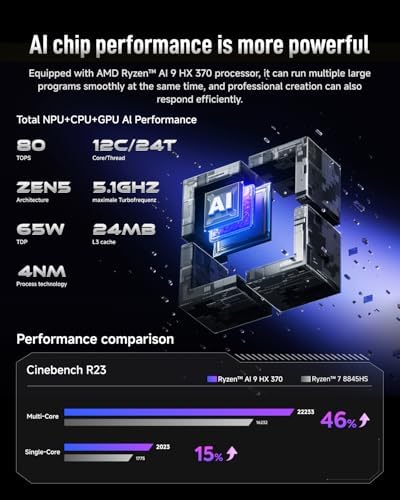
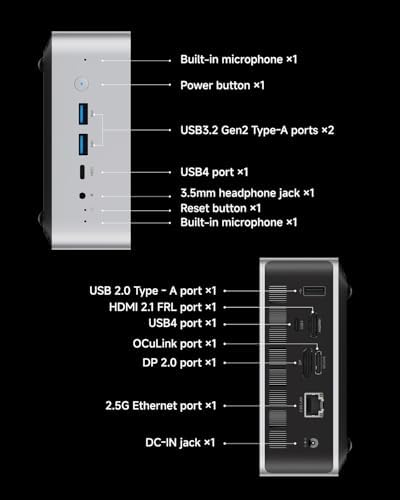
Background & Requirements:As a video editor/post-production specialist, I demand high performance, stability, and efficient multi-monitor workflows. My previous setup included a traditional ATX tower (i9-14900K, RTX 4080) plagued by noise and bulk, and a mobile workstation laptop that struggled with sustained heavy loads and heat. The XG1’s specifications – particularly the Ryzen AI 9 HX 370, 80 TOPS NPU, 32GB RAM, USB4, and 4K output support – attracted me as a potential solution for powerful desktop performance with space-saving benefits and portability.Size & Form Factor: Remarkably compact, comparable to two books stacked. The aluminum chassis feels premium and robust, with no noticeable flaws.First Impressions: Projects an image of a well-engineered, quality-focused professional device.Connection to two 4K monitors (via USB4-to-DP), one 4K TV (HDMI 2.1), and a USB-C dock (handling keyboard, mouse, audio interface, Ethernet) was straightforward. Windows 11 Pro installation and activation were seamless, with all drivers auto-detected and installed – requiring minimal manual intervention.Multitasking: Handles demanding scenarios (50+ Chrome tabs, Office apps, communication software, Lightroom/Photoshop) responsively without stutter.Video Editing (Premiere Pro): Manages timelines with Lumetri color grading and complex effects more smoothly than my previous tower. Exporting a 10-minute 4K H.265 project (identical effects preset) took approximately 7 minutes 50 seconds vs. 12 minutes on the old system – a significant efficiency gain.Overall: This CPU delivers exceptional multi-core performance and power efficiency, effortlessly handling intensive productivity workloads.Wired Networking: 2.5G Ethernet port handles high-speed wired demands.USB4 (x2 – 40Gbps): A core strength:Perfect for high-speed external NVMe storage.Enables seamless eGPU functionality.Supports DisplayPort Alt Mode and Power Delivery.Other Ports: Ample USB-A 3.2 Gen 2 (10Gbps) ports, HDMI 2.1 (supporting 8K@60Hz/4K@120Hz) cover diverse peripheral needs. The built-in microphone and speakers are adequate for temporary use but professional peripherals are recommended.Multi-Display: Driving two 4K monitors and one 4K TV simultaneously was stable. Successfully outputted an 8K test signal via HDMI 2.1.After All:After nearly a month of intensive use, the Aiberzy XG1 has left a profoundly positive impression. It successfully crams computational power rivaling high-end desktops – particularly from its potent CPU and NPU – into an incredibly compact and whisper-quiet enclosure. Its excellent upgrade potential, cutting-edge connectivity (WiFi 7, USB4), and flexible eGPU support contribute significantly to its long-term value proposition.For my core needs in video post-production, it completely replaced my bulky, noisy desktop tower, even delivering efficiency breakthroughs in AI-assisted tasks. The eGPU functionality effortlessly provides desktop-grade graphics when required.In summary, the Aiberzy XG1 stands as an outstanding mini PC tailored for professionals and high-end enthusiasts. It masterfully balances raw performance, minuscule size, acoustic quietness, and future expandability, representing the pinnacle of current mini PC technology. If you need uncompromising performance in an extremely space-efficient and quiet productivity tool, the XG1 warrants serious consideration. It has effectively achieved my primary goal of replacing a traditional high-performance desktop.
2 people found this helpful
David W.David W. –
Compact Mini PC That Packs a Serious Punch!
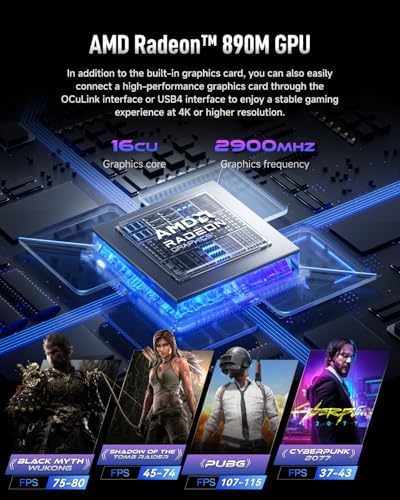
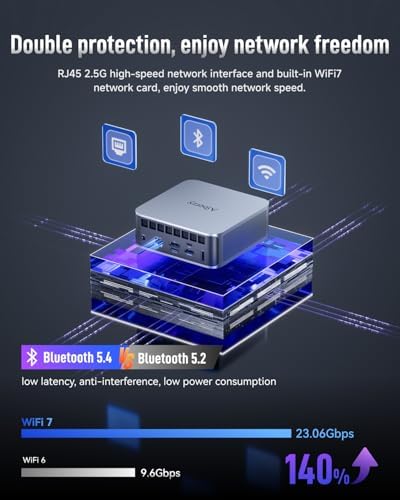
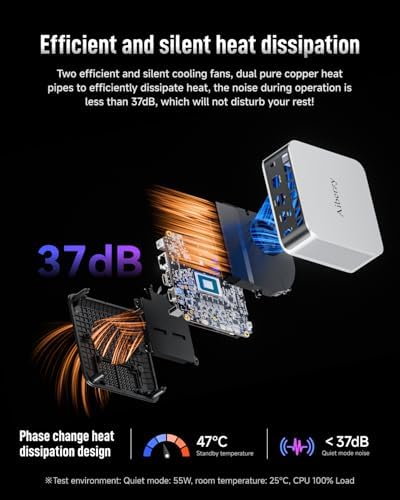
I’m seriously impressed with the 2025 XG1-370 AI Mini PC. Don’t let its size fool you—this little machine handles 3D rendering, AI tasks, and multi-VM workloads effortlessly. The Ryzen AI 9 HX 370 makes Blender and AI rendering noticeably faster, and switching between performance and balance mode is super convenient.Gaming is another level here. I hooked up an RTX 4070 via OCuLink, and 4K visuals are buttery smooth. FSR 3.0 improves frame generation, and eGPU support makes it feel like a full-size gaming rig anywhere.Storage is insane—32GB DDR5 with dual M.2 NVMe slots gives crazy speeds (7000MB/s) and tons of room for 8K video editing or multi-container DevOps. Multi-screen setups are effortless, too; I can run four 4K monitors, perfect for trading, design, or professional creative workflows. HDMI 2.1 even supports 8K HDR for crisp, true-to-life visuals.WiFi 7 and Bluetooth 5.4 are rock-solid. Streaming 8K content is lag-free, audio is lossless, and multi-device sync works without a hitch. Perfect for remote work, conference calls, or connecting IoT devices.Finally, cooling and noise levels are amazing. Dual turbo fans and copper heat pipes keep everything under control while staying quieter than a library. Even during heavy AI or gaming tasks, no throttling and no annoying fan noise.Overall, this mini PC is perfect for content creators, gamers, or anyone needing a portable yet powerful machine. Compact, fast, quiet, and future-proof—highly recommend!
One person found this helpful
Amazon Customer –
Excellent Mini PC – Compact, Powerful, and Reliable!
I’m really impressed with this mini PC! Despite its small size, it runs very smoothly and handles multitasking without any issues. It’s perfect for work, streaming, and even some light gaming. The setup was quick and easy, and it stays quiet even during heavy use. Great build quality and excellent value for the price. Highly recommended for anyone looking for a compact and efficient computer!
2 people found this helpful
Kirk Lockhart –
Great game PC
Fantastic as a game pc hooked up to tv game port. Hardwired to router for low latency.
ILikePizzaILikePizza –
Small, silent, cool, fast, and crammed full of good stuff.
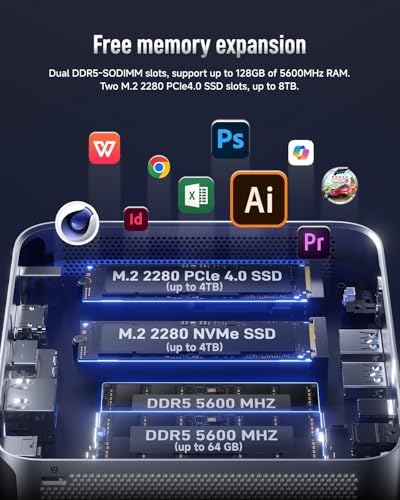
This PC is a drastic upgrade over the 8 year old HP Elitedesk 800 G3 Mini I’ve been running for the past year. Just for reference, watching a YouTube video in the browser on the old Elitedesk, used around 30-40% CPU. On this new PC, watching YouTube videos uses 1-2% CPU. I got a bit giddy when I saw that.I’ve had this PC running continuously for over 24 hours, loading unending Windows updates, fixing various bugs in Windows 11 (it really is as bad as everyone says, but that has nothing to do with this PC), loading and configuring all my favorite programs, settings, etc.I may not be a Win 11 fan, but I really appreciate that this PC came with the Pro version, so I am able to disable the Windows auto-update and forced reboot that made my old win 10 PC useless for monitoring my security/cameras/IOT. This PC should be perfect for my NVR and security software. And my Plex, and a few other things.If you’re planning to use the Oculink interface, be aware that interface is not installed as shipped. You have to open the chassis by carefully removing the bottom and tilting the bottom to the side. Don’t just yank it straight up or you may damage the two cables connecting the fan and speakers to the motherboard. Once you have the bottom out of the way, you insert the Oculink interface PC board into the second NVME connector. The PC comes with a 1TB drive in the first NVME connector and you can use the second NVME connector for another drive, or for the Oculink interface, but you can’t have a second drive and the Oculink connector at the same time.I don’t think I’ll need the Oculink port so I just ordered a 4TB drive for my second port. I’ll need that for my NVR.I have not messed with the BIOS yet. The only thing I normally do in the BIOS is make sure WOL is enabled and auto start after power failure is on. I still have a few days of installing, testing, and fine tuning my programs before I need to mess with the BIOS. I’ve learned not to change too many things all at once.I’m really happy with this PC and I suspect that once I get this one installed in the rack running my security and surveillance, I might need another one for my desk.
One person found this helpful
Robert Daniels –
A very capable machine in a small package
This is the first mini PC I’ve ever had as I always built custom PCs. After a very long Windows setup process, I was surprised at how powerful this little box is. I was worried at first because setting up Windows shouldn’t be that slow.You get quite a lot here; a modern CPU, 32 GB of RAM and 1 TB SSD. The only thing missing is a dedicated GPU, but if you’re not a serious gamer then it doesn’t matter. The integrated graphics can actually play some modern games at an acceptable framerate with low settings. Outside of gaming, it’s a workhorse that is quick and responsive in Windows. It’s easy to open and upgrade the RAM or add another SSD if you want.A very capable machine that doesn’t take up a lot of space.
One person found this helpful
MacTXMacTX –
Impressive but also disappointing at the same time.
August 4, 2025, update:I’ve experienced a strange bug for the past 2 weeks, it has happened 4 times now. I keep my computer on 24/7 but have the screen set to allow it to sleep (turn off) after 20 minutes since the screen consumes more power than the Mini PC. I have 2 monitors connected, a 2023 Samsung G65B connected with HDMI in landscape mode and a 2011 Dell U2711 connected with DisplayPort in portrait mode.The bug is that the computer will wake the Dell up just fine, but the Samsung won’t get waken up. Unplugging the HDMI port and plugging it back in will sometimes work in waking it up, but it takes half a dozen times or more of unplugging and plugging. Also, just restarting the Mini PC works.Both monitors have been used with a previous Windows 10 PC for years and no such issue had ever come up. I don’t know if this is mini PC hardware related or a Windows 11 software related issue. It’s not a catastrophic issue, but it is an annoyance.Original Review:First impression was that it was well-built, and this mini PC has an attractive aluminum casing and kind of looks like an Apple Mac Mini, same footprint and overall design. The built-in GPU is impressive for integrated graphics, as fast as an entry level discrete GPU from several generations ago. Does a decent job if your PC gaming expectations are within reason.Things I liked:Name brand parts were used; AMD APU, Kingston SSD, Crucial RAM.A lot of performance in a tiny package, stays cool and quiet even when under full load, and doesn’t use much power either for most tasks. I measured the load at the wall outlet with a Kill-A-Watt meter, and the whole mini PC draws around 15 watts when idle, about 30 to 50 watts when doing most tasks and general usage, and full load stressing it out tops off at just under 95 watts. Even at full load, the fan is barely audible up close within a few inches of the Mini PC.Easy to get inside to upgrade the RAM, SSD or install the Oculink. It’s just 4 tiny Phillips screws to get access to all three.It has some future proofing with USB4 ports, expandable/upgradeable RAM memory and SSD storage as well as expandable graphics performance through an Oculink compatible eGPU dock expansion feature.Things I didn’t like:Extremely limited options for the UEFI BIOS. For reference, for this Mini PC, it’s the DELETE key. You just press it repeatedly after powering the Mini PC up or after a restart, before the logo comes on screen.32 GB of RAM. For the price, this should have come with 64 GB of RAM, other Mini PCs at this price does come with 64 GB. The integrated GPU cannibalizes some of the system RAM. On fresh boot, without you running any program or doing anything, you’re already down to 22 GB as your baseline. 22 GB of RAM goes by fast, within a few hours, I’m up to over 33 GB of RAM usage. When you go over the actual RAM your system has, it cannibalizes your SSD storage and starts using that as if it were RAM. SSD performance and longevity drops and so does overall system performance as the SSD speed is significantly slower than system RAM. I ended up upgrading this Mini PC to 96 GB of RAM to make it usable for me.The Oculink expansion feature is expensive to make use of, you need an Oculink eGPU dock, a power supply for the dock, and of course the dedicated AMD or Nvidia GPU graphics card. Also of note and buried in the specs is that when you make use of the Oculink eGPU expansion feature, you give up one of the M.2 storage slot since the feature requires you to install the included module into an M.2 slot, leaving you with only 1 M.2 if you decide to use Oculink.
4 people found this helpful
David winnerDavid winner –
Tiny mini pc
Cool powerful mini pc, it come with amd ryzen ai 9 hx370 32gb memories and 1tb storage. It’s good value for the money and small noise.This Tiny Box is an Absolute Monster! The Ryzen AI 9 HX 370 is insane. I generate AI images locally in under a second—it’s mind-blowing to have this power on my desk without a massive tower. The 80 TOPS NPU handles everything I throw at it. Windows Copilot runs natively without a hiccup. For developers and data scientists working on local AI models, this is a game-changing device. The performance per cubic inch is unbelievable.
One person found this helpful
Kimberly Morgan –
Selection of Small Spaces
This mini PC is my new daily driver, and I don’t miss my old big tower one bit. The cooling system is a beast;The small form factor fits my desk like a glove. Whether I’m working, gaming lightly, or just browsing the web, it performs like a champ. Highly recommended for anyone looking for a reliable and space – saving PC.
タク –
初期設定も問題なく完了し、起動時の立ち上がりも早くサクサク動きます。全てにおいて何ら問題なく使えています。サイズコンパクトで、置き場所に困らないのも良いですね。