
BOSGAME E2 Mini PC Ryzen 5 3550H (Max 3.7 GHz) DDR4 Mini Computers, 16GB RAM

Overview: Meet the BOSGAME E2 Mini PC Ryzen 5—Big Power, Tiny Footprint
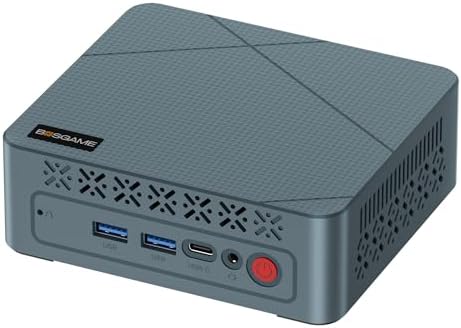
The desktop computer market has changed. You no longer need a massive tower under your desk to get real work done. Enter the BOSGAME E2 Mini PC Ryzen 5—a compact powerhouse that delivers impressive performance, energy efficiency, and modern connectivity in a chassis smaller than a hardcover book.
Whether you are setting up a home office in Texas, a retail kiosk in Florida, a digital signage solution in New York, or a budget-friendly workstation for your small business in California, the BOSGAME E2 Mini PC Ryzen 5 is designed to handle your daily computing needs without breaking the bank or cluttering your workspace.
With a Ryzen 5 3550H processor that can turbo boost up to 3.7 GHz, 16 GB of DDR4 RAM, and a 512 GB NVMe SSD, this mini computer punches well above its weight class. Let’s take a closer look at why the BOSGAME E2 Mini PC Ryzen 5 is one of the best values in small-form-factor computing today.
Powerful Performance: AMD Ryzen 5 3550H (Up to 3.7GHz)
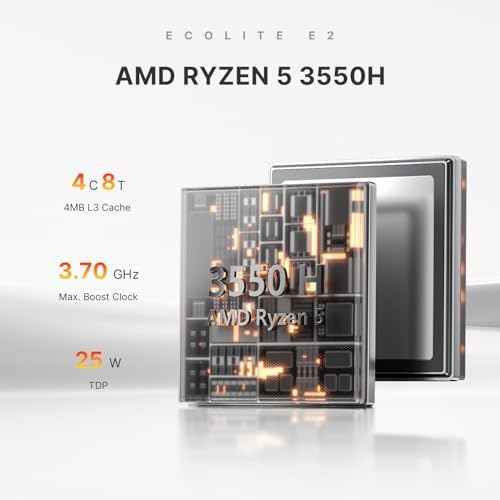
At the heart of the BOSGAME E2 Mini PC Ryzen 5 lies the AMD Ryzen 5 3550H processor. This is not a low-power, slow “Atom-class” chip found in cheap mini PCs. The Ryzen 5 3550H is a true quad-core, eight-thread mobile processor originally designed for gaming laptops and high-performance ultrabooks.
-
Base Clock: 2.1 GHz
-
Max Boost Clock: 3.7 GHz (using BOSGAME’s advanced cooling system)
-
Cores / Threads: 4 cores / 8 threads—handles multitasking with ease
-
TDP: 15W to 35W configurable—powerful yet energy-efficient
What does this mean for you? The BOSGAME E2 Mini PC Ryzen 5 can easily handle:
-
Running Microsoft Office, Google Workspace, and Slack simultaneously
-
Web browsing with 20+ tabs open in Chrome or Edge
-
1080p and 4K video playback (YouTube, Netflix, local files)
-
Light photo editing in Adobe Photoshop or GIMP
-
Basic video conferencing on Zoom, Teams, or Webex
-
Running a home media server or Plex client
-
Light retro gaming (emulators up to PS2, older PC games)
Compared to Intel Celeron or Pentium-based mini PCs, the BOSGAME E2 Mini PC Ryzen 5 offers roughly 2-3x the multi-core performance. This means it stays responsive for years, not months.
Massive Multitasking: 16GB DDR4 RAM
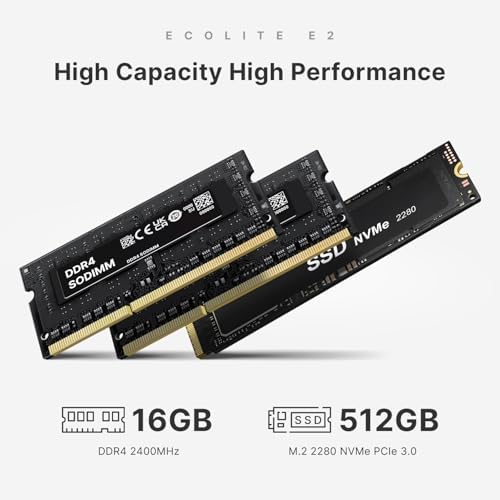
One of the biggest bottlenecks in budget computers is RAM. Many mini PCs ship with only 4GB or 8GB, which leads to stuttering, freezing, and constant frustration. The BOSGAME E2 Mini PC Ryzen 5 solves this problem by including 16 GB of high-speed DDR4 RAM standard.
With 16 GB of memory, you can:
-
Keep 30-40 browser tabs open without reloading
-
Run virtual machines (great for IT professionals)
-
Edit 1080p video in DaVinci Resolve or Shotcut
-
Use Photoshop while streaming music and checking email
-
Host a small Minecraft server for you and your friends
The BOSGAME E2 Mini PC Ryzen 5 also features dual-channel memory architecture (2 x 8GB), which further boosts performance compared to single-channel configurations. And yes, the RAM is upgradeable if you need even more later.
Blazing Fast Storage: 512GB NVMe SSD
Slow storage is the second biggest performance killer. The BOSGAME E2 Mini PC Ryzen 5 comes equipped with a 512GB NVMe SSD—not an old, slow eMMC chip or a mechanical hard drive.
NVMe (Non-Volatile Memory Express) SSDs are dramatically faster than SATA SSDs, and light-years ahead of eMMC storage found in bargain mini PCs.
-
Boot time: Under 10 seconds to Windows 11 Pro
-
App launch: Photoshop loads in under 3 seconds
-
File transfers: Copy 10GB of photos in seconds, not minutes
The 512GB capacity gives you plenty of room for Windows, your essential apps (Office, browser, and Zoom), and dozens of documents, photos, and music files. Need more space? The BOSGAME E2 Mini PC Ryzen 5 has room for an additional 2.5-inch SATA hard drive or SSD (up to 2TB).
-

Triple Display Support: Dual HDMI 4K Output
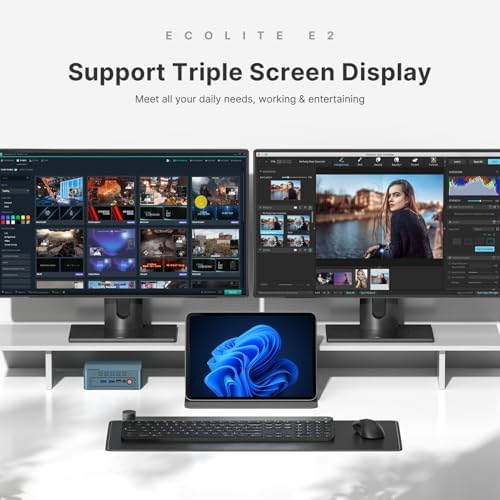
The BOSGAME E2 Mini PC Ryzen 5 features two HDMI ports, allowing you to connect up to two external monitors simultaneously. With the integrated AMD Radeon Vega 8 graphics, you can drive dual 4K displays at 60Hz.
-
Dual 4K output: Perfect for stock traders, programmers, video editors, and productivity power users
-
HDMI 2.0: Supports 4K @ 60Hz for smooth video and sharp text
-
Vega 8 Graphics: 8 compute units at 1200 MHz—capable of light gaming and hardware-accelerated video decoding
Imagine a dual-monitor setup with spreadsheets on one screen and email/chat on the other. Or a 4K video timeline on one monitor and preview on the second. The BOSGAME E2 Mini PC Ryzen 5 makes multi-display productivity affordable and accessible.
Compact Design: 5.1 x 5.1 x 2.2 Inches
The BOSGAME E2 Mini PC Ryzen 5 is truly tiny. Measuring just 5.1 inches square and 2.2 inches tall, this mini computer takes up less desk space than a coffee cup. You can:
-
Mount it to the back of a monitor using the included VESA bracket (hidden behind the screen)
-
Slide it into a drawer or shelf
-
Tuck it next to your router for use as a home server
-
Throw it in a backpack for portable computing (just add a portable monitor)
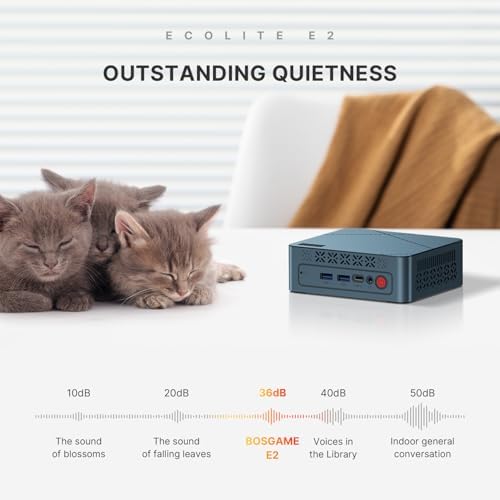
Despite its small size, the BOSGAME E2 Mini PC Ryzen 5 features active cooling with a quiet fan and large heatsink. It stays cool under load and remains whisper-quiet during office work.
Operating System: Windows 11 Pro Pre-Installed
The BOSGAME E2 Mini PC Ryzen 5 comes with Windows 11 Pro pre-installed and activated. No need to buy a separate license or deal with Linux unless you want to.
Windows 11 Pro offers several advantages over Windows 11 Home:
-
BitLocker device encryption—protect your data if the PC is stolen
-
Remote Desktop – access your mini PC from anywhere
-
Hyper-V—run virtual machines for testing or development
-
Group Policy Management – fine-tune Windows behavior
The system is ready to use right out of the box. Just connect a monitor, keyboard, mouse, and power—then complete the simple Windows 11 setup wizard. The BOSGAME E2 Mini PC Ryzen 5 also supports Linux distributions (Ubuntu, Mint, and Fedora) if you prefer open-source software.
Connectivity: All the Ports You Need
The BOSGAME E2 Mini PC Ryzen 5 offers a surprisingly robust selection of ports for such a small device.
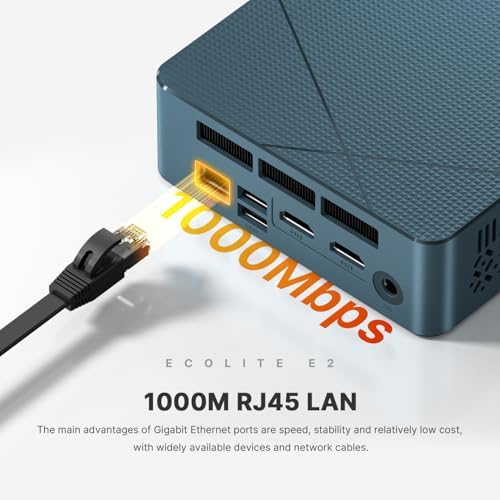
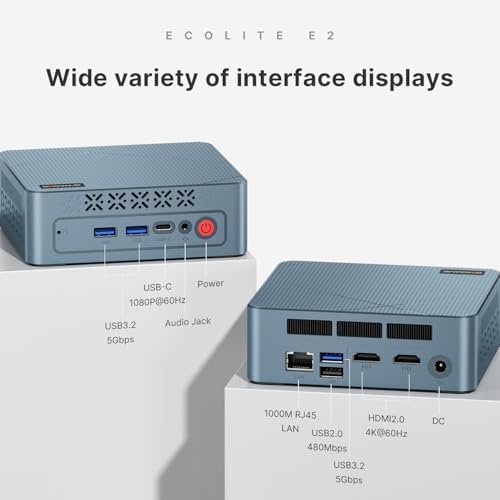
Port Type Quantity Use Case HDMI 2.0 2 Connect dual 4K monitors or TVs. USB 3.0 4 High-speed peripherals (external drives, webcams, flash drives) Gigabit Ethernet 1 Wired internet for lag-free gaming and streaming Headphone / Mic 1 Audio output DC Power Jack 1 Power input (Internal) SATA III 1 (empty) Add a 2.5-inch HDD or SSD for extra storage. Wireless connectivity is also excellent:
-
WiFi 5 (802.11ac): Dual-band (2.4 GHz and 5 GHz) for fast, stable wireless networking
-
Bluetooth 4.2: Connect wireless keyboards, mice, headphones, speakers, and game controllers
Who Is the BOSGAME E2 Mini PC Ryzen 5 For?
The BOSGAME E2 Mini PC Ryzen 5 is an excellent choice for many USA customers:
1. Home Office Workers
Work from home full-time? This mini PC handles Zoom, Teams, Slack, Google Docs, and your CRM software simultaneously. It’s quiet, small, and professional-looking.
2. Small Business Owners
Use it as a point-of-sale (POS) terminal, customer check-in kiosk, digital signage player, or office workstation. The low power draw (under 40W typical) saves money on electricity.
3. Students
College students and high schoolers need a reliable computer for research, essays, online classes, and streaming. The BOSGAME E2 Mini PC Ryzen 5 fits in a dorm room and won’t break a student budget.
4. IT Professionals and Developers
Use it as a home lab server, a thin client for remote work, or a dedicated Linux machine. The 16 GB of RAM and NVMe SSD make virtualization practical.
5. Seniors and Light Users
For grandparents, parents, or anyone who just needs email, web browsing, and video calls, this mini PC is fast enough to feel snappy and simple enough to maintain.
6. Retail and Hospitality
Mount it behind a TV for digital menus, advertisements, or lobby information displays. The dual HDMI output allows for two screens from one tiny box.
-
-

Pros and Cons at a Glance
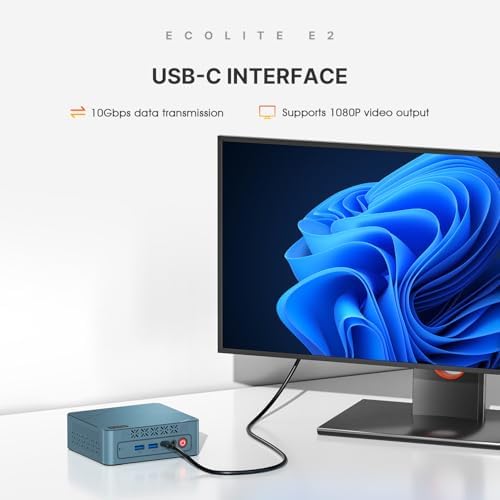
Pros Cons ✅ Powerful Ryzen 5 3550H (up to 3.7GHz) ❌ Integrated Vega 8 graphics—not for AAA gaming ✅ 16GB DDR4 RAM – excellent for multitasking ❌ WiFi 5 (not WiFi 6 or 6E) ✅ 512GB NVMe SSD – fast and responsive ❌ Bluetooth 4.2 (not 5.0 or newer) ✅ Dual 4K HDMI output – dual monitors ❌ No USB-C port ✅ Windows 11 Pro included – no extra cost ❌ Plastic chassis (not metal) ✅ VESA mountable – hides behind monitor ❌ Limited Linux driver support for some hardware ✅ Very affordable price point ❌ Fan can be audible under heavy load ✅ Low power consumption (15-35W) ❌ No built-in SD card reader
Technical Specifications (USA)
Specification Details Brand BOSGAME Model E2 Processor AMD Ryzen 5 3550H (4 cores / 8 threads, up to 3.7GHz) Graphics AMD Radeon Vega 8 (8 CUs, 1200 MHz) RAM 16GB DDR4 (dual-channel, upgradeable) Storage 512GB NVMe SSD + empty 2.5″ SATA bay Operating System Windows 11 Pro (64-bit, pre-installed) Video Outputs 2 x HDMI 2.0 (dual 4K @ 60Hz) USB Ports 4 x USB 3.0 Network Gigabit Ethernet (RJ45) Wireless WiFi 5 (802.11ac), Bluetooth 4.2 Audio 3.5mm headphone/microphone combo jack Power DC 12V input (adapter included) Dimensions 5.1 x 5.1 x 2.2 inches (130 x 130 x 55 mm) Weight 1.3 pounds (590 grams) Mounting VESA 75/100mm compatible (bracket included) Warranty 1-year limited warranty, 30-day money-back guarantee (USA)
What’s in the Box?
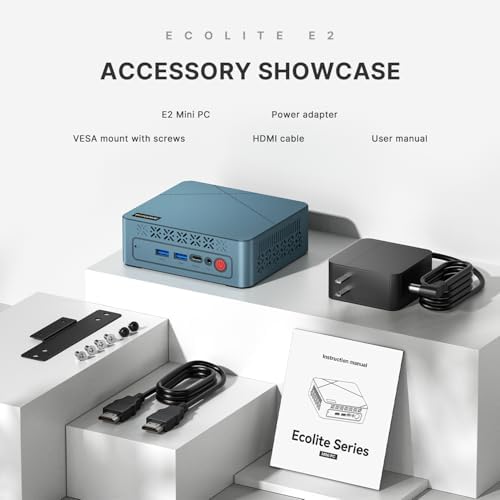
When you purchase the BOSGAME E2 Mini PC Ryzen 5, you receive:
-
BOSGAME E2 Mini PC (main unit)
-
Power adapter (with USA standard plug)
-
VESA mounting bracket
-
VESA mounting screws
-
HDMI cable (1.5 meters)
-
User manual (English)
-
BOSGAME warranty card
Comparison: BOSGAME E2 vs. Competitors
Feature BOSGAME E2 Intel NUC (Celeron) Raspberry Pi 5 Old Office Desktop Processor Ryzen 5 3550H Intel Celeron N5105 ARM Cortex-A76 Old i5/i7 (slow) Performance Excellent Poor Limited Mediocre RAM 16GB 4-8GB 4-8GB 8GB (old DDR3) Storage 512GB NVMe 128GB eMMC microSD (slow) Old HDD (very slow) Windows 11 Pro Included Extra cost Not supported Usually no Price (Value) ⭐⭐⭐⭐⭐ ⭐⭐ ⭐⭐⭐ ⭐⭐ Size Ultra small Ultra small Tiny Huge tower The BOSGAME E2 Mini PC Ryzen 5 offers dramatically better performance and value than similarly priced competitors.
Frequently Asked Questions (USA)
Q: Can the BOSGAME E2 Mini PC Ryzen 5 run Fortnite or Call of Duty?
A: Light gaming is possible. Fortnite at 720p low settings runs around 30-40 FPS. For AAA gaming, you need a dedicated graphics card. This mini PC is not designed for gaming first – it is a productivity and office machine.Q: Can I upgrade the RAM or storage?
A: Yes. The BOSGAME E2 Mini PC Ryzen 5 has two SODIMM slots (upgradeable to 32GB) and an empty 2.5-inch SATA bay for an additional HDD or SSD. The NVMe SSD can also be replaced.Q: Does it support 4K Netflix and Hulu?
A: Yes. With Windows 11 Pro and the Vega 8 graphics, you can stream 4K content from Netflix, Disney+, Hulu, Amazon Prime, and YouTube (subject to your subscription and internet speed).Q: Is the fan loud?
A: Under normal office work (web browsing, email, documents), the fan is barely audible. Under heavy load (video encoding, gaming), you will hear a gentle whir. It is not annoyingly loud. -
-

Why Buy the BOSGAME E2 Mini PC Ryzen 5 Today?
If you are in the USA market for a mini PC that balances performance, price, and size, the BOSGAME E2 Mini PC Ryzen 5 is one of the smartest purchases you can make in 2025.
Here is why:
-
You get true quad-core Ryzen power – not Celeron or Atom sluggishness
-
16GB of RAM – future-proofed for years of Windows updates
-
512GB NVMe SSD – lightning-fast boot and load times
-
Dual 4K HDMI – perfect for multi-monitor productivity
-
Windows 11 Pro included – no hidden software costs
-
Tiny footprint – fits anywhere, mounts behind a monitor
-
Low power usage – saves money on electricity compared to old towers
-
Great USA customer support – warranty and returns handled locally
Whether you are outfitting a home office, a small business, a school computer lab, or a retail kiosk, the BOSGAME E2 Mini PC Ryzen 5 delivers reliable, snappy performance without the high price tag of an Intel NUC or Apple Mac Mini.
Stop struggling with slow, outdated computers. Upgrade to the BOSGAME E2 Mini PC Ryzen 5 today and experience the perfect blend of power, portability, and value.
-
George S –
Astronomers – Works Wonderfully With 12V
I bought this to replace an aging (and venerable) NUC 7 to run my observatory which requires telescope control, dome rotation, basic/initial data stacking and plate solving. IYKYK. I required this to run on 12V. At least when I bought this, this was not specified to run on 12V on Amazon, though Bosgame’s website indicates it runs on 12-20V. For my fellow astronomers out there, this is true.Background: I replaced the 512GB SSD with a 2TB SSD (Silicon Power 2TB NVMe M.2), upgraded to 32GB RAM (Timetec 32GB KIT(2x16GB) DDR4 2400MHz), and replaced the WiFi card with an Intel AX210. None of this was necessary, and this unit was still cheaper than any alternative I found with a processor at this performance level. The Wifi module upgrade was $26 and installed in 4 minutes. The RAM and SSD upgrades were easy for someone who can barely use a screwdriver and knows little about computers. Note: there is only one slot for the SSD. Opening this up showed decent quality control and an easy layout to work with.Power consumption: A stress test with N.I.N.A image capture, PHD2 guiding, Cartes du Ciel, Gemini mount control, ASCOM Hub (for dome control), and, just to make it interesting, SIRIL (astronomy image processing program) stacking 450 subexposures peaked at 37 watts before settling down to 25-26 watts with BIOS settings unchanged from factory settings (“Balanced performance”). Under “normal” conditions, meaning capturing images; controling the dome and mount and cameras; and PHD2 guiding running, this hummed along between 15-21 watts, so less than 2 amps. This is slightly less than my NUC7 with an i5-7260U processor, but this AMD 3550H processor has twice as many cores and threads. The speed improvement over my old processor was significant and immediately noticeable. This will also run laps around Intel N100-N300 processors while allowing for dual-channel RAM.WiFi – Astronomers will know why I automatically upgraded the WiFi module before even turning the computer on. For most users, the standard WiFi module will be more than good enough, but I’m running this 65 feet from my house. The computer is inside a fiberglass observatory. With the upgraded module, download speeds were around 240-260 Mbps in perfect conditions in the observatory with the computer away from the metal telescope pier and without an USB Wifi antenna. With the computer attached to a steel pier, the signal dropped (very expectedly) down to a respectable 35-70 Mbps download (enough for Windows Remote Desktop). As planned, I use this with a relatively cheap TP-Link USB wifi antenna away from the telescope pier. Wifi speeds in this configuration range between 150 to 220 Mbps download. The connection is quite stable and still plenty fast over Windows Remote Desktop. For comparison, inside my house, download speeds were over 600 Mbps, so the physics of walls and distance still apply. In my use so far, I have not had any latency issues controlling this from inside my home (with the computer outside in the observatory) using Windows Remote Desktop in a suburban neighborhood with quite a number of Wifi networks visibile (houses are close together). The connection does not drop.I ran a CrystalDiskMark Read/Write Test with the somewhat generic SSD I bought to replace this was a respectable ~2800MB/s write and a RNK4K speed of ~280MB/s. It is no speed demon, but this was both better than I expected and more than good enough for astronomy.In indoor and outdoor testing, I’ve only ever heard the fan turn on at initial startup. Even while “stress testing,” I never heard the fan turn on during normal use. This thing was cool to the touch indoors and outdoors. I did check temps via HWmonitor a couple of times and never saw temperatures approach 50C. Heavy gamers might have a different experience here. It should be noted that astronomy programs intended to run telescopes and observatories do not tax processors and memory like modern games do, so gamers’ mileage may vary. However, image stacking and processing programs can tax processors and memory a little and the fan never turned on and power consumption remained below 40 watts in my limited use.Cons:1. The plastic quality is somewhat to be desired. I’m nitpicking hard here as that same plastic allows for more effective WiFi range than my NUC had, which was a metal Faraday cage of otherwise beautiful build quality. I’d rate the build quality as good enough, particularly at this price.2. No SATA expansion slot: Hence the reason why I got a 2TB SSD. I knew this going in, and now you do. I will not take a star off of my rating for this because they do not advertise this as having the capability to add a second SSD/SATA drive.3. This is advertised as only being able to use 2400Mhz DDR4 memory, but the module inside the unit was 2666Mhz DDR4. I don’t know whether this was faster memory operating at 2400Mhz or whether the motherboard/processor can handle faster memory, but I had bought new memory sticks for this computer before I knew I could potentially squeeze out a little more speed with 2666Mhz DDR4. It is difficult to call this a con because I don’t know the actual limitations of the computer. For most users, this underpromise and overdelivery might be a good thing. If expecting to upgrade from 16GB RAM immediately, check with BOSGAME first to ensure it can only operate with 2400Mhz.Overall, in the two weeks I’ve had this, I’ve been happy with its performance for astronomy. It has significantly better performance than an ASIAir and uses marginally more power than otherwise lower-performing N97, N100-N305 Intel processors. 1-1.5A under normal loads is extremely reasonable either in the field or in an observatory. This thing is a steal thus far.
7 people found this helpful
Business User –
Low price, good performance, clean Windows 11 install
This is a gift for a child who plays casual/medium spec games. Before hiding it in the closet, I took it out to make sure that it wasn’t junk.1) The Windows 11 install that shipped with the system was clean as far as I could tell (via offline scan on unmounted volume with up to date definitions ClamAV). I did not rescan after testing the system and being internet connected but I did monitor requests from a networked Pihole and detected nothing out of the ordinary.2) The system seems very performant in desktop usecases. I opened a bunch of tabs in Edge, tried using the desktop while running Passmark, etc. Very snappy.3) I tested the few games the child plays to make sure it was a good experience. I didn’t write down numbers bit Roblox ran perfectly with its auto configured quality setting.4) The system is physically smaller than I expected, and was surprisingly well built. The case feels metallic and very dense. I felt like this was a positive as things like heavy HDMI cables won’t flip the system up.5) To test, I used an existing powered USB-C dock I use for work with 2 monitors connected via HDMI, a mouse and keyboard. It did not work at first. Only when I unplugged one of the monitors did the dock function. This is not a negative just an observation and could have been specific to my setup.6) The company actually has a website with drivers and specs and stuff. That’s pretty rare among the unknown Chinese brands of mini-pcs.Overall for $279 (the final price I paid) this was definitely a great buy and fantastic value.
6 people found this helpful
David Bixler –
A bizarrely powerful, capable, workstation PC/NUC
Dev:Excellent for GameDev. Runs Unity 3D scenes well enough to make games, but I wouldn’t build the final executable with this. I would offload that to Unity services etc.It runs Godot / Redot nicely in a scene with lots of objects. Handles Rider nicely. Vivaldi and Discord on a second screen while sharing desktop, all worked nicely.3D ModelingI was able to cook up to 1 million poly (tris) in Blender and yes, it WILL run Cycles, but denoising will be slow, and cycles iterations will be slow. So, great for modeling, sculpting etc, not great for rendering. Maybe see if it supports an eGPU? Theoretically it does with the USB 4.0 / USB-C support.GamingIt runs 2 screens 4K@60hz nicely, but you’ll get a lot more bang for your buck gaming if you’re at 1080p. I was able to run Fortnite with 1080p @ 60hz solid with 60% 3D resolution and everything on low. Satisfactory with low-med settings ran nicely. Don’t expect to be frying people on Fortnite and your Satisfactory builds shouldn’t be super congested in one area. Break it up on the map for better perf. Other games like Frostpunk or IDUN will run, but you might encounter jumps/stuttering in some scenes / UI.Pros:-> It’s amazingly quiet for how powerful it is.-> The ports, size, and overall capabilities are better than expected.-> It’s a solid media center, workstation, technical bench, surveillance station etc.-> Throws some heat, but nothing crazy.-> Preloaded with Windows-> Boots fast, like bizarre fast.-> Impressive wifi speeds, seriously. This thing bucks. I have an ASUS ROG Ally X (2TB) and this NUC’s wifi outpaces it.-> Comes with a convenient bracket for wall/desk/monitor mounting. You can stash this thing out of sight or just put it somewhere out of the way at your workstation.-> It’s a solid piece. Does not feel cheap to handle, and care was taken with presentation and assembly.-> Comes with a 4K capable HDMI cable.Cons:<- It’s not as capable for gaming as I’d like, but that may be a non-concern with an eGPU setup.<- I wish the specs were more clear, does it support more than 1 M.2/NVME? Does it have additional space for RAM modules? I’ll have to open it up and see I suppose.<- It comes with the bloatware version of0 windows (may disregard your selections for prompts like skydrive etc).<- Bulky power supply and prongs can’t be pivoted so you’ll either need a short extension cable to make it fit on a congested surge protector.Honestly though, the cons seem trivial. This is a solid unit for anyone who needs a relatively inexpensive but oddly capable workstation, which is exactly what we needed.Cons aside, this unit deserves 5 stars.
3 people found this helpful
Tough Customer –
Worth every cent and then some
Serouisly impressed with performance so far.Really pissed becuase this mini pc rivals my $3k monster desktop i last built. I wish i would have built this before my last desktop.Running 2 monitors moderate gaming and serious number crunchying in excel.Systems stay cool and barely hear fans when they kick on.BTW: i very rarely rate any pc equipment at max
One person found this helpful
Bruce Garrett –
So far its peefect for my needd
It fits my needs and more. Computer quality is very good, wifi connectivity no problem works well. The size is perfect it s not heavy ,so I don’t have pay much for weight when i ship it overseas.
Sean –
Perfect Emulation Machine
I purchased the AMD Ryzen 5 3550HS model of this product. My wife has an astigmatism and is only able to play older 2d games. I was looking to prepare an emulation machine that allowed her to play all the games of her childhood and others that she missed. I looked at every budget model of mini pc and in the sun $200 range, this provided the best bang for your buck. I purchased at $178 and can run any emulation up to PS2/GameCube/XBox. This has allowed me to box up all of the old machines and consolidate 8+ consoles into one, tiny windows 11 box. This machine will also perform any streaming you may want to do, a Plex server, or any number of Office tasks in word, excel, etc. The Radeon integrated graphics of this computer double or triple the Intel options in this price for similar CPU performance. If you are looking for an emulation platform, a streaming box or a light office processing unit, I would absolutely purchase the Bosgame 2 as the best value sub $200 mini pc.
2 people found this helpful
Formual48Formual48 –
Powerful Compact Gaming Mini PC
The media could not be loaded.
Case Design: The case itself is very compact and looks nice. There are plenty of ports for a mini PC that enables more peripherals than i will probably need for this but it is good to have extra. Having USB-C and USB 3.0 lets me use plenty of newer devices without issue with this mini PC.Easy out of the box setup: Comes pre-loaded with a windows 11 pro image. After examining this image I was happy to find that there was no pre-installed bloatware and the image was very snappy and quick. Choosing to not include any nonsense software or marketing grabs was a nice surprise. This helps speed up the setup process a lot.SPECS Matched Description: Validated that the installed specs matched the order description. With 32GB of DDR5 Ram, a Ryzen 7 with Radeon 780 graphics and 1 TB NVME Drive, this little PC was a surprising powerhouse. I was happy that they went with the Ryzen chipset for this since AMD has recently edged out intel for gaming and multi-use performance.Gaming: After setup I fired up League of Legends and played a round of TFT. Out of the box with no configuration, I was able to see 220FPS on a 4K(3840×2160) ultra-wide monitor. The machine had 0 stuttering while playing and remained very quiet to my pleasant surprise. It maintained this quiet sound throughout the entire round and I was also happy to find that there was no crazy heat to feel on the case.The only caveat I ran into was that the pre-loaded image was not on the latest feature update so expect to have the machine run updates at first launch to grab that. This is not the fault of the PC company as microsoft releases these but it will affect the initial setup timeline.Overall, I was very happy with the performance of this Gaming MiniPC at this price point. There was thoughtful design put into this PC and it pays off with how it runs. I would gladly purchase this again 10/10.
2 people found this helpful
Jacob Bruner –
works great, no issus
Works great, no issues
Peter Domínguez –
BOSGAME E2 Mini PC Ryzen 5 3550H: Impressive retro emulation station
I have a powerful desktop PC with retroarch that I use to stream more demanding emulation into the TV of my living room for some couch play sessions, but it can be a pain to get it to function correctly all of the time. I’ll admit I bought this PC with very low expectations, thinking I may not be able to even properly emulate anything beyond the 4th gen (SNES, Genesis, etc); what I planned for was to leverage vulkan to see how much more I could squeeze out of this device, and I am pleasantly surprised: with the exception of N64 (a notoriously difficult, hardware heavy platform to emulate), I can pull off everything up to the 6th gen (PS2, Gamecube and, more importantly for me, Dreamcast; haven’t tested OG Xbox emulation since it’s not part of Lakka/Retroarch yet).And honestly, that’s where my testing stopped: I am not interested on emulating 7th gen and beyond, so maybe this mini pc can handle even more than what I tried. That said, the Ryzen 5 5500H is still a mobile chip and won’t perform any miracles, so for very graphically intensive gaming, pairing it up with a GPU running externally may be the best bet.My overachieving goal for this experiment was to get Saturn emulation working with Virtua Fighter Remix not running at 2 fps; not only did this mini pc managed it, but exceeded it by giving me decent Dreamcast, GameCube and PS2 emulation as well. The only point of contention is that you need to fiddle around in the BIOS to get the iGPU to use vulkan properly and you’re unlikely to get as much performance as I did if you run Windows on it. In my case, I used Lakka (lightweight Linux based os for making your own retro consoles) and it was compatible with everything: Bluetooth, Wifi, etc. So keep in mind that some knowledge of Linux and system administration is required (SSH, Samba and general Linux terminal usage).Overall, I’m very satisfied with this purchase and was surprised at the capability of this device for retro emulation.UPDATE 08/04/25: I managed to get N64 emulation working by disabling threaded sync in the retroarch settings, which was messing with it and even other emulators. That said, I couldn’t get Mupen64Plus-Next running, only Parallel-N64; that’s good enough for me, however. As a bonus, I also tested Wii emulation with Dolphin and seems to work great too, although I did have some black screen flashes that I managed to get rid of by disabling shader compilation before games start and using Async Ubershaders. So all in all, even more impressed with this item after some time; just keep in mind you will have to fiddle around the BIOS settings to enable vulkan/have the igpu working properly and likely need to swap operating systems to squeeze more performance out.
Wendy T. –
Good things come in small packages!
So far so good! I really like this little computer. I needed a Windows 11 upgrade anyway and I have recommended it to my sister, who also purchased.We got the extended warranty just in case.It’s fast for me.(Although we’re not doing anything fancy.)A great buy! And it freed up a lot of room on my desktop, which I desperately needed.