
BOSGAME P2 Lite Mini PC, 12th Gen Intel Core i5-12600H | 32GB RAM | 512GB NVMe SSD

Overview: Meet the BOSGAME P2 Lite Mini PC—A Desktop Revolution
The era of bulky, noisy, power-hungry desktop towers is over. Welcome to the future of computing with the BOSGAME P2 Lite Mini PC. Powered by a ferocious 12th Gen Intel Core i5-12600H processor, packed with a massive 32GB of DDR4 RAM, and equipped with a blazing-fast 512GB NVMe SSD, this tiny powerhouse delivers workstation-class performance in a chassis smaller than a paperback book.
Whether you are a software developer in Seattle, a financial trader in Chicago, a content creator in Atlanta, a small business owner in Denver, or a multitasking professional working from home anywhere in the USA, the BOSGAME P2 Lite Mini PC is engineered to handle your most demanding workloads without taking over your desk.
Forget everything you thought you knew about mini computers. The BOSGAME P2 Lite Mini PC combines Intel’s latest hybrid architecture, triple 4K display support, enterprise-grade connectivity, and an astonishing 32GB of memory—all at a price that leaves competitors scratching their heads. Let’s dive deep into why this is one of the most compelling mini PCs on the market in 2025.
Unstoppable Performance: 12th Gen Intel Core i5-12600H (Up to 4.5 GHz)
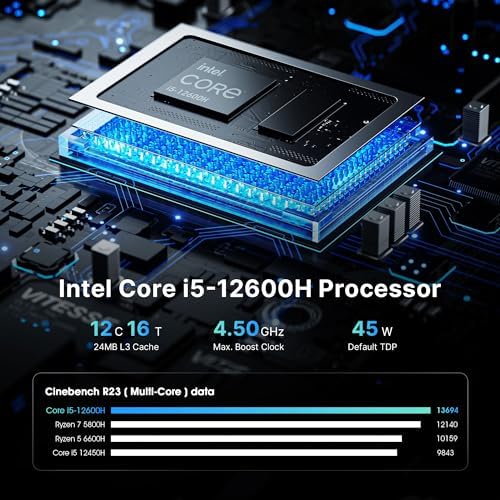
At the heart of the BOSGAME P2 Lite Mini PC lies the revolutionary Intel Core i5-12600H processor. This is not a low-power, efficiency-focused chip found in budget mini PCs. The i5-12600H is a true high-performance mobile processor featuring Intel’s game-changing hybrid architecture.
Processor Architecture Breakdown
| Specification | Detail |
|---|---|
| CPU Generation | 12th Gen Alder Lake |
| Performance Cores (P-cores) | 4 cores / 8 threads (up to 4.5GHz) |
| Efficiency Cores (E-cores) | 8 cores / 8 threads (up to 3.3GHz) |
| Total Cores | 12 cores |
| Total Threads | 16 threads |
| L3 Cache | 18MB Intel Smart Cache |
| Max Turbo Power | 95W (configurable) |
| Processor Base Power | 45W |
What This Means for You
The BOSGAME P2 Lite Mini PC intelligently assigns demanding tasks (video editing, compiling code, gaming) to the 4 high-performance P-cores, while background tasks (email sync, Windows updates, Slack notifications) run on the 8 efficient E-cores. This results in:
-
Up to 40% faster multi-core performance than previous-generation 11th Gen Intel H-series chips
-
Smoother multitasking with 16 threads handling dozens of applications simultaneously
-
Lower power consumption during light use—the E-cores handle basic tasks while P-cores rest
-
Reduced heat and fan noise compared to traditional desktop CPUs
Compared to the Ryzen 5 3550H found in entry-level mini PCs (like the BOSGAME E2), the BOSGAME P2 Lite Mini PC with its i5-12600H offers roughly 2x the multi-core performance. This is not an incremental upgrade—it is a generational leap.

Massive 32GB DDR4 RAM: Multitasking Without Limits
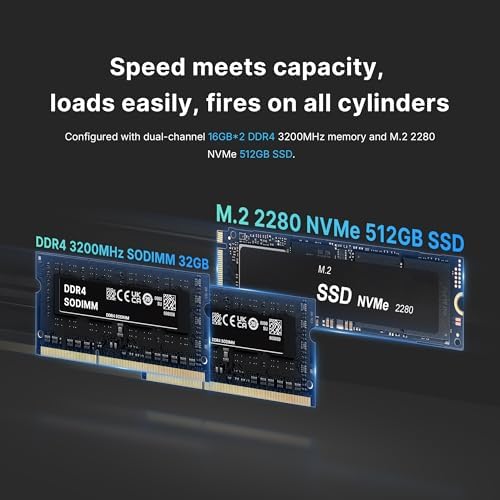
The BOSGAME P2 Lite Mini PC comes standard with an astonishing 32GB of DDR4 RAM (dual-channel, 2 x 16GB). This is not an option or an upgrade—it is included at the base price.
Why 32GB Matters in 2025
Most desktop computers (even expensive ones) still ship with only 8GB or 16GB of RAM. The BOSGAME P2 Lite Mini PC doubles that, giving you headroom for:
| Use Case | RAM Usage | BOSGAME P2 Lite Performance |
|---|---|---|
| Chrome with 50+ tabs | 8-12GB | Smooth, no reloading |
| Adobe Photoshop + Lightroom | 10-16GB | Edit massive RAW files instantly. |
| Virtual Machines (2-3 VMs) | 12-20GB | Run Windows, Linux, and macOS VMs side-by-side. |
| Video Editing (1080p/4K) | 12-18GB | Timeline scrubbing without stutter |
| Software Development (Visual Studio + Docker) | 10-16GB | Compile large projects faster. |
| Data Analysis (Excel with millions of rows) | 8-14GB | No “Not Responding” messages |
| All of the above simultaneously | 20-28GB | Still responsive |
The BOSGAME P2 Lite Mini PC is built for the way professionals actually work—with dozens of applications, browser tabs, and background processes running at once. You will never see an “out of memory” warning again. BOSGAME P2 Lite Mini PC Review: 12th Gen i5-12600H, 32GB RAM, Triple 4K Display Mini Computer
Meta description: BOSGAME P2 Lite Mini PC review—Intel Core i5-12600H, 32GB DDR4 RAM, 512GB NVMe SSD, triple 4K display support. Full specs, pros, cons, and buying guide.
Focus keyword: BOSGAME P2 Lite Mini PC
Introduction
Mini PCs have quietly become one of the smartest upgrades for home offices, small businesses, and remote workers who want desktop-level power without the bulk of a full tower. The BOSGAME P2 Lite Mini PC is one of the more capable options in this category, built around a laptop-grade 12th Gen Intel Core i5-12600H processor, 32GB of RAM, and a 512GB NVMe SSD—all packed into a chassis roughly the size of a paperback book.
This review breaks down the specs, real-world use cases, and the pros and cons worth knowing before you buy.
Key Specifications
Component
Details
Processor
Intel Core i5-12600H (12th Gen, 4 P-cores + 8 E-cores, 12 cores / 16 threads, up to 4.5GHz)
Graphics
Intel Iris Xe (integrated)
RAM
32GB DDR4 (dual-channel, expandable to 64GB)
Storage
512GB NVMe SSD (PCIe Gen 3.0 x4) + empty 2.5″ SATA bay
Display Outputs
2x HDMI 2.0, 1x USB-C (DisplayPort Alt Mode)—up to 3 displays
Networking
Dual Gigabit/2.5 GbE Ethernet, Wi-Fi 6, Bluetooth 5.2
USB Ports
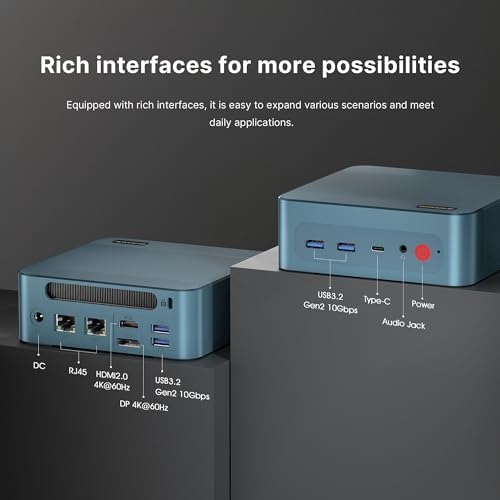
4x USB 3.0 (Type-A), 1x USB-C
Operating System
Windows 11 Pro (pre-installed)
Dimensions
5.5 x 5.5 x 2.2 in (140 x 140 x 55 mm)
Weight
~1.8 lbs (820 g)
Power Draw
45W typical, up to 95W max turbo
Price
Around $287.89
Performance Overview
The i5-12600H is a hybrid-architecture chip originally designed for high-performance laptops, which gives the P2 Lite a real edge over budget mini PCs that rely on low-power N-series or Ryzen entry-level chips. Its 4 performance cores handle demanding tasks like video editing or code compilation, while 8 efficiency cores take on background processes—resulting in smoother multitasking and less fan noise during everyday use.
Paired with 32GB of dual-channel DDR4 RAM (double what most budget desktops ship with) and a fast NVMe SSD rated around 3,500 MB/s read speeds, the system boots in roughly 8-10 seconds and handles dozens of browser tabs, virtual machines, or a Photoshop/Lightroom workflow without slowing down.
Graphics come from the integrated Intel Iris Xe, which is fine for 4K video playback, office work, and light 1080p gaming (older or indie titles), but it isn’t a substitute for a dedicated GPU—don’t expect to run modern AAA games at high settings.
Display and Connectivity
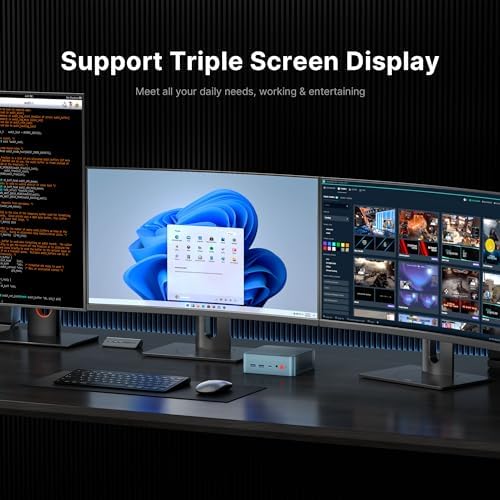
One of the strongest selling points is triple-display support: two HDMI 2.0 ports plus a USB-C DisplayPort output let you run up to three 4K monitors at once, which is genuinely useful for traders, developers, and content creators who rely on multi-monitor setups.
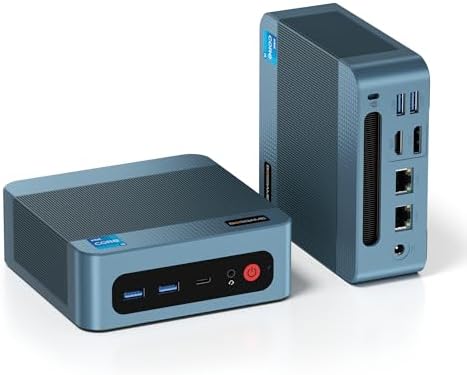
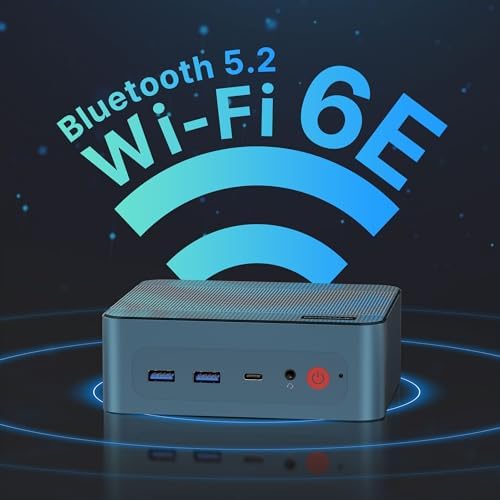
On the networking side, the P2 Lite includes dual Gigabit Ethernet ports, Wi-Fi 6, and Bluetooth 5.2, giving it enterprise-grade connectivity that’s rare at this price point. Four USB 3.0 ports round out the port selection for peripherals and external storage.
Design and Upgradeability
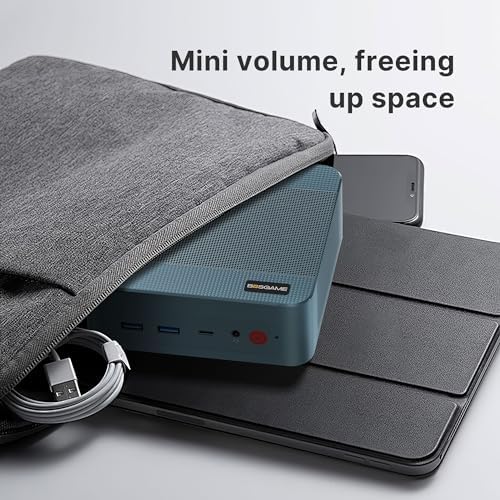
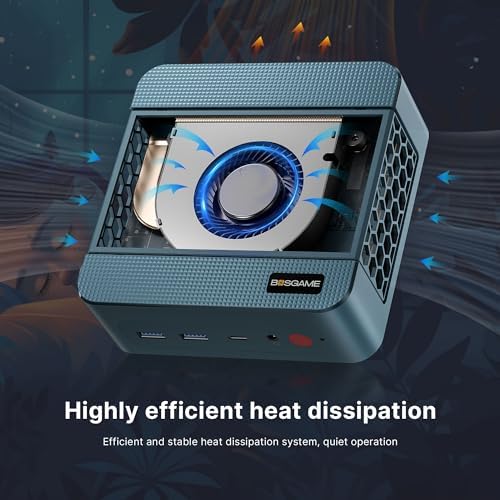
At just 5.5 x 5.5 x 2.2 inches, the P2 Lite is small enough to VESA-mount behind a monitor or tuck away on a shelf. The metal chassis with a copper heat pipe and PWM fan keeps things reasonably quiet under normal workloads, though the fan does become audible under sustained heavy load.
Both the RAM and storage are user-upgradeable—the RAM sits in standard SODIMM slots (expandable to 64GB), and the NVMe SSD can be swapped for a larger drive, with an additional empty 2.5″ SATA bay for extra storage.
Who Is It For?
Remote workers and home offices needing a quiet, compact, multi-monitor-capable PC
Developers who want enough cores and RAM to run IDEs, containers, and VMs simultaneously
Traders and analysts who depend on triple-monitor setups
Small businesses looking for an affordable workstation or point-of-sale terminal
Homelab users wanting a low-power server or NAS front-end
It is not designed for serious gaming, since it relies on integrated graphics rather than a discrete GPU.
Pros and Cons
Strong 12-core/16-thread CPU for the price
Integrated graphics only—not built for gaming
32GB RAM included as standard, expandable to 64GB
Uses DDR4 rather than the newer DDR5 standard
Fast 512GB NVMe SSD with room to add more storage
No Thunderbolt support on the USB-C port
Triple 4K display support
External power brick, like most mini PCs
Wi-Fi 6, Bluetooth 5.2, and dual Ethernet
Fan becomes audible under sustained heavy loads.
Windows 11 Pro pre-installed at no extra cost
No SD card reader
Compact, VESA-mountable, quiet under normal use
Some buyers report needing to reinstall Windows or track down drivers.
Competitive price versus similarly specified mini PCs
Build quality is solid but uses generic RAM/SSD brands.
Real Owner Feedback
Customer reviews are generally positive, with an average rating around 4.3 out of 5. Buyers highlight the machine’s value for office work, light multitasking, and even retro gaming emulation after swapping the OS. A few reviewers noted needing to do a clean Windows reinstall to avoid bloatware, and one mentioned a minor rattle in the chassis—worth keeping in mind, though most reported no lasting issues.
Frequently Asked Questions
Can the BOSGAME P2 Lite run modern AAA games?
Not comfortably. It handles older or lightweight titles at 1080p on low settings, but it lacks a dedicated GPU for demanding modern games.
Can I upgrade the RAM and storage myself?
Yes. It uses standard SODIMM RAM slots (up to 64GB) and a replaceable NVMe SSD, plus an extra SATA bay for a second drive.
Does it support 4K streaming?
Yes, the integrated graphics and HDMI 2.0 ports support 4K streaming at 60Hz on supported platforms.
Is it good for a home server or NAS setup?
Yes—its low power draw, extra drive bay, and fast Ethernet make it a reasonable pick for lightweight home server duties.
Final Verdict
The BOSGAME P2 Lite Mini PC packs genuinely capable laptop-class hardware—a 12-core i5, 32GB of RAM, and fast NVMe storage—into a compact, quiet, and affordable package. It won’t replace a gaming desktop, but for office work, multitasking, multi-monitor productivity, and light home server use, it’s a strong value pick in the mini PC category.
This article is based on publicly listed product information and customer reviews for the BOSGAME P2 Lite Mini PC.
-

BOSGAME Mini PC—Big Future, Small
-


-


Malcolm BMalcolm B –
Working like champs
Setting up my business and starting using the mini PCs to service my client base. For what I’m doing they are working out fantastic.Easy to setup and configure. I’m planning on purchasing another 10 of these and using them with my KVM switch.No issues so far and lots of hope they continue to operate as they are now.They are hooked up through WiFi and performance is great. 16gb ram works great for my application in stock trading.Highly recommend!
I want all the plants –
Excellent Mini PC for Retro Games
I ordered this to have a portable PC to play retro games. This PC has just enough power to accomplish that goal but I did have to make a few changes. First, I swapped out the 500G SSD with a 1TB of pretty much the same speed but added space. Second, I loaded Batocera and removed Windows 11. Windows 11 worked okay but it’s a very bloated OS in my opinion and didn’t add anything to what I was trying to accomplish. I’m able to run pretty much anything up to PS2 at 1080p without any issues. The built in Bluetooth pairs perfectly with PS5 and XBO controllers as well with no lag. The PC is very small so I’m able to plug it into any TV or monitor without making a mess. I’m over the moon with how well this works with Batocera. I have had it running with this configuration for a few months now and it’s easily one of the best retro gaming setups I’ve ever used.
One person found this helpful
Steven M. SilvermanSteven M. Silverman –
Nicely Made Mediocre Performance
I’ve designed and built many PC’s since the early 1990’s and know very well that there are price vs performance trade offs and when you build a Mini PC there are further constraints due to heat (and that means power issues.) This Mini PC is based on the Intel i5-12450H a processor made specifically for laptops and originally released in 2022. It is part of the Intel 12th generation of core processors which is now about 3 years old.. It has 8 cores and 12 threads. It also has integrated Graphics on the chip (which are not particularly powerful GPU’s).Physically it’s a well built unit. It exhausts through the bottom and sports 4 USB-A 3.2 Gen 2 ports (2 on the front and 2 on the back. It can handle up to 3 monitors (1 USB-C, 1 HDMI, and 1 DP). It also has dual Gigabit RJ-45 ports. It also comes with an attachable VESA mount so you can, if you wish, mount the Mini PC on the back of a VESA compatible monitor. It’s easily expandable by removing the base plate and removing the fan assembly which exposes both the M.2 2280 SSD and the DDR4 Memory. The SSD can be replaced with up to a 2TB SSD and the memory can be expanded to 64 GB.I put this Mini PC through a series of performance tests to get a feel for how well this PC performs relative to the universe of PC’s . The results as a whole are not remarkable and I think it’s because of some of the trade offs they made to keep the price down. Overall it ranks at about the 30th percentile. Notice though that the processor tests place this CPU at the 58th while the memory ranks 33rd percentile and the3D graphics at 23rd percentile. Why? they’re relying on DDR4 memory rather than the newer, faster DDR5 which the processor can handle and is a tradeoff they made based on cost and also rely on the Intel built in graphics rather than a separate GPU which is a heat and space trade off. Note the disk is reasonably fast and helps make the performance of this mini PC quite reasonable.Overall this is a good value although I don’t think it would be a great gaming machine. However, as a home workstation I think it would be more than fine..
FastFreddy –
Without breaking the Bank!!
The BOSGAME B100 Mini PC fills a unique niche in the computing world, perfectly suited for those who need reliable performance for daily office tasks, light multimedia, and general browsing. This mini computer may not compete with high-end gaming desktops or heavy-duty workstations, but it excels in its own realm, providing quick responsiveness and a stable Windows 11 Pro experience on a more compact OS setup. For its intended uses and price, it’s surprisingly robust, capable of managing tasks like document editing, spreadsheets, point-of-sale operations, and web surfing without the typical lag associated with mini PCs.This mini PC features the Intel 12th Gen N100 processor, which balances efficiency with enough power to reach speeds of up to 3.4GHz. The 16GB RAM and 512GB SSD setup allows for smooth multitasking, and there’s an option to add a second internal drive if more storage is needed. Setting it up was easy, though the initial update process did take some time. Once everything was in place, the B100 was quick and stable—a great performer for day-to-day tasks.One highlight of this device is its triple display support, featuring two HDMI 2.0 ports and a USB-C port that allows up to 4K at 60Hz across multiple screens. This capability is perfect for professionals who need to view multiple windows simultaneously, making it an efficient workstation for productivity.Another strong point is its low power consumption, drawing around 10-20W, which means it stays cool with minimal fan noise, thanks to its efficient copper tube heat dissipation technology. This makes it suitable for quiet environments where background noise can be distracting. For connectivity, the BOSGAME B100 includes multiple USB ports, dual HDMI, 2.5G LAN, and WiFi 5, plus Bluetooth 4.2, offering plenty of options for peripherals and network access.In short, this BOSGAME B100 Mini PC is an excellent choice for those seeking a reliable, low-power system at a great price point. Its easy expandability, responsive performance, and versatile connectivity options make it a worthy addition for anyone needing a capable mini PC without breaking the bank.
TXSuburbShopperTXSuburbShopper –
Decent NUC alternative for multi media or simple home PC
This Bosgame mini PC is designed and built similar to Intel’s NUCs, and it targets a similar usage scenario. It would work well as a multi media PC, or as a basic home PC. It and has sufficient capability to run casual games, but is not a gaming system by any stretch. (If you care about FPS, shadows, and reflections you’ll want a PC with a dedicated graphics card.)Bosgame lowered the costs to a comparable Intel NUC by using generic components. The NVMe is PCIe Gen3x4 with ~3500 MB/s read speeds. Write is a little slower, but perfectly acceptable for this budget and the PC’s intended use. Memory is DDR4 with two 8gb modules. I don’t recognize the branding, so you’ll be reliant on Bosgame’s warranty. (Manual says 12 months, but Amazon page says 3 years.) Interestingly, you get two 1gig ethernet ports. That’s not enough interfaces to use this is a firewall, and the PC doesn’t have the power or storage capacity (even with the extra NVMe slot) to be a server or something that would need link aggregation.The system came preinstalled within Win11, and it is configured with a local account. I didn’t poke around too much for bloatware because I was a little uncomfortable with preinstalled Windows and it’s local security settings. I made sure it booted, activated to phone home to Microsoft, and then proceeded to wipe everything and install a fresh instance of Win11. This ensures no bloatware, spyware, or unknowns with the OS. Bosgame’s website provided the drivers needed for this P2 machine, but the audio drivers did not work. I found a blog post (google DigitalJoshua Bosgame P2) and you can find extracted audio drivers from the original Windows image (signed by Microsoft). After installing that everything worked fine.All in all the PC is a good value but took a little more work than with an Intel NUC. However, nothing too arduous if you’re comfortable around PCs.
TechEagle_ACTechEagle_AC –
Good build quality but some caveats
This is a review for the B95 mini PC with the N95 processor. The N95 processor is good for light desktop use. If you intend to run Linux it isreally worth getting over a raspberry pi.The mostly metal case on this is a sign of the good build quality – which seems to be better than the average mini PC. I own several different models from different manufacturers.The unit has the ability to easily add a 2.5 sata drive. As long as you don’t lose the included special cable and mounting screws. When you install this extra drive, you have to put it in the top. So that makes it a small paint to re-assemble. I wish this were a bit easier as I’ve seen on other models.I like that the ram and NVME SSD are user replaceable given that they are off brand name. These parts are probably fine for this type of unit but some other manufacturers use brand name components – especially on the RAM.Ok now on to the caveats. The first is that with any PC that doesn’t come from one of the big names, you probably want to install your own version of windows just to be safe. The second is that the version of the bios on this computer isn’t the version that is on the manufacturers website. This is highly suspect as they should have the latest version on their website. This unit is apparently being sold by the OEM which makes it slightly less suspect.Anyway the TLDR here is that the hardware seems fine but the software is suspect.
2 people found this helpful
Review –
Fantastic little mini-PC
I’ve been pleasantly surprised with this mini-PC from BOSGAME. This little PC is super small and very portable but powerful enough to do just about everything the average person needs their computer to do. I’ve even played some games on it, and it worked decently which was surprising to me as it lacks a dedicated graphics card.I use this for travel as it fits easily in a tech bag I have and I can carry it and all the peripherals I need in a small tote (two portable monitors, mouse, keyboard, monitor stands, speaker and gaming earbuds. The Bluetooth function is great for connecting things to and I love that I can connect my Bluetooth earbuds to it later at night when I need to be quiet but still want to watch shows or listen to music.I did wipe and install a fresh version of Windows 11 when I set it up just because I wanted to get rid of any bloatware or anything else that might be lurking. Afterwards I reinstalled the drivers I needed and haven’t had any issues. I really dig this mini-PC and it’s a good value at the price.
TRE –
Impressive mini pc
Thought we’d try this mini for movie streaming and general internet usage. Impressive! For such a small footprint, the BOSGAME Mini PC is decent speed and quiet.The setup was easy – typical windows setup – just follow the prompts. WiFi speed far exceeds what I get with a current older laptop running Windows 10 (can’t be upgraded). The applications load pretty fast, even when I have multiple windows open.I tested attaching the mini pc to 2 monitors using HDMI and Type C and it performed flawlessly. I also attached it to a tv using hdmi and again no issues.I had no issues streaming movies from the typical platforms. However, the BOSGAME didn’t perform as well as a plex server. Nonetheless, a pretty good device for movie streaming and general browsing purposes.
B. Aikens –
rattle but works fine
This has a small rattle in it if shook which gave me pause when i pulled it out of the box. However, so far so good with it as it works like it should.
42ZEROLIFE –
Overpriced
Expensive for what it is. But still does the job!