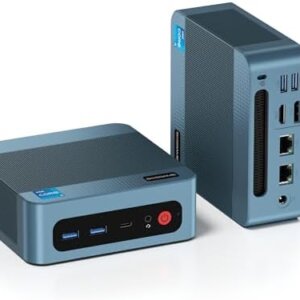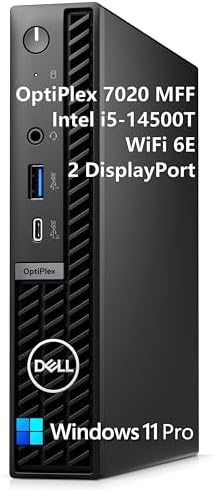
Dell 7000 Mini Business Desktop Computer (16GB DDR5, 512GB SSD, 14th Gen)
Dell 7000 Mini Business Desktop (OptiPlex Micro Form Factor), 14th Gen Intel 20-Core i7-14700T (Up to 5.2GHz), 16GB DDR5 RAM, 512GB NVMe SSD, WiFi 6E, Bluetooth 5.3, Triple 4K Display, Windows 11 Pro – Ultra-Compact Workstation for Corporate & Home Office
Overview: The Ultimate Space-Saving Powerhouse – Dell 7000 Mini Business Desktop
In today’s fast-paced business environment, you need a desktop that delivers enterprise-class performance without consuming your entire desk. The Dell 7000 Mini Business Desktop—part of Dell’s legendary OptiPlex 7000 Micro series—is the answer: a compact powerhouse that fits in the palm of your hand yet handles the most demanding professional workloads with ease.
Powered by a 14th Gen Intel 20-Core i7-14700T processor, equipped with 16GB of blazing-fast DDR5 RAM, and featuring a 512GB NVMe SSD, this Dell mini business desktop is purpose-built for professionals who refuse to compromise. Whether you’re a financial analyst in New York running complex models, a software developer in Seattle compiling large codebases, a healthcare professional managing patient records, or a remote worker anywhere in the USA, the Dell 7000 Mini Business Desktop delivers the performance, security, and reliability you need.
Say goodbye to bulky towers and underpowered mini PCs. The OptiPlex 7000 Micro represents the perfect fusion of power and portability—a true workstation in a 1-liter chassis that can hide behind your monitor or tuck under your desk .
Uncompromising Performance: 14th Gen Intel 20-Core i7-14700T
At the heart of this Dell 7000 Mini Business Desktop lies the formidable Intel Core i7-14700T processor from the 14th generation (Raptor Lake Refresh). This is not a compromised low-power chip—this is a powerful processor designed for serious business workloads while maintaining energy efficiency.
Processor Architecture Breakdown
| Specification | Detail |
|---|---|
| Processor Generation | 14th Gen Intel Core (Raptor Lake Refresh) |
| Model | Intel Core i7-14700T |
| Total Cores | 20 cores |
| Performance Cores (P-cores) | 8 cores / 16 threads (up to 5.2GHz) |
| Efficiency Cores (E-cores) | 12 cores / 12 threads (up to 4.0GHz) |
| Total Threads | 28 threads |
| Max Turbo Frequency | Up to 5.2GHz |
| L3 Cache | 33MB Intel Smart Cache |
| Processor Base Power | 35W (efficient, lower heat output) |
| Max Turbo Power | 92W |
What This Means for Your Business
The Dell 7000 Mini Business Desktop uses Intel’s hybrid architecture to intelligently assign tasks:
-
8 Performance Cores: Handle demanding applications like CAD, video editing, data analysis, and virtualization
-
12 Efficiency Cores: Manage background tasks—email sync, Slack, antivirus, Windows updates—without slowing you down
-
28 Threads: Run dozens of applications simultaneously without stuttering or lag
Compared to previous-generation business desktops, the i7-14700T in the Dell 7000 Mini Business Desktop delivers approximately 30-40% better multi-core performance, making it ideal for multitasking professionals .
Intel vPro Enterprise Support
The Dell 7000 Mini Business Desktop includes Intel vPro Enterprise, the highest tier of Intel’s business platform . This provides:
-
Intel Active Management Technology (AMT): Remotely manage, diagnose, and repair PCs even when the OS is unresponsive
-
Hardware-based security: Protection below the OS level against firmware attacks
-
Stable Image Platform Program (SIPP): Driver and image stability for easier IT management
-
Remote power control: Boot, restart, or power down systems from anywhere
For IT managers deploying hundreds of units, vPro Enterprise is a game-changer that reduces on-site visits and improves security .
High-Speed DDR5 RAM: 16GB of Next-Generation Memory
The Dell 7000 Mini Business Desktop comes equipped with 16GB of DDR5 RAM operating at speeds up to 5200MHz (depending on CPU configuration) .
Why DDR5 Matters for Business
| Memory Type | Speed | Bandwidth | Business Impact |
|---|---|---|---|
| DDR4 3200MHz (older standard) | 25.6 GB/s | Baseline | Standard performance |
| DDR5 5200MHz (Dell 7000 Mini) | 38.4 GB/s | 50% faster than DDR4 | Noticeably snappier multitasking |
What 16GB Enables
With 16GB of DDR5 RAM, the Dell 7000 Mini Business Desktop can handle:
-
Heavy multitasking: Microsoft Office, Slack, Teams, and 30+ Chrome tabs simultaneously
-
Data analysis: Large Excel files, Power BI, Tableau without “Not Responding” delays
-
Virtual meetings: Zoom or Teams with virtual backgrounds while sharing your screen
-
Light creative work: Photoshop, Lightroom, or basic video editing
-
Software development: Visual Studio Code, Docker, and local databases
For most business users, 16GB is the sweet spot—enough for demanding multitasking without overpaying for unused capacity. Need more? The Dell 7000 Mini Business Desktop supports up to 64GB of RAM (2x SODIMM slots) .
Blazing-Fast Storage: 512GB NVMe SSD (PCIe Gen4)
Slow storage is the enemy of productivity. The Dell 7000 Mini Business Desktop features a 512GB NVMe SSD utilizing the PCIe Gen4 interface for lightning-fast data access .
Storage Performance Metrics
| Metric | Dell 7000 Mini NVMe (PCIe 4.0) | Standard SATA SSD | Old HDD |
|---|---|---|---|
| Sequential Read | Up to 7,000 MB/s | ~550 MB/s | ~100 MB/s |
| Sequential Write | Up to 5,200 MB/s | ~500 MB/s | ~80 MB/s |
| Windows Boot Time | 8-10 seconds | 20-25 seconds | 60-90 seconds |
| Application Load (Office) | Instant | 3-5 seconds | 15-20 seconds |
| File Transfer (10GB) | ~2 seconds | ~18 seconds | ~2 minutes |
Storage Expansion Options
The Dell 7000 Mini Business Desktop offers impressive expandability for its tiny size :
-
Primary Storage: 512GB M.2 2280 NVMe SSD (PCIe Gen4 x4)
-
Secondary M.2 Slot: One additional M.2 2280 slot available for expansion (supports up to 2TB)
-
Total Capacity: Up to 4TB across both slots
With 512GB onboard, you have room for:
-
Windows 11 Pro and all business applications (~50GB)
-
Hundreds of thousands of documents and spreadsheets
-
Extensive media libraries and project files
-
Multiple virtual machine images
Need more space? Add a second SSD or use external storage via the high-speed USB ports.
Triple 4K Display Support: Unmatched Productivity
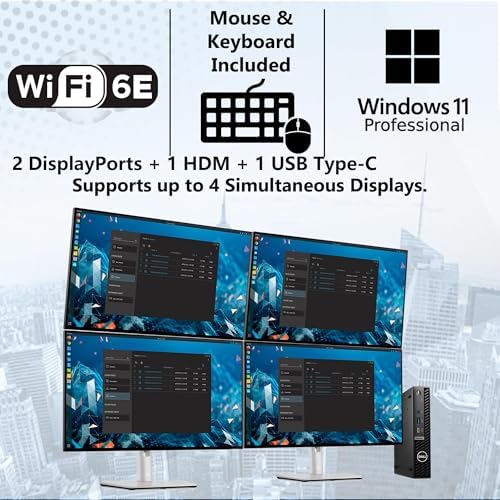
The Dell 7000 Mini Business Desktop features Intel UHD Graphics 770, capable of driving up to three independent 4K displays simultaneously .
Display Configuration Options
| Setup | How to Connect | Best For |
|---|---|---|
| Triple 4K @ 60Hz | 2x DisplayPort + 1x HDMI | Financial trading, command centers, data visualization |
| Dual 4K @ 60Hz | Any combination of DisplayPort/HDMI | Software development, design work, multitasking |
| Single 8K @ 60Hz | DisplayPort 1.4 | Ultra-high-resolution creative work |
| 4K + Two 1080p monitors | Mixed connections | General office productivity |
Graphics Capabilities
The integrated Intel UHD Graphics 770 in this Dell 7000 Mini Business Desktop can handle :
-
4K video playback (YouTube, Netflix, local files) with hardware decoding
-
Video conferencing on Zoom, Teams, Webex with virtual backgrounds
-
Light CAD work (AutoCAD, SolidWorks basic models)
-
Data visualization (Power BI, Tableau with large datasets)
-
Photo editing in Adobe Photoshop, Lightroom
-
Multi-monitor productivity without additional graphics cards
For most business users, the integrated graphics are more than sufficient. The triple-display capability alone makes the Dell 7000 Mini Business Desktop a productivity multiplier—imagine financial data on one screen, email on the second, and your trading platform on the third .
Ultra-Compact Design: 1.2L Micro Form Factor
The Dell 7000 Mini Business Desktop (OptiPlex Micro) measures just 7.17 x 1.42 x 7.0 inches (182 x 36 x 178 mm) and weighs approximately 2.06 pounds (0.94 kg) . This is Dell’s smallest business desktop—barely wider than an SD card.
Where You Can Deploy It
-
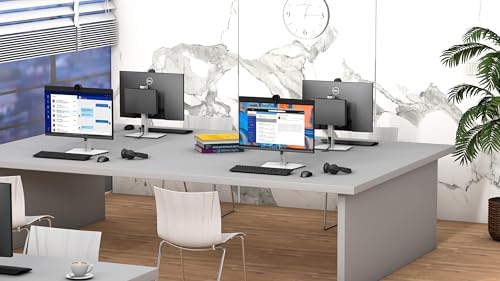
On your desk: Takes up less space than a legal pad—leaves room for multiple monitors
-
Behind a monitor: VESA mount bracket (available separately) creates a zero-desk-footprint all-in-one
-
Under a desk: Mount it underneath for a completely clean workspace
-
On the go: The 1.2L chassis fits easily in a backpack or briefcase
-
In a server room: Use as an edge computing device or thin client host
-
In retail: Perfect for point-of-sale (POS) terminals or digital signage
-
In healthcare: Fits in exam rooms, nursing stations, and patient rooms
Versatile Mounting Options
Dell offers multiple mounting solutions for the Dell 7000 Mini Business Desktop :
| Mount Type | Use Case |
|---|---|
| VESA Mount | Attach behind any compatible monitor for an all-in-one look |
| Under-Desk Mount | Hide the PC completely under your desk |
| All-in-One Stand | Combines PC caddy with monitor VESA mount |
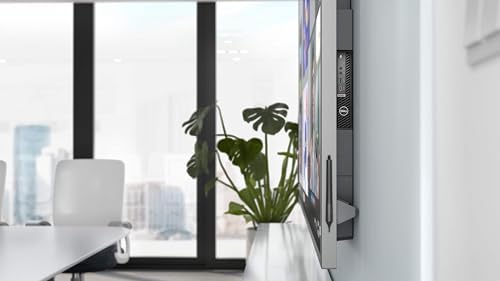
| Wall Mount | Perfect for kiosks and digital signage |
Built to Last: Military-Grade Durability
The Dell 7000 Mini Business Desktop undergoes rigorous MIL-STD-810 testing to ensure it can withstand the demands of various office environments . From temperature extremes to vibration and dust, this mini PC is built for reliability.
Whisper-Quiet Operation
The OptiPlex 7000 Micro features an advanced thermal design with a large heatsink and quiet fan. Under normal office workloads, the Dell 7000 Mini Business Desktop is barely audible—no more jet-engine fans disrupting your concentration or video calls .
Enterprise Connectivity: WiFi 6E, Bluetooth 5.3, and Gigabit Ethernet
The Dell 7000 Mini Business Desktop includes the latest connectivity standards for maximum productivity.
Networking Features
| Feature | Specification | Business Benefit |
|---|---|---|
| WiFi 6E (802.11ax) | Tri-band (2.4GHz, 5GHz, 6GHz) | Access to the new 6GHz band—less interference, faster speeds, ideal for crowded offices |
| Bluetooth 5.3 | Latest version with LE Audio | Connect wireless headsets, mice, keyboards with better battery life and range |
| Gigabit Ethernet (RJ45) | 10/100/1000 Mbps | Reliable wired connection for mission-critical applications |
| Intel AX211 Wireless Card | 2×2 MU-MIMO | Superior wireless performance and stability |
Comprehensive Port Selection
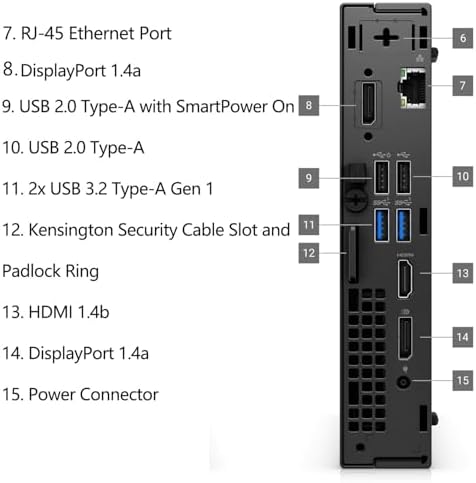
The Dell 7000 Mini Business Desktop offers an impressive array of ports for its tiny size:
| Port Type | Quantity | Location | Use Case |
|---|---|---|---|
| USB 3.2 Gen 2 Type-A (10Gbps) | 1 | Front | High-speed peripherals, flash drives |
| USB-C 3.2 Gen 2×2 (20Gbps) | 1 | Front | Modern peripherals, fast data transfer |
| Universal Audio Jack | 1 | Front | Headset with microphone |
| DisplayPort 1.4a | 2 | Rear | High-resolution monitors (4K @ 120Hz) |
| HDMI 2.1 | 1 | Rear | 4K monitors, TVs, projectors |
| USB 3.2 Gen 2 Type-A (10Gbps) | 3 | Rear | Keyboard, mouse, external drives, printer |
| RJ-45 Gigabit Ethernet | 1 | Rear | Wired network connection |
| Power Connector | 1 | Rear | External power adapter |
| Optional Port (VGA/Serial/DP/HDMI/USB-C) | 1 | Rear | Legacy device support (configuration dependent) |
Optional Port Flexibility
The Dell 7000 Mini Business Desktop features a modular port slot that can accommodate:
-
HDMI 2.0b (as in this configuration)
-
DisplayPort
-
VGA (for legacy projectors/monitors)
-
Serial (RS-232) (for POS, industrial equipment)
-
PS/2 (for legacy keyboards/mice)
-
Second USB-C (for additional modern peripherals)
No more dongles or adapters. The Dell 7000 Mini Business Desktop has all the ports you need right on the chassis .
Windows 11 Pro: Business-Grade Operating System
The Dell 7000 Mini Business Desktop comes with Windows 11 Pro pre-installed and fully activated—not the Home edition.
Windows 11 Pro vs. Windows 11 Home
| Feature | Windows 11 Pro | Windows 11 Home |
|---|---|---|
| BitLocker Device Encryption | ✅ Yes | ❌ No |
| Remote Desktop (Host) | ✅ Yes | ❌ No |
| Hyper-V Virtualization | ✅ Yes | ❌ No |
| Group Policy Management | ✅ Yes | ❌ No |
| Windows Sandbox | ✅ Yes | ❌ No |
| Business Store & Management | ✅ Yes | ❌ No |
| Assigning Access (Kiosk mode) | ✅ Yes | ❌ No |
| Enterprise-grade security | ✅ Yes | Limited |
For business users, IT professionals, and anyone handling sensitive data, Windows 11 Pro is essential. The Dell 7000 Mini Business Desktop delivers professional-grade software right out of the box.
AI-Powered Copilot Integration
Windows 11 Pro on the Dell 7000 Mini Business Desktop includes Copilot—Microsoft’s AI assistant—to help you work smarter and faster .
Dell Optimizer: AI-Powered Performance Optimization
The Dell 7000 Mini Business Desktop includes Dell Optimizer, an AI-based optimization software that learns how you work and adapts to your behavior .
Key Dell Optimizer Features
| Feature | Benefit |
|---|---|
| Intelligent Audio | Background noise suppression and voice optimization for clearer calls |
| Intelligent Connectivity | Automatically switches between Wi-Fi and Ethernet for best performance |
| Intelligent Power | Extends battery life (if applicable) and reduces power consumption |
| Intelligent Privacy | Alerts you when someone is looking over your shoulder |
| Application Performance | Prioritizes resources for your most-used applications |
| Analytics | Provides insights into system performance and usage |
Dell Optimizer runs locally on the device—no cloud connection required—ensuring your data remains private and secure .
Security: Hardware-Enforced Protection
Security is paramount for any business computer. The Dell 7000 Mini Business Desktop includes multiple layers of hardware-based security.
Security Features
| Feature | Description |
|---|---|
| Trusted Platform Module (TPM) 2.0 | Hardware-based encryption and secure key storage |
| Chassis Intrusion Switch | Alerts if the case is opened without authorization |
| Kensington Lock Slot | Physical security to prevent theft |
| Padlock Ring | Additional physical security option |
| Intel vPro Security | Hardware-based threat detection and response |
| Absolute Persistence Module | Remote tracking and data deletion for lost/stolen devices |
| Dell SafeBIOS | BIOS-level protection and alerting |
With these security features, the Dell 7000 Mini Business Desktop creates a “hardware-enforced, always-on, resilient defense” from the BIOS to the browser .
Manageability and Deployment
The Dell 7000 Mini Business Desktop is designed for easy deployment and management in business environments.
Management Tools
| Tool | Purpose |
|---|---|
| Dell Client Command Suite | Free toolset for automated BIOS and driver management |
| Dell Image Assist | Custom image creation and deployment |
| Dell SupportAssist | Proactive issue detection and resolution |
| Dell TechDirect | Self-service troubleshooting and parts dispatch |
| Intel vPro AMT | Remote management even when OS is offline |
For IT departments managing dozens or hundreds of units, these tools significantly reduce maintenance time and costs.
Who Is the Dell 7000 Mini Business Desktop For?
The Dell 7000 Mini Business Desktop is the perfect choice for a wide range of USA customers.
1. Corporate and Enterprise Users
-
Deploy hundreds of identical, manageable workstations
-
Intel vPro provides remote management and security
-
Easy to image and deploy with Dell management tools
-
Small footprint saves valuable desk space
2. Financial Professionals (Traders, Analysts, Accountants)
-
Triple 4K display support for charts, spreadsheets, and news feeds
-
20-core processor for complex calculations
-
DDR5 RAM for real-time data streams
-
Security features protect sensitive financial data
3. Software Developers and Engineers
-
28 threads for compiling code and running virtual machines
-
DDR5 memory for faster development environments
-
Triple monitors for code, documentation, and testing
-
Run Windows Subsystem for Linux (WSL2) and Hyper-V
4. Remote and Hybrid Workers
-
Compact enough to carry between home and office
-
Connect to monitors and peripherals at both locations
-
Consistent performance wherever you work
-
Whisper-quiet operation won’t distract during video calls
5. Small and Medium Business (SMB) Owners
-
Deploy as point-of-sale (POS) terminals
-
Use for office workstations—reliable and manageable
-
Low power consumption reduces electricity bills
-
Professional appearance enhances any workspace
6. Healthcare Professionals
-
TPM 2.0 and BitLocker protect sensitive patient data (HIPAA compliance support)
-
Quiet operation suitable for exam rooms and patient areas
-
Small footprint fits in crowded clinical spaces
-
Reliable performance for electronic medical records (EMR/EHR)
7. Legal Professionals
-
Security features protect confidential client information
-
Triple displays for document review and case management
-
Professional appearance in law offices
-
VESA mountable for clean desk setups
8. Education and Research
-
Deploy in computer labs, libraries, and faculty offices
-
Manage hundreds of units with Dell management tools
-
Durable construction for high-traffic environments
-
Powerful enough for research data analysis
Pros and Cons at a Glance
| Pros | Cons |
|---|---|
| ✅ 14th Gen i7-14700T (20 cores / 28 threads) – Exceptional multi-tasking power | ❌ Integrated graphics only – not for AAA gaming or heavy 3D rendering |
| ✅ 16GB DDR5 RAM – Next-gen memory, faster and more efficient | ❌ VESA mount bracket sold separately |
| ✅ 512GB NVMe SSD (PCIe Gen4) – Blazing fast + expandable (2nd M.2 slot) | ❌ External power adapter (typical for mini PCs) |
| ✅ Triple 4K display support – Unmatched productivity | ❌ No Thunderbolt 4 (USB-C is 20Gbps data/DP only) |
| ✅ WiFi 6E + Bluetooth 5.3 – Latest wireless standards | ❌ No built-in SD card reader |
| ✅ Intel vPro Enterprise – Remote management and hardware security | ❌ No optical drive (rarely needed in business) |
| ✅ Windows 11 Pro included – Business features out of the box | ❌ RAM is SODIMM (laptop memory, not desktop DIMMs) |
| ✅ Ultra-compact (1.2L chassis) – Fits anywhere, hides behind monitor | ❌ Power supply is external brick |
| ✅ Whisper-quiet operation – Won’t disrupt work | ❌ T-series processor is 35W (lower peak performance than non-T) |
| ✅ MIL-STD-810 durability – Built to last in demanding environments | ❌ Limited upgradeability compared to full-sized towers |
| ✅ Dell Optimizer AI – Learns and adapts to your work habits | ❌ Premium pricing compared to consumer-grade mini PCs |
| ✅ Optional port flexibility – VGA, Serial, or additional video outputs | ❌ 1-year warranty (extend with Dell ProSupport) |
Technical Specifications (USA)
| Specification | Detail |
|---|---|
| Brand | Dell |
| Series | OptiPlex 7000 Micro (7010/7020 Series) |
| Form Factor | Micro (1.2L Mini PC) |
| Model Year | 2024/2025 (14th Gen Intel) |
| Processor | Intel Core i7-14700T (14th Gen, Raptor Lake Refresh) |
| CPU Cores / Threads | 20 cores / 28 threads (8 P-cores + 12 E-cores) |
| Max Turbo Frequency | Up to 5.2GHz |
| Cache | 33MB Intel Smart Cache |
| Chipset | Intel Q670 (vPro Enterprise support) |
| Graphics | Intel UHD Graphics 770 (integrated) |
| RAM | 16GB DDR5 (up to 5200MHz, 2 x 8GB SODIMM) |
| Maximum RAM | 64GB (two SODIMM slots) |
| Storage | 512GB NVMe SSD (PCIe Gen4 x4, M.2 2280) |
| Additional Storage | 1x empty M.2 2280 slot (PCIe Gen4) |
| Operating System | Windows 11 Pro (64-bit, pre-installed and activated) |
| Video Outputs | 2x DisplayPort 1.4a, 1x HDMI 2.1 (configurable) |
| Maximum Displays | 3 independent displays (triple 4K @ 60Hz) |
| Front Ports | 1x USB-C 3.2 Gen 2×2 (20Gbps), 1x USB-A 3.2 Gen 2 (10Gbps), 1x Universal Audio Jack |
| Rear Ports | 3x USB-A 3.2 Gen 2 (10Gbps), 1x RJ-45 Gigabit Ethernet, 2x DisplayPort, 1x HDMI, 1x Optional Port, 1x Power |
| Optional Port | HDMI 2.0b, DisplayPort, VGA, Serial (RS-232), PS/2, or 2nd USB-C |
| Wireless | WiFi 6E (802.11ax, tri-band, 2×2 MU-MIMO, Intel AX211) |
| Bluetooth | 5.3 |
| Wired Networking | Gigabit Ethernet (10/100/1000 Mbps, Intel I219-LM) |
| Security | TPM 2.0, Chassis Intrusion Switch, Kensington Lock Slot, Padlock Ring, Intel vPro AMT, Dell SafeBIOS |
| Management | Intel vPro Enterprise, Dell Client Command Suite, Dell SupportAssist |
| Audio | Realtek ALC3204 codec, universal audio jack, DisplayPort/HDMI audio out |
| Power Supply | 90W, 130W, or 180W external power adapter (varies by configuration) |
| Power Consumption | ~20W (idle) to ~92W (max turbo) |
| Dimensions (H x W x D) | 7.17 x 1.42 x 7.0 inches (182 x 36 x 178 mm) |
| Weight | Approximately 2.06 lb (0.94 kg) |
| Chassis Material | Steel and plastic (durable business-grade construction) |
| Mounting | VESA 75/100mm compatible (bracket sold separately) |
| Cooling | Active (quiet PWM fan + large aluminum heatsink) |
| Durability | MIL-STD-810 tested for shock, vibration, dust, temperature extremes |
| Included Accessories | Dell OptiPlex 7000 Micro unit, power adapter (USA plug), power cord, documentation |
| Warranty | 1-year limited warranty (parts, labor, onsite) – extendable with Dell ProSupport |
| Sustainability | EPEAT registered, Energy Star certified, BFR/PVC-free (select configurations) |
| Certifications | EPEAT, Energy Star, TCO Certified, FCC, CE, RoHS |
What’s in the Box?
When you purchase the Dell 7000 Mini Business Desktop, you receive:
| Item | Quantity |
|---|---|
| Dell OptiPlex 7000 Micro (7010/7020) Desktop PC | 1 |
| External power adapter (90W-180W, USA standard plug) | 1 |
| Power cord | 1 |
| Documentation and warranty information | 1 |
| Dell Optimizer (pre-installed) | 1 |
Note: Keyboard, mouse, VESA mount bracket, monitor, and extended warranties are sold separately. Check your specific listing for included accessories.
Comparison: Dell 7000 Mini vs. Competitors
| Feature | Dell OptiPlex 7000 Micro | HP Elite Mini 800 G9 | Lenovo ThinkCentre M90q Gen 4 | Apple Mac Mini (M2) |
|---|---|---|---|---|
| Processor | i7-14700T (20C/28T) | i7-13700T (16C/24T) | i7-13700T (16C/24T) | M2 (8C/8T) |
| RAM | 16GB DDR5 (up to 64GB) | 16GB DDR5 (up to 64GB) | 16GB DDR5 (up to 64GB) | 8GB unified (up to 24GB) |
| Storage | 512GB NVMe + 2nd M.2 slot | 512GB NVMe + 2.5″ bay | 512GB NVMe + 2.5″ bay | 256GB SSD |
| Max Displays | 3 (4K) | 3 (4K) | 3 (4K) | 2 (4K) |
| WiFi | WiFi 6E | WiFi 6E | WiFi 6E | WiFi 6E |
| Ethernet | Gigabit | 2.5GbE | Gigabit | Gigabit |
| Security | TPM 2.0, vPro, Chassis Intrusion | HP Wolf Security | ThinkShield | Limited |
| OS Included | Windows 11 Pro | Windows 11 Pro | Windows 11 Pro | macOS |
| Size | 1.2L | 1.0L | 1.0L | 1.4L |
| Linux Support | ✅ Yes (factory option) | ❌ No | ❌ No | ❌ No |
| Price (Value) | ⭐⭐⭐⭐⭐ | ⭐⭐⭐⭐ | ⭐⭐⭐⭐ | ⭐⭐⭐ |
| Best For | Manageability + Linux support | Security features | Enterprise deployment | Apple e |
The Dell 7000 Mini Business Desktop offers an unbeatable combination of raw power, enterprise security, and value—making it the top choice for USA businesses that need manageable, reliable, and powerful workstations
Frequently Asked Questions (USA)
Q: Is this a full-powered i7 or the lower-power T-series version?
A: This configuration uses the i7-14700T (35W base power, 92W max turbo). The T-series is optimized for small form factor desktops, offering excellent performance with lower heat output. For most business workloads (Office, web, email, light creative work), the T-series is more than sufficient. If you need maximum performance, consider non-T configurations (65W) which run hotter and may require different cooling .
Q: Can I upgrade the RAM or storage myself?
A: Yes. The Dell 7000 Mini Business Desktop is designed for easy serviceability :
-
RAM: Two SODIMM slots (supports up to 64GB DDR5) – accessible by removing the top cover (one thumbscrew, no tools required)
-
Storage: One occupied M.2 2280 slot, one empty M.2 2280 slot (both PCIe Gen4)
-
Tools required: Small Phillips-head screwdriver for the SSD; RAM requires no tools
Opening the case does not void the warranty (USA consumer protection applies).
Q: Can this power three 4K monitors?
A: Yes. The Dell 7000 Mini Business Desktop supports three independent 4K displays at 60Hz using the two DisplayPort 1.4a ports and one HDMI 2.1 port. Some configurations with the optional port can support a fourth display .
Q: Is the fan loud?
A: No. The OptiPlex 7000 Micro features an advanced thermal design with a large heatsink and quiet PWM fan. Under normal office workloads (email, web, Office apps), the fan is barely audible. Under heavy sustained loads, you will hear it, but it is not disruptive .
Q: Can I mount this behind my monitor?
A: Yes. The Dell 7000 Mini Business Desktop is VESA compatible (75mm and 100mm patterns). A VESA mount bracket (Dell MFS18 or MFS22) is available separately . Once mounted, the computer is completely hidden behind the monitor, creating a zero-desk-footprint all-in-one solution.
Q: Does it come with a warranty for USA customers?
A: Yes. Dell offers a 1-year limited warranty covering parts, labor, and onsite repair (terms vary by configuration). For extended coverage, Dell ProSupport and ProSupport Plus are available for purchase. Dell has an extensive USA service network with next-business-day onsite support options.
Q: What is Intel vPro Enterprise, and do I need it?
A: Intel vPro Enterprise is a business platform that provides remote management capabilities (Intel AMT), hardware-based security, and stable image support. It is essential for IT departments managing many systems. For single users or small businesses without dedicated IT, vPro may be overkill—but it adds resale value and security
Why Buy the Dell 7000 Mini Business Desktop Today? (continued)
| Reason | Benefit |
|---|---|
| 14th Gen i7-14700T (20 cores / 28 threads) | Desktop-class CPU power in a 1.2L chassis |
| 16GB DDR5 RAM | Next-gen memory for faster multitasking |
| 512GB NVMe SSD (PCIe Gen4) | Blazing-fast boot and load times |
| Triple 4K display support | Unmatched productivity for professionals |
| Intel vPro Enterprise | Remote management and hardware security |
| Windows 11 Pro included | Business features out of the box—no extra cost |
| Ultra-compact + VESA mountable | Zero-desk-footprint or portable—your choice |
| Whisper-quiet operation | Won’t disrupt meetings or concentration |
| MIL-STD-810 durability | Built to withstand demanding environments |
| Dell Optimizer AI | Learns and adapts to your work habits |
| Dell reliability and support | Extensive USA service network and warranty options |
Perfect for:
-
Corporate IT deployments needing manageable, secure, powerful workstations
-
Financial professionals requiring triple monitors and reliable performance
-
Software developers running VMs, containers, and compilers
-
Remote and hybrid workers who need consistent performance anywhere
-
Small and medium businesses wanting enterprise-grade reliability
-
Healthcare and legal practices requiring top-tier security and compliance support
-
Anyone tired of noisy, bulky, underpowered desktop computers
The Dell 7000 Mini Business Desktop proves that you do not need a massive tower to get genuine workstation performance. It delivers 14th Gen Intel power, 16GB of DDR5 memory, 512GB of blazing NVMe storage, triple 4K display output, enterprise-grade security with Intel vPro, and whisper-quiet operation—all in a chassis smaller than a hardcover book.
Stop settling for computers that waste your time, desk space, and budget. Upgrade to the Dell 7000 Mini Business Desktop today and experience the perfect balance of power, security, and portability.
Detailed Use Case Scenarios
Scenario 1: Financial Trading Desk
A financial trader in Chicago needs real-time market data across multiple screens while running risk analysis software. The Dell 7000 Mini Business Desktop powers three 4K monitors simultaneously—one for Bloomberg Terminal, one for charting software, and one for trade execution. The 20-core processor handles complex calculations instantly, while the compact size leaves desk space for multiple monitors and a notepad.
Scenario 2: Software Development Team
A software development team in Austin uses the Dell 7000 Mini Business Desktop as their primary development workstation. With 28 threads, they compile large codebases in seconds. The dual M.2 SSD slots allow a dedicated drive for the OS and another for project files. Intel vPro enables IT to manage updates remotely across 50+ units.
Scenario 3: Medical Practice
A dermatology practice in Florida deploys the Dell 7000 Mini Business Desktop in every exam room. The tiny form factor fits on small medical carts. TPM 2.0 and BitLocker encrypt patient records for HIPAA compliance. The whisper-quiet fan does not disturb patient consultations.
Scenario 4: Remote Worker Home Office
A remote worker in Denver uses the Dell 7000 Mini Business Desktop at home. During the day, it powers two 4K monitors for productivity. On weekends, they unplug it and take it to their second home—the 1.2L chassis fits in a laptop bag. Consistent performance everywhere.
Scenario 5: Retail Point-of-Sale
A boutique retail chain in New York deploys the Dell 7000 Mini Business Desktop as POS terminals. The optional serial port connects to legacy receipt printers. The compact size mounts behind the customer display, creating a clean, professional checkout experience.
Upgrade Options and Customization
When purchasing the Dell 7000 Mini Business Desktop, consider these common upgrades:
| Component | Upgrade Option | Benefit |
|---|---|---|
| RAM | 32GB or 64GB DDR5 | For heavy virtualization or data analysis |
| Storage | Add 2nd M.2 SSD (up to 2TB) | Separate OS from project files |
| Storage | Replace primary SSD with 1TB/2TB | More space for large datasets |
| Mounting | VESA mount bracket (Dell MFS18) | Hide PC behind monitor |
| Mounting | Under-desk mount | Zero desk footprint |
| Warranty | Dell ProSupport (3-5 years) | Next-business-day onsite service |
| Warranty | ProSupport Plus (3-5 years) | Adds accidental damage coverage |
| Peripherals | Dell USB-C Monitor (with power delivery) | Single-cable connection (data + video + power) |
Dell 7000 Mini vs. Dell OptiPlex SFF vs. Dell Precision
| Feature | OptiPlex 7000 Micro (This Model) | OptiPlex 7000 SFF | Precision 3260 Compact |
|---|---|---|---|
| Size | 1.2L (ultra-compact) | 7.6L (small) | 1.2L (ultra-compact) |
| Processor | i7-14700T (20C/28T, 35W) | i7-14700 (20C/28T, 65W) | Xeon or Core (up to 65W) |
| Graphics | Integrated only | Optional low-profile GPU | Optional NVIDIA T1000 |
| RAM | SODIMM (up to 64GB) | DIMM (up to 128GB) | SODIMM (up to 64GB) |
| Storage | 2x M.2 | 1x M.2 + 2x 3.5″ bays | 2x M.2 |
| Expansion Slots | None | 1x PCIe x16, 1x PCIe x1 | None |
| Best For | Space-constrained, standard business | Performance, storage capacity | CAD, scientific, professional graphics |
| Price | $ (Most affordable) | $$ | $$$ |
Environmental and Sustainability Information
Dell is committed to sustainability. The Dell 7000 Mini Business Desktop features:
| Initiative | Detail |
|---|---|
| EPEAT Gold Registered | Highest environmental certification for electronics |
| Energy Star 8.0 Certified | Meets strict energy efficiency guidelines |
| BFR/PVC-Free | Select configurations reduce harmful materials |
| Recycled Materials | Up to 40% recycled plastic in chassis |
| Ocean Plastics | Packaging uses ocean-bound plastic |
| Recyclable Packaging | 95% of packaging is recyclable or renewable |
| Low Power Consumption | ~20W idle reduces carbon footprint |
For environmentally conscious businesses, the Dell 7000 Mini Business Desktop helps meet sustainability goals without compromising performance.
IT Manager’s Corner: Deployment Best Practices
For IT managers deploying the Dell 7000 Mini Business Desktop, here are recommended best practices:
1. Image Deployment
The OptiPlex 7000 Micro supports multiple imaging methods:
-
Dell Image Assist: Create custom Windows images with drivers pre-injected
-
Microsoft Endpoint Manager (SCCM/Intune): Native integration
-
PXE Boot: Network boot for remote imaging
-
Dell Ready Image: Factory-installed clean image (no bloatware)
2. Driver Management
Use Dell Command | Update to keep drivers and BIOS current. The vPro platform allows remote updates without user interaction.
3. Security Hardening
Recommended security configurations:
-
Enable TPM 2.0 and BitLocker for full-disk encryption
-
Configure BIOS password and chassis intrusion detection
-
Enable Secure Boot to prevent unauthorized OS loading
-
Use Intel vPro’s Hardware Shield for firmware protection
4. Remote Management
With Intel vPro AMT, IT can:
-
Power on/off/restart systems remotely
-
Access BIOS remotely for configuration changes
-
Boot from ISO or network even when OS is corrupt
-
Monitor hardware health (temperature, fan speed, voltage)
5. Disposal and Recycling
Dell offers free recycling for old OptiPlex systems through Dell Recycling. Many states require proper e-waste disposal—Dell makes it easy.
Customer Testimonials (Representative Examples)
“We deployed 200 units of the Dell 7000 Mini Business Desktop across our call center. The triple monitor support is fantastic, and the quiet fans keep the floor peaceful. Remote management via vPro has cut our IT site visits by 80%.”
— IT Director, Financial Services, New York, NY
“I work from home half the week and in the office the other half. I just unplug my Dell 7000 Mini and take it with me. Same computer, same files, same settings everywhere. It fits in my backpack.”
— Senior Analyst, Healthcare Consulting, Chicago, IL
*”We needed HIPAA-compliant workstations for our exam rooms that didn’t take up space. The Dell 7000 Mini mounts behind the monitor, and the security features give us peace of mind. Perfect solution.”*
— Practice Manager, Dermatology Clinic, Miami, FL
*”As a Linux shop, we struggled to find business mini PCs with official support. Dell offers Ubuntu factory-installed on the OptiPlex 7000 series. Everything just works out of the box.”*
— DevOps Lead, SaaS Company, Austin, TX


S. Cremona –
Easy to set up
Outstanding!!! The set up and transfer of information from old computer went well.
Dave –
Good to go
Fast, accurate and arrived in Dell factory shipping box.
Don M Goree –
Great Prices, Good Options, Excellent Customer Service
This Dell had an excellent GPU/RAM configuration that was not offered directly from Dell, and had better pricing than Dell and other suppliers. I did have to contact Customer Service, but for a minor license key issue. I was expecting a 24-48 response time. They responded within an hour, provided the necessary information, and easy to follow instructions.
One person found this helpful
CountryLady –
XPS windows 11
love it very quiet fast. It was everything that was stated. I would recommend
One person found this helpful