
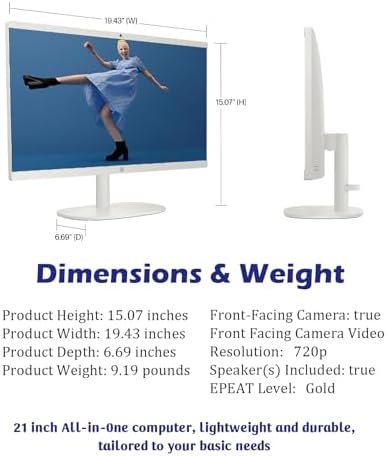


HP All-in-One Computer 21.5″ FHD (Windows 11 Pro) Helpful
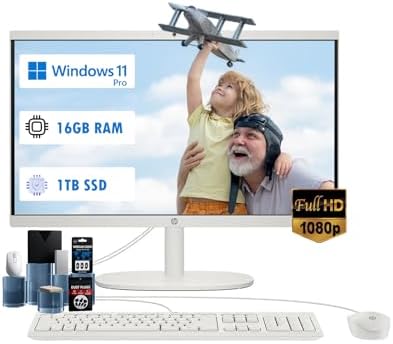
Upgrade your workspace with the HP All-in-One Computer, a sleek, space-saving solution designed for modern U.S. homes and offices. Combining performance, style, and convenience, this all-in-one desktop computer integrates everything you need into a single compact unit—eliminating clutter while delivering reliable performance for everyday computing. Whether you’re working, studying, or enjoying entertainment, this HP All-in-One Computer is built to keep up with your lifestyle.
21.5” Full HD Anti-Glare Display
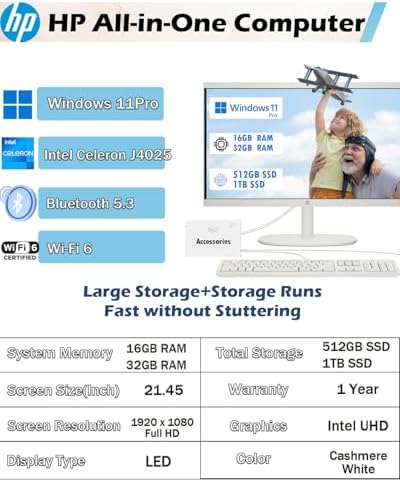
Enjoy clear and vibrant visuals on the 21.5-inch Full HD screen. The anti-glare display reduces eye strain and reflections, making it perfect for long work sessions, video calls, and streaming. This 21.5 inch desktop computer offers sharp resolution and consistent brightness for both productivity and entertainment.
Reliable Performance for Everyday Tasks
The HP All-in-One Computer is built to handle daily computing needs with ease. From browsing and document editing to streaming and multitasking, it provides smooth and responsive performance for home and office use. It’s an excellent choice for users looking for a dependable home desktop computer.
Windows 11 Pro for Productivity
Pre-installed with Windows 11 Pro, this all in one PC Windows 11 offers enhanced security, productivity tools, and a modern interface. Features like improved multitasking, virtual desktops, and business-level security make it ideal for professionals and students alike.
Space-Saving All-in-One Design
Say goodbye to bulky setups. The HP All-in-One Computer combines the monitor and CPU into one streamlined device, saving valuable desk space. Its clean and minimal design makes it perfect for small offices, apartments, and home workstations.
Easy Setup & Cable Management
With fewer cables and components, setup is quick and hassle-free. This compact desktop computer allows you to get started within minutes, making it ideal for users who want simplicity and efficiency.
Perfect for Home & Office Use
Whether you’re attending virtual meetings, managing tasks, or helping kids with schoolwork, this all in one PC for home use adapts to your needs. It’s also a reliable option for small businesses and remote work setups.
Smooth Multitasking Experience
The HP All-in-One Computer is designed for efficient multitasking. Run multiple applications, browse the web, and handle office tasks simultaneously without interruptions.
Ideal for Students & Professionals
This HP desktop PC supports learning, productivity, and everyday computing. From online classes to professional tasks, it offers a balanced combination of performance and usability.
Great for Entertainment & Streaming
Enjoy your favorite shows, movies, and videos in Full HD clarity. The large display and smooth performance make this full HD desktop computer a great choice for entertainment.
Trusted HP Quality & Durability
HP is known for its reliability, and this HP All-in-One Computer is no exception. Built with quality materials and tested for performance, it ensures long-lasting use for everyday computing.
Key Features:
- 21.5-inch Full HD anti-glare display
- Windows 11 Pro operating system
- Space-saving all-in-one design
- Smooth performance for daily tasks
- Easy setup with minimal cables
- Ideal for home, office, and student use
Why Choose HP All-in-One Computer?
The HP All-in-One Computer stands out for its simplicity, efficiency, and modern design. It’s perfect for users who want a space saving desktop computer with monitor while maintaining reliable performance for work and entertainment.
Ideal For:
- Home offices and remote work
- Students and online learning
- Everyday computing and browsing
- Small business use
- Entertainment and streaming
Keywords Used
HP All-in-One Computer, all in one desktop computer, HP all in one computer, 21.5 inch desktop computer, all in one PC Windows 11, home desktop computer, compact desktop computer
Final Thoughts
If you’re looking for a dependable, stylish, and efficient desktop solution, the HP All-in-One Computer is a smart investment. With its Full HD display, Windows 11 Pro features, and compact design, it offers everything you need for productivity and entertainment in one device. Perfect for modern U.S. households, this all-in-one PC delivers convenience, performance, and value in a single powerful package.
✅ Pros – HP All-in-One Computer
- Space-Saving Design
Combines monitor and CPU into one unit, reducing desk clutter. - 21.5” Full HD Anti-Glare Display
Clear visuals with reduced eye strain for long usage. - Windows 11 Pro Included
Advanced features for productivity, security, and business use. - Easy Setup & Cable Management
Minimal wiring makes installation quick and hassle-free. - Great for Home & Office Use
Ideal for everyday tasks, remote work, and online learning. - Compact & Modern Look
Sleek design fits well in small spaces and modern setups. - Reliable HP Performance
Trusted brand with consistent everyday performance.
❌ Cons – HP All-in-One Computer
- Limited Upgrade Options
Hardware upgrades can be restricted compared to traditional desktops. - Not Ideal for Heavy Gaming
Designed for productivity, not high-end gaming or graphics work. - Moderate Performance for Advanced Tasks
May struggle with intensive software like video editing or 3D design. - Fixed Screen Size
Cannot upgrade display size like separate monitor setups. - Repair Can Be Costly
All-in-one design may increase repair complexity and cost.
❓ FAQs – HP All-in-One Computer
1. Is the HP All-in-One Computer good for home office use?
Yes, it’s ideal for home offices, offering reliable performance for tasks like documents, meetings, and browsing.
2. Can I upgrade the hardware later?
Upgrades are limited compared to traditional desktops, but some models may allow basic RAM or storage upgrades.
3. Does it come with Windows installed?
Yes, it comes pre-installed with Windows 11 Pro for productivity and security features.
PengzhouPengzhou –
Highly recommended
Excellent product at a good price. Communication was perfect, and the item arrived earlier than expected. Good sell that I heartily endorse Excellent product at an affordable price. Communication was perfect, and arrived rapidly. I heartily endorse this excellent seller!
One person found this helpful
Vsfj –
COMPLETELY WORTH PURCHASING
The media could not be loaded.
100% satisfied with purchase. Shipped/delivered quickly and setup was a breeze. Up/running in les then 30 min after Cortana setup snd updates. Not sure why the complaints of it being slow. I shut down and restarted and booted right up. Navigation from tab to tab opening up Spotify, YouTube, Google mail, FB etc… there’s no connectivity lag time and each webpage loads very quickly. Camera is fine… Give it a 3.5 out of 5. Speakers are nice and clear , monitor resolution is bright & crisp. Keyboard is nice and keys are soft to touch. Mouse is fine. Feels a bit light & very plastic but it’s not a bad tool. Stand is solid, monitor offers great tilt options. Computer is clean and eye appealing. Would order another without hesitation if we’re in the market for another. May just do do to simply have a backup. Currently working-from Home with company supplied computer but invested in my HP AIO to be able to pursue other work-from-home opportunities. (Don’t mind the quick video… set up was done to be sure everything worked and computer was set temporarily set on a TV tray since my company supplied computer was occupying my desk)
11 people found this helpful
JimJim –
Fantastic laptop.
I’m thrilled with my recent purchase. The website was user friendly and the product descriptions were accurate. Customer service was prompt and helpful, answering all my questions. My order arrived quickly, well packaged and the product exceeded my expectation in quality. I am impressed with the attention to detail and the overall experience. I ‘ll definitely shop here again and highly recommend this seller to others.
Private Joker –
Great Mainstream PC for the Price
Overall, I would say this HP all-in-one is a good package for the price, especially if you select a version with the solid state drive (as I did) to make the most of the mid-range CPU. Lots of storage, wireless, even a DVD drive, which I wanted!I got this to replace an older PC/monitor/speakers setup as an upgrade and to save space on my desk when writing, etc. And for that it is just fine. I did not get it for games but, I must admit, it can play some recent games so long as they have the option to turn down graphics a bit. (I run World of Warships and it runs with no problem at all- a pleasant surprise!)That being said, it would not be a good choice for someone seeking max performance in any particular area- graphics work, games, audio entertainment… in these areas, it is just “OK.” I run Pandora or Amazon Music sometimes and it’s fine but the speakers are not meant for loud, deep music. The camera is alright for a Zoom meeting but grainy and low-res.The screen was an unexpected bonus at this price point; it is sharp with good color and outstanding brightness. I often use it with the brightness turned down to about 75%. Also, the keyboard is excellent and the ports (USB, HDMI, headphone) are fine. As I say, for the price- this is all perfectly acceptable to me! For less than $500 and the neat package of an all-in-one without all the mess of separate components, I’m happy.My one complaint is the noise! As other reviewers have noted, this PC makes constant, whining noises. It’s not a blowing noise, like an oversize fan in a hot high-performance PC but rather an up and down, moaning noise all the time, whether you are running anything or not. I have heard hot PCs and even built PCs that needed extra cooling due to high powered graphics card, etc. This is different. My unit has several feet of open air all around, it is clean and not blocked at all, yet it has made this high and low whining noise since day one.If you are bothered by such things, I would look elsewhere. Although I have excellent hearing, I have gotten used to it and just ignore it. If I’m playing music, I forget about it. But it is there, even if I’m a few feet away, if there is no TV or music in the room, I hear it.
7 people found this helpful
Edwin Stopherd –
Get one
very nice machine. perfect screen and quality made. HP forever. !!
Andrew –
Very good buy for everyday tasks and communication with family.
The review prompt asks about the touchscreen, it does not appear to have one.I bought this for an older relative to replace their aging computer. I am impressed at what you get for the money. Clean design, well made, was not loaded with bloatware. Was easy to set up for their everyday use. Nice picture quality.I saw some reviews on speed; this new version was quite smooth and everything loaded quickly.
One person found this helpful
B. Sloan –
Just what I was looking for
First of all, the computer was perfectly packaged, no damage whatsoever. The set up was so ridiculously easy. I waited for my son because I thought I would mess it up but I definitely could have done it myself. It’s perfect for my needs, I use the computer for basic online tasks such as shopping, banking, etc.
One person found this helpful
Gwen –
Works great
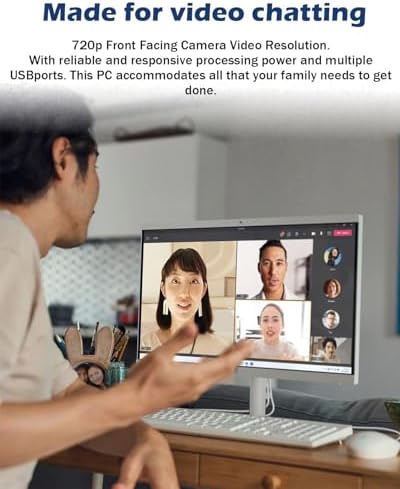
I use my computer for work, I work in multiple portals, and the speed is great. I love the 22in screen cause I can open multiple web pages and have it side by side as I work. my manager often have virtual meeting so the camera is very clear, I like the fact camera pushes down for privacy and you can pull it back up when ready to use. It’s very light weight, sometimes when I want to change scenery from the office upstairs I go down stairs to the kitchen.
2 people found this helpful
Tonstant Weader 2 –
Kinda cool, mostly stupid
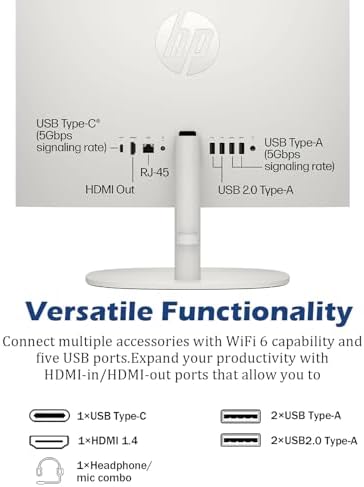
You get what you pay for. The peripherals bought separately aren’t all that expensive, so HP could have included better ones. The keyboard and mouse are pretty flimsy. It’s cool that the CPU is built into the monitor so there is no separate box on my desk. All the USB ports are in the back and the monitor does not swivel so they are hard to get to. The CD drive is installed vertically on the side, since there’s no box, they pretty much have to do that. Why do manufacturers insist on putting the power button on the back? It does not take up all that much room. Setting up is a pain. You have to have a Microsoft account to do so and you can’t get rid of the set up screen until you log into your MS account, which is really annoying. Cortana is no help. The monitor has a nice big screen, but if it can’t be raised, so you’d have to put it on a book or cardboard box or something. If you are on a tight budget, it’s not bad. However, if I hadn’t missed the return date, I’d have sent it back. I had an HP computer before and really liked it. Maybe I’d like one of their more expensive models. I would not recommend it. I’m going to have to buy a new mouse and keyboard. I really expected better of HP, even for a budget model.
4 people found this helpful
Lara –
Not for Gaming. Just for school or work.
Camera is not that great but it’s still okay if your not going to use it much. I was able to set it up easy and the steps to learning how it works was all done during the introduction of the set up. Audio and video quality is very good for its price. I personally just needed a computer for work and college. But I did buy a game called State of Decay and it was a bit laggy and the graphics for the game alone was not so great. I don’t recommend it for people looking for a gaming computer.
One person found this helpful