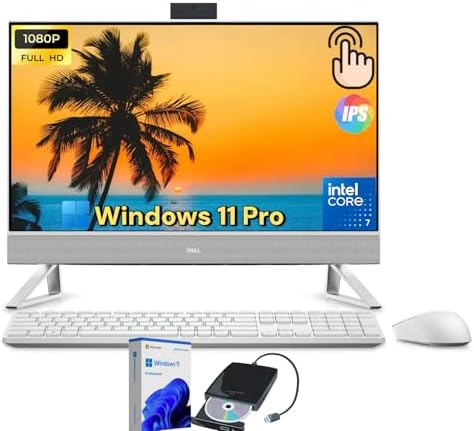



Dell Inspiron 27 All-in-One Desktop Computer – 27″ FHD IPS Touchscreen, Intel 10-Core 7
Dell Inspiron 27 All-in-One Desktop Computer â 27″ FHD IPS Touchscreen (1920×1080), Intel 10-Core i7-1355U (Up to 5.0GHz), 16GB DDR4 RAM, 1TB NVMe SSD, WiFi 6, Bluetooth 5.2, FHD Webcam, Windows 11 Home â Modern Home & Family PC with Elegant Design
Overview: The Perfect Centerpiece for Your Digital Life â Dell Inspiron 27 All-in-One Desktop
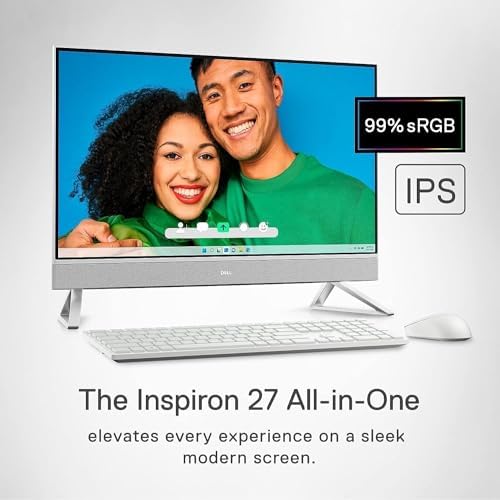
Your home desktop should be more than just a computer. It should be a statement piece, a family hub, and a productivity powerhouse all rolled into one. The Dell Inspiron 27 All-in-One Desktop delivers exactly thatâa stunning 27-inch FHD IPS touchscreen display wrapped in an elegant, minimalist chassis that looks beautiful in any room.
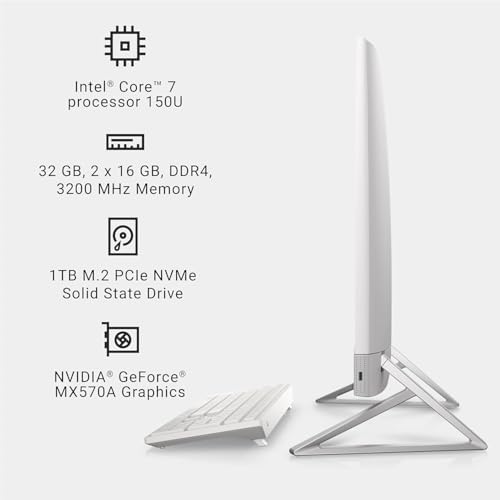
Powered by an Intel 10-Core i7-1355U processor, equipped with 16GB of DDR4 RAM, and featuring a massive 1TB NVMe SSD, this Inspiron 27 is purpose-built for modern families, remote workers, students, and creative enthusiasts. Whether you’re helping the kids with homework in Ohio, running your home business in Texas, streaming 4K movies in California, or video calling grandparents in Florida, the Dell Inspiron 27 All-in-One Desktop delivers the perfect blend of performance, style, and simplicity.
Say goodbye to tangled cables, bulky towers, and underpowered all-in-ones. The Inspiron 27 combines everything you needâcomputer, monitor, speakers, webcam, and microphoneâinto one gorgeous, space-saving package. Just plug it in and you’re ready to go.
Stunning 27-Inch FHD IPS Touchscreen Display
The centerpiece of the Dell Inspiron 27 All-in-One Desktop is its breathtaking 27-inch FHD IPS display. This isn’t just a screenâit’s your window to work, entertainment, and connection.
Display Specifications
| Specification | Detail |
|---|---|
| Screen Size | 27 inches (diagonal) |
| Resolution | 1920 x 1080 (Full HD) |
| Panel Type | IPS (In-Plane Switching) |
| Touchscreen | Yes (10-point multi-touch) |
| Aspect Ratio | 16:9 |
| Brightness | 250 nits (typical) |
| Color Gamut | 72% NTSC (typical) |
| Anti-Glare Coating | Yes |
| Viewing Angle | 178° horizontal / 178° vertical |
Why You’ll Love This Display
Vibrant, Accurate Colors:Â The IPS panel delivers consistent, vivid colors from virtually any angle. Whether you’re editing family photos, watching movies, or browsing the web, everything looks rich and lifelike.
Touchscreen Convenience:Â The 10-point multi-touch display lets you interact with Windows 11 naturallyâtap, swipe, pinch, and zoom just like on your tablet or phone. Great for kids’ educational apps, scrolling through recipes in the kitchen, or navigating maps.
Anti-Glare for Comfort:Â The anti-glare coating reduces reflections from windows and overhead lights, making it easier to work for hours without eye strain.
Perfect Size for Anything:Â 27 inches is the sweet spot for home desktopsâbig enough for side-by-side windows and immersive entertainment, but not so large that it overwhelms your desk.
Narrow Borders:Â The slim bezels create a modern, almost borderless look that maximizes screen real estate and minimizes visual clutter.
Powerful Performance: Intel 10-Core i7-1355U
At the heart of the Dell Inspiron 27 All-in-One Desktop lies the Intel Core i7-1355U processor from the 13th generation (Raptor Lake). This is not a compromised low-power chipâthis is a powerful mobile processor designed for responsive everyday computing.
Processor Architecture Breakdown
| Specification | Detail |
|---|---|
| Processor Generation | 13th Gen Intel Core (Raptor Lake) |
| Model | Intel Core i7-1355U |
| Total Cores | 10 cores |
| Performance Cores (P-cores) | 2 cores / 4 threads (up to 5.0GHz) |
| Efficiency Cores (E-cores) | 8 cores / 8 threads (up to 3.7GHz) |
| Total Threads | 12 threads |
| Max Turbo Frequency | Up to 5.0GHz |
| L3 Cache | 12MB Intel Smart Cache |
| Processor Base Power | 15W (efficient, cool, quiet) |
| Max Turbo Power | 55W |
What This Means for Your Family
The Dell Inspiron 27 All-in-One Desktop uses Intel’s hybrid architecture to intelligently assign tasks:
-
2 Performance Cores:Â Handle demanding tasks like video editing, photo rendering, and heavy multitasking
-
8 Efficiency Cores:Â Manage background tasksâWindows updates, antivirus, email sync, Spotifyâwithout slowing you down
-
12 Threads:Â Run multiple applications simultaneously without stuttering or lag
Real-World Performance
| Activity | Performance on Dell Inspiron 27 |
|---|---|
| Web browsing with 20+ tabs | Smooth, instant loading |
| Microsoft Office (Word, Excel, PowerPoint) | Blazing fast |
| Video conferencing (Zoom, Teams, Webex) | Crystal clear, no lag |
| Streaming 4K Netflix / YouTube | Perfect playback |
| Photo editing (Adobe Photoshop Elements) | Responsive, quick filters |
| Light video editing (1080p) | Smooth timeline scrubbing |
| Casual gaming (Minecraft, Roblox, Among Us) | Excellent performance |
| Running multiple apps simultaneously | No slowdowns |
| Family sharing (multiple user accounts) | Fast switching, responsive |
Compared to older Intel Celeron or Pentium-based all-in-ones, the i7-1355U in the Dell Inspiron 27 All-in-One Desktop delivers roughly 3-4x the multi-core performance. This means the computer stays responsive for years, not months.
Ample Memory: 16GB DDR4 RAM
The Dell Inspiron 27 All-in-One Desktop comes equipped with 16GB of DDR4 RAM operating at 3200MHz. This is the sweet spot for family and home office computing.
Why 16GB Matters
| Memory Usage | Typical Requirement | Dell Inspiron 27 Performance |
|---|---|---|
| Basic computing (email, web, documents) | 4-6GB | Plenty of headroom |
| Heavy multitasking (Office + 20 tabs + Spotify + Zoom) | 8-12GB | Smooth and responsive |
| Photo editing (Lightroom, Photoshop Elements) | 8-12GB | No lag, quick exports |
| Light video editing (Clipchamp, DaVinci Resolve) | 8-14GB | Handles 1080p easily |
| Casual gaming (Minecraft, Roblox) | 6-10GB | Runs great |
| Kids using educational software | 4-8GB | More than enough |
| Multiple user accounts | 8-12GB | Fast switching |
With 16GB of RAM, the Dell Inspiron 27 All-in-One Desktop handles everything a modern family can throw at it. Mom can be on Zoom, the kids can be on educational apps, and background updates can runâall simultaneously without slowdown.
Upgradeability
The RAM is not soldered. The Dell Inspiron 27 All-in-One Desktop uses standard SODIMM slots, allowing you to upgrade to 32GB in the future if your needs grow (2 x 16GB or 2 x 8GB depending on configuration).
Massive Storage: 1TB NVMe SSD
Slow storage ruins fast computers. The Dell Inspiron 27 All-in-One Desktop features a 1TB NVMe SSD utilizing the PCIe interface for lightning-fast data access.
Storage Performance Metrics
| Metric | Dell Inspiron 27 NVMe SSD | Old HDD | Standard SATA SSD |
|---|---|---|---|
| Sequential Read | Up to 3,500 MB/s | ~100 MB/s | ~550 MB/s |
| Sequential Write | Up to 2,800 MB/s | ~80 MB/s | ~500 MB/s |
| Windows Boot Time | 10-12 seconds | 60-90 seconds | 20-25 seconds |
| App Launch (Office) | Instant | 15-20 seconds | 3-5 seconds |
| File Transfer (10GB) | ~4 seconds | ~2 minutes | ~18 seconds |
Storage Capacity: 1TB Gives You Room For
-
Windows 11 and all applications (~50GB)
-
Thousands of family photos and videos
-
Hundreds of hours of music
-
Dozens of movies and TV shows
-
Multiple games (Minecraft, Roblox, Fortnite)
-
School projects and work documents
-
Backups of phones and tablets
Additional Storage Options
The Dell Inspiron 27 All-in-One Desktop also includes:
-
SD card reader for transferring photos from cameras
-
Multiple USB ports for external drives
-
Optional second drive bay (check configuration) for additional internal storage
No more “low disk space” warnings. No more deleting files to make room. 1TB gives your family room to grow.
Integrated Graphics: Intel Iris Xe
The Dell Inspiron 27 All-in-One Desktop features Intel Iris Xe Graphicsâa significant step up from basic UHD Graphics.
Graphics Capabilities
| Use Case | Performance |
|---|---|
| 4K video playback (Netflix, YouTube, Disney+) | Smooth, hardware-accelerated |
| Photo editing (Photoshop, Lightroom) | Responsive with quick filters |
| 1080p video editing (Clipchamp, DaVinci Resolve) | Smooth timeline, quick renders |
| Casual gaming (Minecraft, Roblox, Among Us, Fall Guys) | Excellent at 1080p |
| Older AAA games (GTA V, Sims 4, Portal 2) | Playable at medium settings |
| Video conferencing (Zoom, Teams with backgrounds) | No issues |
For family useâstreaming, homework, photo editing, casual gamingâthe integrated graphics are more than sufficient. You won’t need a separate graphics card.
Hardware Video Decoding
The Dell Inspiron 27 All-in-One Desktop supports hardware decoding for modern video codecs:
-
HEVC (H.265):Â Efficient 4K streaming
-
AV1:Â Newer codec used by YouTube, Netflix, and Amazon Prime
-
VP9:Â Used by YouTube
This means smoother, more efficient video playback with lower CPU usageâlonger component life and quieter operation.
Elegant, Space-Saving All-in-One Design
The genius of the all-in-one form factor is that the entire computer lives inside the display. The Dell Inspiron 27 All-in-One Desktop combines everything into one elegant package.
Dimensions and Weight
| Measurement | Detail |
|---|---|
| Height | 18.4 inches (467 mm) |
| Width | 24.1 inches (612 mm) |
| Depth | 1.6 inches (41 mm) â thin profile |
| Weight | Approximately 12.8 lb (5.8 kg) |
Where It Fits Perfectly
-
Home office desk:Â Replaces tower, monitor, speakers, and webcam
-
Kitchen counter:Â Touchscreen makes recipe browsing easy
-
Family room:Â Entertainment hub for movies and games
-
Dorm room:Â Space-saving design for students
-
Home business:Â Professional appearance for client meetings
-
Shared family computer:Â Central location for everyone to use
Adjustable Stand
The included stand offers:
-
Tilt adjustment: -5° to 25° for comfortable viewing angles
-
Height adjustment:Â Not available on base stand (optional stand available)
-
Stable base:Â Won’t tip over, even with enthusiastic touchscreen use
VESA Mount Compatibility
The Dell Inspiron 27 All-in-One Desktop includes VESA mounting holes (100mm x 100mm) on the back. You can:
-
Mount on a wall for a clean, modern look
-
Use an articulating arm for maximum adjustability
-
Install in a kitchen or retail space for space efficiency
Cable Management
Dell includes thoughtful cable management:
-
Power cord routes through the stand for a clean look
-
Peripheral cables can be hidden behind the display
-
One power cord onlyâno separate tower power cord
Built-in FHD Pop-Up Webcam with Privacy Shutter
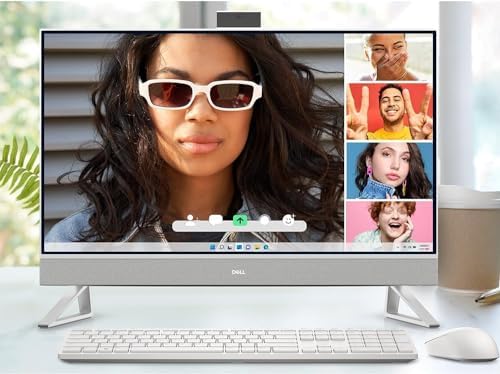
Video calls are a part of modern life. The Dell Inspiron 27 All-in-One Desktop features a built-in FHD (1080p) pop-up webcam that hides away when not in use.
Webcam Specifications
| Feature | Detail |
|---|---|
| Resolution | 1920 x 1080 (Full HD) |
| Type | Pop-up (retracts into bezel) |
| Privacy Shutter | Physical (camera hides when retracted) |
| Microphone | Dual-array digital microphones |
| Temporal Noise Reduction | Yes (clearer video in low light) |
| Wide Dynamic Range | Yes (handles backlighting) |
Why This Matters
Privacy You Can See:Â When the camera is retracted, you know it’s physically off. No software hacks can activate it. Peace of mind for the whole family.
Great Video Quality:Â 1080p resolution means you look sharp on Zoom calls with colleagues, family video chats, or virtual doctor appointments.
Clear Audio:Â The dual-array microphones pick up your voice clearly while reducing background noiseâless “you’re breaking up” from the other side.
Pop-Up Convenience:Â The camera pops up when you need it and disappears when you don’t. Clean, simple, and secure.
High-Quality Audio: Front-Firing Speakers
The Dell Inspiron 27 All-in-One Desktop features dual 5W front-firing speakers tuned by Waves MaxxAudio Pro.
Audio Features
| Feature | Benefit |
|---|---|
| Front-firing design | Sound comes toward you, not out the back or bottom |
| 5W per speaker (10W total) | Clear, room-filling audio |
| Waves MaxxAudio Pro | Advanced tuning for dialogue clarity and bass |
| 3.5mm headphone jack | Private listening when needed |
| Bluetooth audio support | Connect wireless headphones or speakers |
What You Can Enjoy
-
Movies and TV shows:Â Clear dialogue, immersive sound
-
Music:Â Rich, full audio for background listening
-
Video calls:Â Hear and be heard clearly
-
Casual gaming:Â Decent positional audio
-
YouTube and streaming:Â No external speakers needed
For most families, the built-in speakers are more than adequate. No need for separate computer speakers cluttering your desk.
Comprehensive Connectivity: WiFi 6, Bluetooth 5.2, and More
The Dell Inspiron 27 All-in-One Desktop includes modern connectivity standards for all your peripherals and networking needs.
Networking Features
| Feature | Specification | Benefit |
|---|---|---|
| WiFi 6 (802.11ax) | Dual-band (2.4GHz, 5GHz), 2×2 MU-MIMO | 3x faster than WiFi 5, better performance in crowded networks |
| Bluetooth 5.2 | Low energy, extended range | Connect wireless keyboards, mice, headphones, game controllers |
| Gigabit Ethernet (RJ45) | 10/100/1000 Mbps | Reliable wired connection for streaming or gaming |
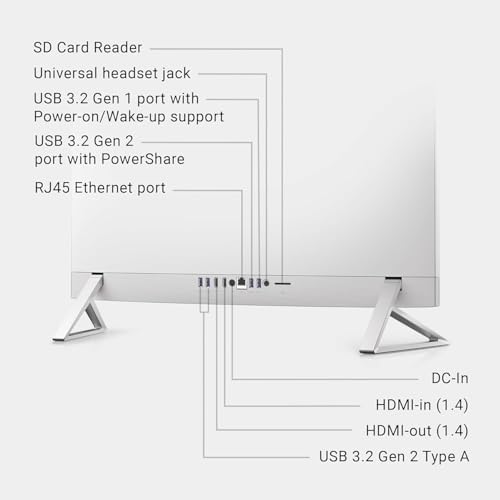
Complete Port Selection
The Dell Inspiron 27 All-in-One Desktop offers a generous selection of ports:
| Port Type | Quantity | Location | Use Case |
|---|---|---|---|
| USB 3.2 Gen 1 Type-AÂ (5Gbps) | 3 | Rear | Keyboard, mouse, printer, external drive |
| USB 3.2 Gen 1 Type-AÂ (5Gbps) | 1 | Right side | Flash drives, phone charging |
| USB 2.0 Type-A | 2 | Rear | Legacy devices, keyboard, mouse |
| HDMI 1.4b | 1 | Rear | Second monitor or TV output |
| RJ-45 Gigabit Ethernet | 1 | Rear | Wired network connection |
| SD Card Reader (3-in-1) | 1 | Right side | Transfer photos from camera |
| Headset Jack (3.5mm) | 1 | Right side | Headphones or headset |
| Power Connector | 1 | Rear | External power adapter |
Wireless Keyboard and Mouse
Many configurations of the Dell Inspiron 27 All-in-One Desktop include a wireless keyboard and mouse right in the box. No extra purchase needed. The wireless receiver is tiny and plugs into a USB portâor Bluetooth models connect directly.
Second Monitor Support
The HDMI 1.4b output allows you to connect a second monitor for dual-display productivity. Extend your desktop across two screens or mirror the display for presentations. Perfect for:
-
Spreadsheet work with reference documents on the second screen
-
Video editing with preview on one screen, timeline on the other
-
Teaching or presenting with a projector or TV
Windows 11 Home: Modern, Secure, and Family-Friendly
The Dell Inspiron 27 All-in-One Desktop comes with Windows 11 Home pre-installed and fully activated.
Key Windows 11 Features for Families
| Feature | Benefit |
|---|---|
| Microsoft Teams integration | Chat and video call directly from the taskbar |
| Snap Layouts | Easily arrange multiple windows side-by-side |
| Widgets | At-a-glance weather, news, calendar |
| Microsoft Store | Safe, curated apps for all ages |
| Family Safety features | Screen time limits, content filters, activity reports |
| Windows Hello | (Requires compatible webcam) Face or fingerprint sign-in |
| Auto HDR | Better gaming visuals on compatible displays |
| DirectStorage | Faster game loading on NVMe SSD |
Touch-Optimized
Windows 11 is designed for touch. On the Dell Inspiron 27 All-in-One Desktop, you can:
-
Swipe from the left for widgets
-
Swipe from the right for notifications
-
Pinch to zoom in photos and maps
-
Scroll with your finger in browsers and apps
-
Use the on-screen keyboard when the physical keyboard isn’t handy
Free Upgrade to Windows 11 (if applicable)
If your unit ships with Windows 10, the upgrade to Windows 11 is free and easy through Windows Update.
Dell Mobile Connect: Seamless Phone Integration
The Dell Inspiron 27 All-in-One Desktop includes Dell Mobile Connectâsoftware that bridges your PC and phone.
What You Can Do
| Feature | Benefit |
|---|---|
| Make/receive calls | Use your PC’s speakers and mic for phone calls |
| Send/receive texts | Type on a real keyboard instead of tapping on glass |
| Get notifications | See phone alerts on your PC screen |
| Transfer files | Drag and drop between phone and PC |
| Mirror your phone | Use Android apps on the big screen |
| iOS and Android support | Works with iPhones and Android phones |
Dell Mobile Connect runs locally on your PCâyour data stays private, not uploaded to the cloud. Available in the Microsoft Store.
Family-Friendly Features
The Dell Inspiron 27 All-in-One Desktop is designed with families in mind.
Microsoft Family Safety
Built into Windows 11, Microsoft Family Safety helps parents:
-
Set screen time limits for each child
-
Filter inappropriate websites and apps
-
See activity reports (what they searched, what apps they used)
-
Share location (for children with phones)
-
Manage spending in Microsoft Store
All from a central dashboard that parents control.
Kid-Friendly Content
The Dell Inspiron 27 All-in-One Desktop is perfect for:
-
Educational apps from Microsoft Store
-
Khan Academy, ABCmouse, Duolingo (web-based)
-
Minecraft: Education Edition
-
Zoom for virtual classes
-
Google Classroom
Multiple User Accounts
Create separate Windows accounts for each family member:
-
Parents:Â Full access, admin rights
-
Teens:Â Limited admin, content filters
-
Young kids:Â Strict time limits, app restrictions
-
Guests:Â Basic access, no personal files
Each user gets their own desktop, files, browser favorites, and settings. Switch users in seconds without logging off.
Energy Efficiency and Sustainability
The Dell Inspiron 27 All-in-One Desktop is designed with energy efficiency in mind.
Power Consumption
| State | Power Draw |
|---|---|
| Off | < 1W |
| Sleep | ~2-3W |
| Idle (desktop) | ~20-30W |
| Typical usage | ~40-60W |
| Maximum load | ~90W |
Compare this to a traditional desktop tower + monitor that might draw 150-250W. Over a year, the Dell Inspiron 27 All-in-One Desktop can save a typical family $30-50 in electricity costs.
Environmental Certifications
| Certification | Status |
|---|---|
| Energy Star 8.0 | â Certified |
| EPEAT Silver | â Registered (varies by config) |
| RoHS Compliant | â Yes (restricted hazardous substances) |
| Recyclable Packaging | â Yes (up to 90% recyclable) |
Responsible Materials
Dell uses:
-
Recycled plastics in the chassis (select configurations)
-
Responsibly sourced palm oil in packaging
-
Reduced BFR/PVCÂ materials
For environmentally conscious families, the Dell Inspiron 27 All-in-One Desktop helps reduce your carbon footprint.
Who Is the Dell Inspiron 27 All-in-One Desktop For?
The Dell Inspiron 27 All-in-One Desktop is the perfect choice for a wide range of USA customers.
1. Families with School-Age Children
-
Shared family computer for homework, research, and educational apps
-
Touchscreen makes learning interactive and engaging
-
Microsoft Family Safety gives parents peace of mind
-
Large screen allows multiple kids to gather around
-
1TB storage holds everyone’s files and projects
2. Remote Workers and Home-Based Professionals
-
Professional appearance for video calls
-
27-inch screen for side-by-side windows (email + documents)
-
FHD webcam and clear microphones for Zoom/Teams
-
Quiet operation won’t disturb calls
-
Clean, minimalist design looks great in home office
3. Students (High School and College)
-
Enough power for research papers, spreadsheets, presentations
-
Large screen for multitasking (notes + browser + document)
-
Touchscreen for annotating PDFs and taking handwritten notes (with stylus)
-
VESA mountable to save desk space in dorms
-
Affordable compared to laptops with similar specs
4. Seniors and Older Adults
-
Large, bright screen with adjustable text size
-
Touchscreen is intuitive (tap instead of mouse)
-
Built-in webcam for video calls with grandchildren
-
All-in-one design means fewer cables to manage
-
Windows 11 is designed for accessibility (voice typing, magnifier, narrator)
5. Creative Hobbyists (Photo Editing, Scrapbooking)
-
27-inch IPS display shows accurate colors
-
Touchscreen for zooming and panning photos
-
1TB SSD stores thousands of high-resolution images
-
16GB RAM handles Photoshop Elements and Lightroom
-
SD card reader for importing from cameras
6. Casual Gamers (Not Hardcore)
-
Plays Minecraft, Roblox, Among Us, Fall Guys, Fortnite (medium settings)
-
Touchscreen adds new gameplay possibilities
-
Large screen is immersive
-
WiFi 6 for lag-free online play
7. Small Business Owners
-
Use as a point-of-sale (POS) terminal with touchscreen
-
Customer-facing display for check-in or presentations
-
Professional all-in-one for reception areas
-
Clean, modern look impresses clients
8. Kitchen and Family Room Computers
-
Touchscreen is great for recipes (swipe, zoom, no mouse needed)
-
Compact design fits on kitchen counters
-
Built-in speakers for music while cooking
-
Easy to wipe clean (but avoid liquids near ports)
Pros and Cons at a Glance
| Pros | Cons |
|---|---|
| â  27-inch FHD IPS touchscreen â Beautiful, responsive, great viewing angles | â 1080p resolution only (not 4K) on base model |
| â Â Intel 10-core i7-1355UÂ â Excellent everyday performance | â Integrated graphics only â not for AAA gaming |
| â Â 16GB DDR4 RAMÂ â Smooth multitasking for families | â 60Hz refresh rate (not for competitive gaming) |
| â Â 1TB NVMe SSDÂ â Fast and spacious | â 250 nits brightness â not ideal for bright rooms |
| â  FHD pop-up webcam with privacy shutter â Secure, great video quality | â Stand lacks height adjustment (tilts only) |
| â Â Built-in WiFi 6 and Bluetooth 5.2Â â Fast wireless | â No Thunderbolt 4 / USB4 support |
| â  Clean, minimalist design â Looks great in any room | â External power adapter (brick) |
| â  All-in-one simplicity â One plug, no tower | â RAM is SODIMM (laptop memory, not desktop DIMMs) |
| â Â Touchscreen Windows 11Â â Natural, intuitive interaction | â No HDMI input (can’t use as monitor for other devices) |
| â  Wireless keyboard and mouse included (most configs) | â 72% NTSC color gamut (not professional grade) |
| â  VESA mountable â Wall or arm mounting option | â No built-in optical drive (rarely needed) |
| â  Good value for money â Lots of features at competitive price | â 1-year warranty (extendable with Dell Premium Support) |
Technical Specifications (USA)
| Specification | Detail |
|---|---|
| Brand | Dell |
| Series | Inspiron 27 All-in-One |
| Model Year | 2024/2025 (13th Gen Intel) |
| Form Factor | All-in-One Desktop |
| Display Size | 27 inches (diagonal) |
| Display Resolution | 1920 x 1080 (Full HD) |
| Display Type | IPS (In-Plane Switching) |
| Touchscreen | Yes, 10-point multi-touch |
| Brightness | 250 nits (typical) |
| Color Gamut | 72% NTSC (typical) |
| Processor | Intel Core i7-1355U (13th Gen, Raptor Lake) |
| CPU Cores / Threads | 10 cores / 12 threads (2 P-cores + 8 E-cores) |
| Max Turbo Frequency | Up to 5.0GHz |
| Cache | 12MB Intel Smart Cache |
| Graphics | Intel Iris Xe Graphics (integrated) |
| RAM | 16GB DDR4 3200MHz (2 x 8GB SODIMM) |
| Maximum RAM | 32GB (two SODIMM slots) |
| Storage | 1TB NVMe SSD (PCIe Gen3 or Gen4, depending on config) |
| Additional Storage | SD card reader (3-in-1), optional second drive bay |
| Operating System | Windows 11 Home (64-bit, pre-installed) |
| Webcam | FHD (1080p) pop-up webcam with privacy shutter |
| Microphone | Dual-array digital microphones |
| Speakers | Dual 5W front-firing speakers (10W total) with Waves MaxxAudio Pro |
| Wireless | WiFi 6 (802.11ax, 2×2 MU-MIMO) |
| Bluetooth | 5.2 |
| Wired Networking | Gigabit Ethernet (RJ45, 10/100/1000 Mbps) |
| Rear Ports | 3x USB 3.2 Gen 1 Type-A, 2x USB 2.0 Type-A, 1x HDMI 1.4b, 1x RJ-45 Ethernet, 1x Power |
| Side Ports | 1x USB 3.2 Gen 1 Type-A, 1x SD Card Reader, 1x Headset Jack |
| Included Accessories | Dell Wireless Keyboard, Dell Wireless Mouse, Power Adapter, Power Cord, Documentation |
| Stand | Tilt-adjustable stand (-5° to 25°) â height adjustment not included |
| VESA Mount | 100mm x 100mm (compatible, bracket not included) |
| Dimensions (with stand) | 18.4 x 24.1 x 1.6 inches (467 x 612 x 41 mm) |
| Weight (with stand) | Approximately 12.8 lb (5.8 kg) |
| Power Supply | External power adapter (90W typical) |
| Power Consumption | ~20W idle, ~60W typical, ~90W max |
| Warranty | 1-year limited warranty (parts, labor, onsite) â extendable with Dell Premium Support |
| Sustainability | Energy Star 8.0, EPEAT Silver (varies), RoHS compliant |
What’s in the Box?
When you purchase the Dell Inspiron 27 All-in-One Desktop, you receive:
| Item | Quantity |
|---|---|
| Dell Inspiron 27 All-in-One Desktop (main unit with stand attached) | 1 |
| Dell Wireless Keyboard (batteries included) | 1 |
| Dell Wireless Mouse (batteries included) | 1 |
| External power adapter (90W, USA plug) | 1 |
| Power cord | 1 |
| Documentation and warranty information | 1 |
Note: Configuration may vary by retailer. Some configurations include wired keyboard/mouse or no peripherals. Check your specific listing.
Comparison: Dell Inspiron 27 vs. Competitors
| Feature | Dell Inspiron 27 | HP All-in-One 27 | Lenovo IdeaCentre AIO 27 | Apple iMac 24″ |
|---|---|---|---|---|
| Display | 27″ FHD IPS Touch | 27″ FHD IPS | 27″ FHD IPS | 24″ 4.5K Retina |
| Touchscreen | â Yes | â No (optional on higher models) | â Yes (select models) | â No |
| Processor | i7-1355U (10-core) | Ryzen 5 or i5 | i7-1355U (10-core) | M3 (8-core) |
| RAM | 16GB DDR4 | 16GB DDR4 | 16GB DDR4 | 8GB unified |
| Storage | 1TB NVMe | 512GB SSD + 1TB HDD | 512GB NVMe | 256GB SSD |
| Webcam | FHD pop-up (privacy) | 5MP pop-up | 5MP pop-up | 1080p |
| Ports | Excellent (6 USB + HDMI) | Good | Good | Limited (2-4 ports) |
| Wireless Keyboard/Mouse | â Included | â Often sold separately | â Included | â Sold separately |
| Price | $$ (Best value) | $$ | $$ | $$$$$ |
| Touchscreen Value | âââââ | ââ | ââââ | â |
| Best For | Families, touch interaction | General home use | Home office | Apple ecosystem |
The Dell Inspiron 27 All-in-One Desktop offers the best combination of touchscreen functionality, performance, and valueâespecially for families who will use the touch interface daily.
Frequently Asked Questions (USA)
Q: Is the touchscreen worth it?
A: For families, absolutely. Kids naturally want to touch the screen. For recipe browsing, educational apps, photo scrolling, and Windows 11 navigation, the touchscreen is intuitive and fun. If you never want to touch your screen, consider a non-touch model. But for most families, the Dell Inspiron 27 All-in-One Desktop‘s touchscreen becomes a favorite feature.
Q: Can I use this as a monitor for a game console like Xbox or PlayStation?
A: No. The HDMI port on the Dell Inspiron 27 All-in-One Desktop is HDMI output (to connect a second monitor), not HDMI input. You cannot use the Inspiron 27’s display with an external device. If you need a monitor for consoles, consider a dedicated monitor or TV.
Q: Can I upgrade the RAM or storage?
A: Yes. The Dell Inspiron 27 All-in-One Desktop is designed for user upgrades:
-
RAM:Â Two SODIMM slots (supports up to 32GB DDR4)
-
Storage:Â M.2 SSD is replaceable; some models have a second 2.5-inch drive bay
-
Tools required:Â Small Phillips-head screwdriver
Opening the case does not void the warranty (USA consumer protection applies). Dell provides service manuals online.
Q: Is this good for video editing?
A: For 1080p video editing in Clipchamp, DaVinci Resolve (free version), or Adobe Premiere Elements, yes. The i7 processor and 16GB RAM handle 1080p timelines smoothly. For 4K video editing or professional work, you need a more powerful desktop with a dedicated graphics card and more RAM.
Q: Can I play Fortnite on this?
A: Yes. Fortnite runs well on the Dell Inspiron 27 All-in-One Desktop at 1080p with medium settings (60+ FPS). Other popular games like Minecraft, Roblox, Among Us, Fall Guys, and Rocket League also run great. For demanding AAA games like Call of Duty, Cyberpunk, or Starfield, you need a gaming PC with a dedicated graphics card.


Roberto ValerioRoberto Valerio –
The media could not be loaded.
En lo general vino bien el equipo solo que después de abrirlo me di cuenta que no viene el transmisor del teclado, asà que no se puede utilizar ese teclado, espero me lo puedan enviar lo antes posible.
Khan –
V good