


HP Flagship HD Laptop with 1 Year Office 365—14″ | 16GB RAM | 1.22TB Storage (64GB eMMC)

HP Flagship HD Laptop Review: What You Actually Get for Under $500
Scroll through any major US retailer and you’ll spot the “HP Flagship” name attached to a wide range of budget laptops—14-inch, 15.6-inch, and even 17-inch models, all wearing the same “AI Copilot” and “Student & Business” branding. The HD Laptop variant sits at the entry point of that lineup, built to answer one question: how cheap can a new Windows laptop get before it stops being usable?
Inside the Hardware
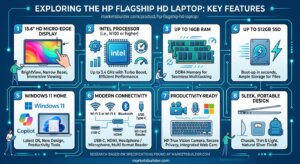
The core configuration centers on an Intel N150 processor—a four-core, low-power chip clocked around 3.6 GHz that’s designed for efficiency rather than speed. Base memory is typically 4GB of DDR4, though some listings market combined totals well above that using virtual memory expansion or paired external storage, not additional physical RAM chips.
Storage follows a now-familiar formula for this product line: a small internal 128GB UFS drive supplemented by an external docking station adding anywhere from 500GB to 1TB. Total advertised storage often reads as “1.12TB” or similar, which is accurate only when counting the external dock as part of the package.
The display is a 14-inch HD panel at 1366×768 resolution—functional for text and browsing, but noticeably softer than the Full HD (1920×1080) panels now standard on most mid-range laptops. Connectivity holds up well for the price tier, with Wi-Fi 6, Bluetooth 5.4, HDMI, USB-C, and USB-A all included. The laptop ships in Windows 11 S mode and bundles a one-year Office 365 subscription plus basic Microsoft Copilot access.
Real-World Expectations
At this price point—commonly under $300–$500 depending on configuration and retailer—this laptop is designed for a narrow set of tasks: email, web browsing, document editing, and video calls. It is not intended for multitasking with many browser tabs, photo or video editing, or any software requiring dedicated graphics. The 4GB RAM baseline in particular will show its limits quickly under modern Windows workloads.
Pros and Cons
Pros:
- Aggressive US pricing makes it accessible for tight budgets
- Bundled Office 365 subscription adds genuine value over the laptop’s cost
- Wi-Fi 6 and Bluetooth 5.4 are modern standards rarely found this cheap
- Lightweight, portable build suited to students carrying it daily
- Multiple color and configuration options across retailers
- Windows 11 S mode adds a security-focused layer for school or shared use
Cons:
- 1366×768 HD resolution feels dated next to Full HD competitors
- 4GB RAM is restrictive even for light multitasking
- Advertised “1.12TB” storage largely depends on an external docking accessory, not internal capacity
- Windows 11 S mode blocks non-Microsoft Store apps until manually upgraded
- Intel N150 is an efficiency chip, not a performance one—expect slower load times under load
- Build materials and long-term durability trail HP’s higher-tier laptop lines
FAQs
1. Why does the HP Flagship HD Laptop advertise over 1TB of storage if it only has 128GB internally?
The larger figure combines the laptop’s internal 128GB UFS drive with an external docking station (often 500GB–1TB) included in the box. It’s genuine extra storage, but it’s not built into the laptop itself—worth checking before assuming it’s all onboard capacity.
2. Is 4GB of RAM enough for everyday use?
It’s enough for light tasks like browsing, email, and document editing, but it’s on the low end for 2026. Having many browser tabs open or running several programs at once will likely cause noticeable slowdowns. If your budget allows, a configuration with more RAM will feel meaningfully smoother.
3. What does Windows 11 S mode mean, and can I change it?
S mode limits installations to apps from the Microsoft Store for added security and speed, which is common on budget laptops aimed at students. It can typically be switched to standard Windows 11 for free through Settings, which unlocks the ability to install any desktop software—but this is currently a one-way switch and can’t be reversed.
Bottom Line
The HP Flagship HD Laptop delivers exactly what its price suggests: a functional, no-frills Windows machine for basic daily computing. It’s a reasonable stopgap or secondary device, but buyers expecting smooth multitasking or long-term performance should look at HP’s mid-range lines instead. Read the specific configuration carefully—RAM, storage, and processor generation vary meaningfully between listings sharing this same “Flagship” name.

B. –
Basic laptop
The laptop arrived fine. Its just not a very good laptop and regardless of internet its pretty slow. It gets the job done, however. If you need a quick laptop that will just take notes and help with school work etc this will do for a while. Basic use only.
Elisa P. –
Nice small laptop
Nice small laptop. Good for what I need it for.
S.A. –
This is not what you think it is
I have never felt scammed by a purchase before. I am so disappointed! It does NOT have 1 TB storage. Do not buy for remote work or for any kind of work. This computer has finally convinced me to switch from PC to mac. Here are my issues which might not be the same for you…The computer has very little storage and memory space. I tried to upgrade the OS, which it is telling me to do, but I need an external hard drive as there’s very little disk space to do so. What’s taking up disk space? Of the 50GB-ish that comes with the laptop (not even 64), 50% of that is taken up by system required stuff. The remaining is other and apps and documents. I barely had 2 documents on the computer. I stripped it of all apps, except MS Office and still I couldn’t install without an external hard drive which I don’t have.Then, I wasn’t aware of this but with windows OS 10 S, you can only download apps that are on the Microsoft app store. Chrome is gone, Dropbox isn’t there, adobe acrobat isn’t there.I may be old school and used to what I’m used to but there are some things that just came standard with a generic MS enabled PC that’s just gone. If you are a gamer, this laptop is definitely not for you as you just won’t have enough memory space.This laptop is only useful if you want to use it as a glorified typewriter and email platform. I am irritated and disappointed.
40 people found this helpful
Mattieajay –
Great laptop
Met all of my expectations. The battery is great.
carl –
Good
Great laptop
ibrahin antunez –
Excelente laptop
Excelente laptop, buena relación precio calidad.. llego sin problema
Kindle Customer –
Not what I expected
It has been months since I got this and was sorely disappointed on opening. It seemed to get worse for Mr Anyway. It had been sometime since I bought a laptop but the thing seems to have less weight than my new tablet which I bought after this. I bought not access anything online and after several weeks gave up. Note I used to maybe a 6.5 -7/10 on my office computer and my previous laptop. I would never claim to be particularly overly literate on them so I would say a lot of this is me and maybe what programs I don’t want to pay for but don’t know how to work around. Between the weight (my pov is light slamming a car and getting a thig versus thunk[i.e. pos]) and not being able to my email, go online and search, play the games I want. I would not buy this. The score based on my own deficits taken into account then based on my honest opinion.
2 people found this helpful
Vladsko –
Love it
Exactly what I needed to get. It works great and the customer services was beyond helpful with a little snag I had. Thank you.
2 people found this helpful
David –
Feedback
Nice product!
EricEric –
Screen freezes
Got it and the screen froze twice and now this is the looks of the screen as it froze for a third time