
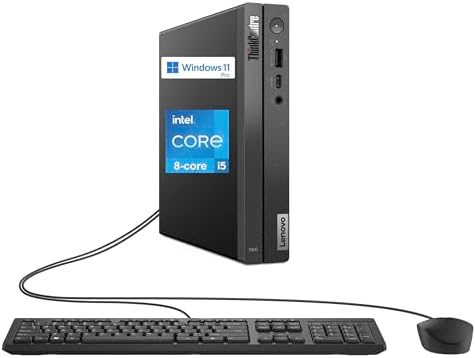
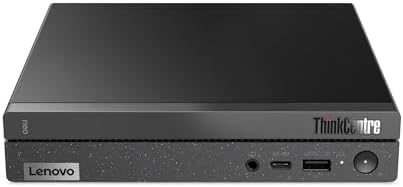

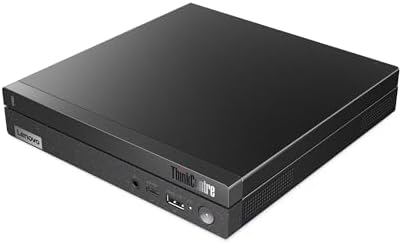

Lenovo ThinkCentre Neo 50Q Gen 4 Mini Desktop Computer, 8-core Intel Core i5-13420H
Lenovo ThinkCentre Neo 50q Gen 4 Tiny: A Compact Desktop for U.S. Business Users
For offices that need reliable, everyday computing without sacrificing desk space, the Lenovo ThinkCentre Neo 50q Gen 4 Tiny has become a go-to option in the ultra-compact business PC category. Built on Lenovo’s long-running “Tiny” 1-liter chassis, it’s designed to run the modern hybrid-work mix of local software, SaaS tools, and streaming applications reliably, without demanding a full-size tower’s worth of desk real estate.
Overview
The Neo 50q Gen 4 Tiny packs a full desktop platform into a chassis roughly the size of a hardcover book—about 7.2 x 7.05 x 1.44 inches and under 2.5 pounds. It’s built on 13th Gen Intel Core processors, up to a Core i5-13420H, an 8-core chip (4 performance cores plus 4 efficient cores) with performance cores boosting up to 4.6 GHz. Depending on configuration, it ships with anywhere from 8GB up to 64GB of DDR4 memory and SSD storage options ranging from 256GB up to 2TB, running Windows 11 Pro.
It isn’t positioned as Lenovo’s flagship performance machine—that’s reserved for higher-tier ThinkCentre and ThinkStation lines—but independent testing has found it more than capable of handling the daily workload of a typical office employee, including use as a virtual desktop infrastructure (VDI) client for organizations running centralized desktop environments.
Key Specifications
- Processor: Up to Intel Core i5-13420H (8-core, boosts to 4.6GHz)
- Graphics: Integrated Intel UHD Graphics
- Memory: Configurable from 8GB up to 64GB DDR4
- Storage: SSD options from 256GB up to 2TB PCIe
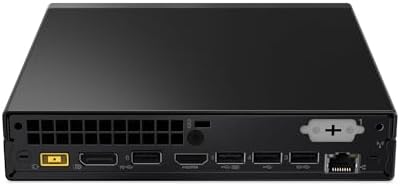
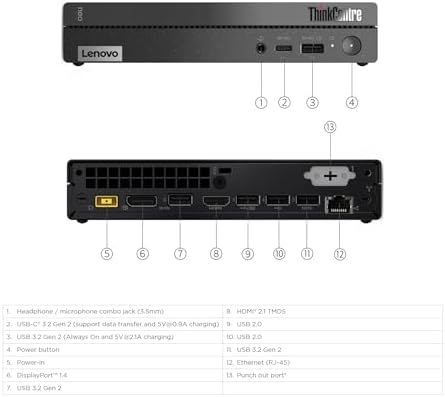
- Display support: Dual 4K monitor output via HDMI, DisplayPort, and USB-C
- Connectivity: Wi-Fi 6, Gigabit Ethernet, Thunderbolt 3, Bluetooth 5.2, USB 3.2 Gen 2
- OS: Windows 11 Pro
- Dimensions/Weight: Approximately 7.2 x 7.05 x 1.44 in., about 2.45 lbs
- Expansion: Optional BTB punch-out for an extra DisplayPort, VGA, or COM port; supports docking stations for added connectivity
Who It’s Best For
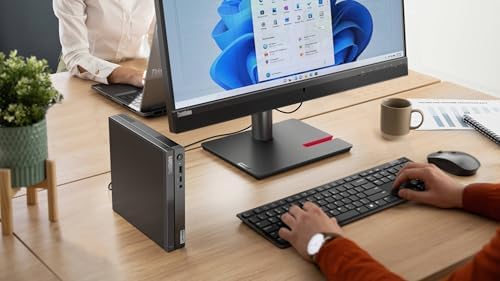
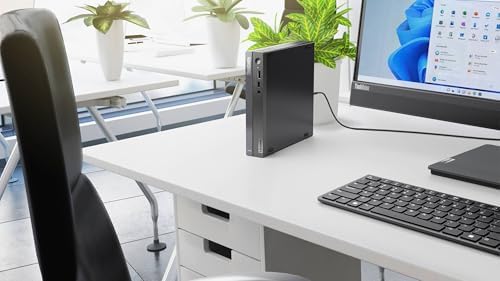
The Neo 50q Gen 4 Tiny is built for standard office and hybrid-work scenarios: document editing, cloud applications, video conferencing, dual-monitor multitasking, and light creative tasks. It’s also a solid pick for VDI deployments, front-desk or reception stations, and classroom or STEM lab use where a compact, reliable machine matters more than raw graphics horsepower. Businesses that need it can mount the unit directly to the back of a monitor, keeping desks completely clear.
It’s not the right choice for graphics-intensive workloads, serious gaming, or heavy video/3D rendering—for those, a workstation-class tower with a dedicated GPU is the better investment.
Pros
- Extremely compact footprint—around 1 liter in volume, small enough to mount behind a monitor or tuck out of sight entirely.
- Configurable up to 64GB RAM and 2TB SSD, giving it real headroom for multitasking despite the small chassis.
- Strong connectivity for its size, including Thunderbolt 3, dual 4K display output, Wi-Fi 6, and Gigabit Ethernet.
- Quiet, energy-efficient operation, well suited to shared office spaces.
- Upgradeable design—internal components are more accessible than in many ultra-compact rivals, useful for IT departments maintaining a fleet.
- Business-grade reliability, backed by Lenovo’s commercial support and warranty options.
Cons
- Base configurations are underpowered—entry models with 8GB RAM and a 256GB SSD feel tight for multitasking-heavy roles and may need an immediate upgrade.
- Integrated graphics only—fine for office work, but not suited to gaming or GPU-accelerated creative work.
- Still on DDR4 memory rather than the faster DDR5 found in some newer competitors.
- Wi-Fi 6 rather than Wi-Fi 6E/7, a minor step behind the latest wireless standard.
- USB-C port limitations—it doesn’t support power delivery for charging peripherals without additional accessories.
- Not built for heavy workloads—video editing, engineering simulation, or high-end multitasking will bottleneck on the integrated graphics and base memory configurations.
Frequently Asked Questions
Is the Lenovo ThinkCentre Neo 50q Gen 4 good for small businesses? Yes. It’s built specifically for the kind of everyday office computing—email, cloud apps, video calls, multitasking—that most small business workstations handle daily, and its size makes it easy to deploy across multiple desks.
Can it support two monitors? Yes, the Neo 50q Gen 4 Tiny supports dual 4K displays through its combination of HDMI, DisplayPort, and USB-C outputs.
How much RAM should I choose? For general office use, 16GB is a comfortable baseline. If the machine will run demanding multitasking, VDI sessions, or several resource-heavy applications at once, stepping up to 32GB or higher is worth the cost.
Is it upgradeable after purchase? The chassis is more accessible than many ultra-compact competitors, allowing for memory and storage upgrades down the line—useful for extending the machine’s useful life as workloads grow.

Reviews
There are no reviews yet.