
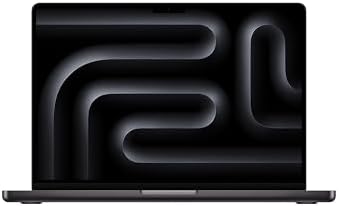

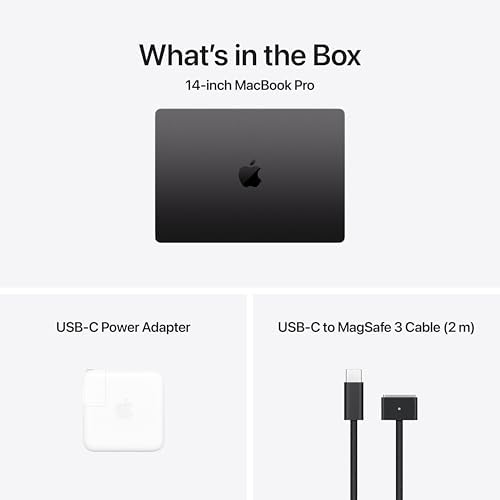
Apple 2025 MacBook Pro Laptop with M4 Chip with 10‑Core CPU
The 2025 Apple MacBook (M4)—Is the Entry-Level Pro Still Worth It?
Apple no longer markets a machine under the simple “MacBook” label. So, if you encounter a listing using that terminology, you are most likely looking at the entry-level 14-inch MacBook Pro equipped with the standard M4 processor. It represents the least expensive doorway into Apple’s professional notebook range, positioned above the MacBook Air while remaining considerably more affordable than the M4 Pro and M4 Max variants aimed at demanding creative workloads.
Interestingly, the base configuration may be more sensible than its more extravagant siblings for a surprisingly broad audience. You get much of the Pro experience without immediately venturing into workstation-level territory.
What You Actually Get
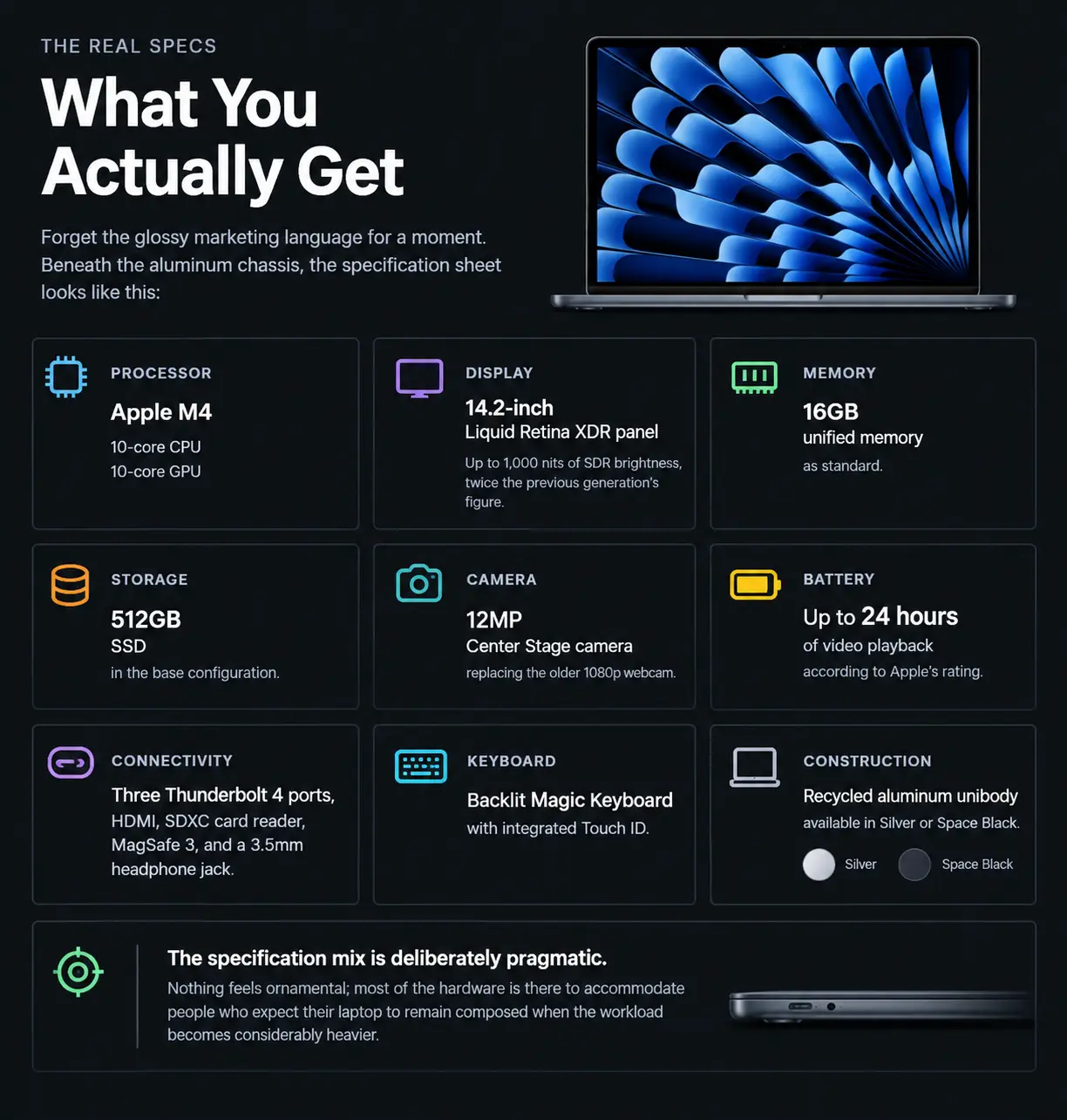
Forget the glossy marketing language for a moment. Beneath the aluminum chassis, the specification sheet looks like this:
- Processor: Apple M4 with a 10-core CPU and 10-core GPU
- Display: 14.2-inch Liquid Retina XDR panel with up to 1,000 nits of SDR brightness, twice the previous generation’s figure
- Memory: 16GB unified memory as standard
- Storage: 512GB SSD in the base configuration
- Camera: 12MP Center Stage camera, replacing the older 1080p webcam
- Battery: Up to 24 hours of video playback according to Apple’s rating
- Connectivity: Three Thunderbolt 4 ports, HDMI, an SDXC card reader, MagSafe 3, and a 3.5 mm headphone jack
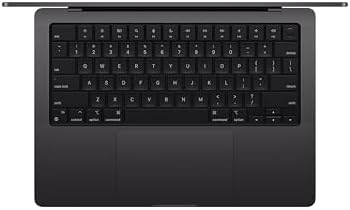
- Keyboard: Backlit Magic Keyboard with integrated Touch ID
- Construction: Recycled aluminum unibody available in Silver or Space Black
The specification mix is deliberately pragmatic. Nothing feels ornamental; most of the hardware is there to accommodate people who expect their laptop to remain composed when the workload becomes considerably heavier.
US Pricing: Where the Debate Begins
The starting price is $1,599 in the United States. Students and educators can receive a $100 education discount, bringing the effective entry price down accordingly.
That figure places the machine roughly $600 above the entry-level MacBook Air. And that price gulf is difficult to ignore. The crucial question isn’t whether the MacBook Pro is more capable—it is. The real issue is whether your particular workload will actually exploit those additional capabilities.
Who Should Consider This Laptop?
For ordinary computing—email, web browsing, document editing, YouTube, Netflix, and similar tasks—the base M4 MacBook Pro is arguably more machine than necessary. A MacBook Air can perform those duties without breaking a sweat and leaves considerably more money in your wallet.
The Pro begins to justify itself when your workload becomes more strenuous.
Developers compiling projects locally, students manipulating substantial datasets, photographers processing batches of images, designers working with sizeable creative files, and professionals juggling numerous demanding applications can all benefit from the additional thermal headroom.
One important distinction is hidden beneath the chassis: active cooling.
Unlike the fanless MacBook Air, the MacBook Pro incorporates a cooling system designed to dissipate heat during prolonged workloads. That matters because sustained processing can continue at a steadier pace rather than relying solely on short-lived performance bursts.
For extended development sessions or lengthy rendering and export jobs, that difference can become much more consequential than benchmark figures suggest.
However, there is a ceiling.
If your routine involves serious video production, intensive 3D rendering, complex simulations, or genuinely punishing multitasking, the standard M4 may eventually feel restrictive. That’s precisely where Apple’s M4 Pro and M4 Max configurations enter the picture.
Advantages
A Remarkably Capable Display
The 14.2-inch Liquid Retina XDR display is one of the machine’s most conspicuous strengths. Its brightness and high-contrast presentation give photographs, video, and other visual material considerably more punch than a conventional laptop panel.
The 1,000-nit SDR brightness rating is particularly notable when compared with the previous generation.
Better Sustained Performance
The integrated cooling fan is not merely a technical footnote. Under prolonged computational pressure, active cooling allows the M4 to maintain performance more consistently than a passively cooled machine can.
For workloads that run for minutes or hours rather than seconds, that distinction matters.
Excellent Battery Endurance
Apple rates the machine for up to 24 hours of video playback. Actual longevity will naturally vary with brightness, applications, wireless activity, and workload intensity, but the headline figure remains impressive for a notebook in this class.
A More Generous Port Selection
The MacBook Air’s minimalist port arrangement isn’t ideal for everyone. The MacBook Pro addresses that limitation with HDMI and an SDXC card slot alongside its Thunderbolt 4 connections.
For photographers, content creators, and anyone regularly connecting external displays or storage, those ports can eliminate the nuisance of carrying a collection of adapters.
A Much Better Webcam Experience
The 12MP Center Stage camera is another meaningful refinement. It offers a more contemporary video-call experience than the older 1080p camera and can keep the subject centered during compatible video conversations.
For remote workers and students who spend substantial time on calls, that is a practical improvement rather than merely a specification-sheet upgrade.
Touch ID Comes Standard
The backlit Magic Keyboard and Touch ID are included without requiring an additional configuration. Authentication is quick, convenient, and well integrated into the macOS experience.
Drawbacks Worth Considering
The Price Gap Is Substantial
The biggest stumbling block remains the cost. The base MacBook Pro commands a sizable premium over the MacBook Air, yet everyday applications may not feel dramatically quicker.
If your workload is mostly lightweight, the additional expenditure can be difficult to rationalize.
512GB Storage Can Disappear Quickly
The entry configuration includes a 512GB SSD. That sounds respectable until large photo libraries, video footage, development environments, and creative applications begin accumulating.
Apple’s storage upgrades can also become expensive rather quickly, so buyers should consider their storage requirements before ordering.
The Base Configuration Has Limited Expansion Headroom
The standard M4 configuration comes with 16GB of unified memory. Users who require substantially more memory are pushed toward higher-tier configurations, which changes the economics of the purchase.
For professionals working with unusually large projects, this can become an important consideration rather than a minor specification detail.
It Is Heavier Than the Air
Portability enthusiasts may notice the difference immediately. The MacBook Pro is thicker and heavier than the MacBook Air.
That extra mass isn’t accidental—it accompanies the brighter display, cooling system, and broader connectivity—but frequent travelers may still prefer the lighter machine.
The Fan Can Be Heard
Active cooling is advantageous during sustained workloads, but it comes with one unavoidable trade-off: fan noise.
MacBook Air users accustomed to a completely silent, fanless design may find the acoustic difference noticeable when the Pro is pushed hard.
Casual Users May Not Need It
Someone whose computing routine consists primarily of browsing, streaming, email, and office documents probably won’t exploit the machine’s full potential.
In such circumstances, the MacBook Air can cover the same territory while demanding substantially less from the buyer’s budget.
Final Take
The entry-level 2025 MacBook Pro with the M4 chip occupies an intriguing middle ground in Apple’s notebook ecosystem. It isn’t designed to replace the heavyweight M4 Pro or M4 Max machines, yet it offers considerably more thermal and connectivity headroom than the MacBook Air.
For users whose workloads regularly exceed casual computing but stop short of workstation-class demands, the combination of an XDR display, active cooling, substantial battery endurance, and a richer selection of ports makes the machine particularly compelling.
For everyone else, the calculation is different. The extra $600 or so over the entry MacBook Air is meaningful, and the benefits only become apparent when your workload actually puts them to work.
In other words, the base M4 MacBook Pro isn’t universally necessary. It is a machine designed for a particular kind of buyer—someone who wants more breathing room than Air provides but doesn’t require the formidable horsepower of Apple’s higher-tier Pro and Max chips.
Dilone DigitalDilone Digital –
The Best Mac for Developers Yet
As a developer, performance, reliability, and efficiency are non-negotiable. After upgrading to the MacBook Pro with the M4 chip, I can confidently say: this is the best Mac you can get if you’re a developer like me.The jump in speed is noticeable across the board. Whether I’m compiling large projects, running Docker containers, or juggling multiple VS Code windows with Chrome, Postman, and the terminal—everything feels faster and smoother. Thermal management is excellent, meaning I can work in silence without the fans kicking in or the machine heating up under pressure.Battery life is another huge win. I can go through a full workday on a single charge, even with my usual heavy dev workflow.If you’re in the Apple ecosystem and you’re serious about development—whether it’s web, mobile, backend, or even AI/ML—the M4 MacBook Pro is an investment that pays off immediately in productivity and peace of mind.
26 people found this helpful
Garrett Wiley –
Incredible performance
This is my very first Apple device, my initial thoughts are:I am very impressed by the hardware of this device. Specifically:- A quick CPU benchmark placed this at around 90% of my desktops performance (Ryzen 9 9800X3D). For a laptop, that is absolutely unheard of.- The battery seems to last forever, even with semi-intensive workloads. At one point I used it for an hour and still had 97% battery.- The display is incredible. The contrast, resolution, and refresh rate combined make this about the best I’ve seen.- The webcam is high quality.- The MagSafe charger is very niceIn general, Macs don’t support as much software as Windows. In my case, it does support everything I would need a laptop for, but it is something to keep in mind.However, because Apple has their own OS, hardware, etc, the software experience is far more tailored to the device than Windows devices are. As an example, the webcam settings are very easy to use and access.The device itself is very light and thin, it was a little smaller than I expected, ordering the 14 inch one, but I don’t have any issues with it.In conclusion: This is a premium laptop, for a premium price – designed with ease of use and workloads in mind.
78 people found this helpful
Bienvenido VillanuevaBienvenido Villanueva –
⭐️⭐️⭐️⭐️☆ Powerful, Sleek, and Fast — But the Black Finish Needs Care
The MacBook Pro M4 14-inch is hands-down one of the fastest, smoothest laptops I’ve ever used. Everything from boot-up to heavy multitasking is incredibly quick and responsive. Apps launch instantly, video editing is seamless, and battery life is excellent — I can go a full day without needing to plug in.The screen is gorgeous, speakers are rich and clear, and the keyboard/trackpad combo is still the best in the game. It feels like a true professional machine in a compact body.✅ What I Love: • Blazing fast performance with the new M4 chip • Beautiful 14” Liquid Retina XDR display • Long-lasting battery • Solid build quality — feels premium and sturdy • Quiet and cool under load⚠️ Minor Concern:I went with the black (Space Black) finish, which looks amazing out of the box — but it picks up fingerprints and smudges easily. Even with clean hands, I find myself constantly wiping it down to keep it looking clean. It doesn’t affect performance at all, but something to be aware of if you’re picky about aesthetics.⸻💬 Final Verdict:If you want a powerful, premium laptop for work, creativity, or everyday use, the MacBook Pro M4 14” is an absolute beast. Just be ready to give the black finish a little extra care — or consider using a case or skin if that kind of thing bothers you.
27 people found this helpful
Matthew Wilson –
Power house def more then I needed
This MacBook Pro is a powerhouse. The 2024 model is incredibly fast, with apps opening instantly and multitasking handled with ease. The display is stunning — bright, sharp, and with amazing color accuracy that makes everything from work documents to movies look incredible. Battery life is excellent, easily lasting all day with normal use, and the build quality is exactly what you’d expect from Apple: sleek, solid, and premium. The keyboard is comfortable to type on for long stretches, and the trackpad remains the best in the business. I’ve used both Windows laptops and Macs, and this machine is easily the smoothest computing experience I’ve had. Perfect for business, creative work, or just everyday tasks. If you want a laptop that delivers performance, reliability, and design in one package, this is it.
6 people found this helpful
Dee Dee –
Perfect Laptop for Productivity
I have had this laptop for 6 months now. It feels very premium, the screen is great, battery is great, keyboard and trackpad is great, and performance is great. It handles what ever task I need if to do. It was also easy to set up as well. Since I got the 14 inch it was also very portable. I don’t have any regrets buying it.
One person found this helpful
bobbyinpa –
Great MacBook Pro M4 for home and school
Great price, 1 TB SSD, 24 GB RAM allows for satisfying use and Sequoia Mac OS is a strong performer. Black case is handsome and I never hear the fans ramp up.
3 people found this helpful
Frumplegoat Kittenmitten –
Longest lasting battery I’ve ever seen in a laptop
Very fast laptop, very long battery life. For the graphically interesting games natively compatible with it, very good graphics performance. The display is amazing and is capable of twice as many pixels as it shows you. It was a good value in a Black Friday sale (~$1400), but this (M4 Pro 12/16) chip is on par with or under performance of the prior generation M3 Max 14”, so if it can get one of those for a good deal refurbished or open box, there is no shame in it. As with all M1/2/3/4s, there are dedicated neural cores for Apple Intelligence to run, which allows for a personalized Siri who listens to you and watches you all the time, without sharing this information. You can disable Apple Intelligence and Siri, but after I got past the creepiness, I configured Siri as an Irish Female, and it makes everything lovely. There is a lot of integration with other Apple devices, like you can operate your iphone from a distance on your MacBook. You can also receive texts and Messages from your iPhone, and easily use it for tethering, as a substitute for your webcam (the webcam is pretty solid nonetheless). This model supports linking hearing aids and also supports airpods much in the same way the iPhone does. You can easily use your living room TV as a second monitor on the fly, and if you can plug in via HDMI, you can get the whole 4K@120hz. MacOSX is a great operating system, built on Unix, and with tons of room for customization for beginners to super users. Time Machine backups with your own plug-in hard drives and iCloud are incredibly convenient. Safari gets better and better, but the Mac versions of Chromium and Firefox also dazzle.For most programs that aren’t games, macOSX is widely supported, but if you just *need* it, parallels desktop and vmware can run windows for you.New users ought to pay close attention to Tips and go into settings and learn all the trackpad gestures. You won’t want to come back to a different trackpad, and until you want to game, you will not care to use a mouse.Anyway, I got this for my wife as a gift, partly because she needed a new computer and partly because I wanted to convert her. She seems pretty converted.
104 people found this helpful
Onasis VillarOnasis Villar –
Overall good price and product.
Pretty good purchase. I saved more than going to the Apple Store. I received support from Apple during initial setup and it has been working pretty well. It is my first apple computer so trying to get used to MacOS. It was easy to setup with the exception of remembering my apple credentials. Head for power supply is a bit bulky but that is something from Apple.
11 people found this helpful
Amazon Customer –
Almost perfect, except of the price
My 16 inch 2019 MacBook i9 is always hot to the touch and it drains the battery in about 3 hours. Obviously something is wrong that I didn’t want to hash out since Rosetta 2 is going to faze out in 2027. In case you are unaware, once OS X stops supporting Intel, you will not be able to update OS X on Macs with Intel processors.I went with a 14 inch M4 with 16GB or RAM and 512GB of storage. I also added AppleCare +. Which the laptop automatically added to the warranty with zero issues. I couldn’t justify the extra money for a 16 inch. It would be nice if it had 1TB of storage since file sizes are always growing. The new M4 processor MacBook pros are excellent. Even the base model I went with is extremely quick. It loads apps such as the Adobe Creative Suite and Office programs which have been optimized for the silicon extremely quickly. The workflows through moderate video and picture editing are significantly faster than the previously mentioned MacBook and a newer Lenovo Thinkpad i7. It is surprisingly thicker, about 1/2 inch, than previous models. Its thickness reminds me of the 2012 unibody MacBook pros. Regarding weight, you have a high end laptop that is built for speed making it weigh about 4.5 pounds. I wouldn’t consider it a boat anchor, but it is more to lug across an airport than more portable models. There is no problem putting it in any case designed for 15 inch laptops. I am a fan of the travel pro models. The premium elite is able to carry this laptop and a 15.6 inch Lenovo in separate compartments along with a power brick (they can use the same brick) and enough office supplies to assemble contracts. The display is sharp with good color reproduction. Like all MacBooks, it is built well. We don’t like to drop laptops, but this one with everything solid state, has good survivability potential. I suspect it will have a few dents like all of my previously retired MacBooks when the time comes. It comes with a 65 watt charger. You can plug the larger 96 – 130 watt USB C chargers in it. It will not damage the laptop or significantly shorten the battery life. I am a fan of the return of the Mag Safe port. This really helps make sure that the dog or a clumsy family member doesn’t trip over the charger cable and damage your port. It is also nice to have the return of HDMI so I don’t have to remember an adapter if I am presenting. I have never been a fan of single type flash card readers. High end camera makers have moved from SD to CF Express cards. I would rather see a legacy USB port or another Thunderbolt 4 port instead of the SD reader. It is nice that Apple started braiding their cables. Living in the extremely dry Rocky Mountain West, the old vinyl cables always dried out, frayed, and looked tacky with electric tape until I retired them. The M4 sips the battery. Taking it to work, I usually consume about 10% battery life per hour. Depending on your software and usage, you could easily go all day without needing to plug this in. Unless I am rendering video, there is no significant performance decrease when the laptop is not plugged in. The magic in the M silicon chips reminds me of the leap from Pentium 4 to Core about 15 years ago. Time will tell, but it looks like Apple fixed the hacking vulnerabilities that plagued the earlier M series processors. Being able to go all day, there is no reason to seek or fight for an outlet while traveling with this laptop.I do have a few dislikes. First, the price. I know that you pay for high end computers, but it seems like Apple adds an additional 25% to the premium. Second, I couldn’t care less about a similar experience between a laptop display and a phone or iPad display. The notch with the camera is stupid. It is especially annoying if you have older applications that don’t move the menus around the notch. When I am editing photos or video, I find it really distracting. Third, I know that Apple will never admit their mistake, but printers, scanners, mice, jump drives, and almost every other device is still most likely USB 3. They really should have a legacy port. Carrying a dongle reduces the portability. Fourth, Rosetta 2 is slow. If your applications are ports from Intel, you will take a big performance hit. Fifth, the Thunderbolt 4 does not maintain true 10GbE speeds. I have a wired Cat 8e network with a Thunderbolt 4 external card. It is connected through a powered 10GbE router to a NAS that supports 3100 Mbps before I added NVMe cache. The bottleneck is the MacBook. I get faster, more stable transfer speeds with PC based laptops. This model runs a sine wave of transfer speeds ranging from about 250 Mbps to 800 Mbps with occasional surges above 10GbE speeds. Regardless, this is still much faster than 2.5GbE or Gigabit, but it is a bit of a letdown. Sixth, the finish fingerprints easily. I suggest going with the lighter color if it is available. Finally, make sure you get the processor, video, and storage you think you will need for the next few years. Laptops are difficult to upgrade, but Apple is the worst. Everything is attached to the logic board. You have to use multiple tools to even open the case. Most high end laptops allow you to change the storage with NVMe compatible drives, upgrade the RAM, and replace the battery.Do I recommend this laptop? Yes I have already recommended it to colleagues.
5 people found this helpful
Laura –
Easy and no-brainer purchase that makes my life much easier
The process of purchasing my new MacBook Pro is unmatched. I am so thankful that I didn’t have to go brave the Apple Store or Best Buy to purchase this. I still got all of the peripherals and AppleCare that I needed and was able to make a very thoughtful and thorough decision due to purchasing this online and not being pressured by any sales people. Right out of the box, my MacBook Pro was easy to set up and use, and if you are familiar with other Apple products, this will be a brief learning curve. I am amazed by the speed and the capabilities, and my video editing and content creation has just been taken to the next level. The battery goes on and on, and I have not had to plug in nearly as frequently as I had to with my other PC. It has not heated beyond any unreasonable point, even when I use it excessively. I was expecting near perfection, and I have not been disappointed. I got an acrylic cover to protect it, and if I ever accidentally hurt this laptop, it will be a huge pain point for me. The only thing I needed to purchase separately was a carrying case for it, the acrylic cover to protect it, and a Bluetooth mouse. I don’t care for using trackpads of any kind, and even though the apple trackpad is easy to use, I still find it to be a hindrance to my workflow. Maybe that is just me and my arthritic hands? Anyway, after I use this one for several years, I will be coming right back to get another updated one.
4 people found this helpful